<?xml version="1.0" encoding="utf-8"?>
<feed xmlns="http://www.w3.org/2005/Atom">
    <id>https://about.gitlab.com/blog</id>
    <title>GitLab</title>
    <updated>2025-10-30T19:26:22.639Z</updated>
    <generator>https://github.com/jpmonette/feed</generator>
    <author>
        <name>The GitLab Team</name>
    </author>
    <link rel="alternate" href="https://about.gitlab.com/blog"/>
    <link rel="self" href="https://about.gitlab.com/atom.xml"/>
    <subtitle>GitLab Blog RSS feed</subtitle>
    <icon>https://about.gitlab.com/favicon.ico</icon>
    <rights>All rights reserved 2025</rights>
    <entry>
        <title type="html"><![CDATA[Ace your planning without the context-switching]]></title>
        <id>https://about.gitlab.com/blog/ace-your-planning-without-the-context-switching/</id>
        <link href="https://about.gitlab.com/blog/ace-your-planning-without-the-context-switching/"/>
        <updated>2025-10-28T00:00:00.000Z</updated>
        <content type="html"><![CDATA[<p>Software development teams face a challenging balancing act: dozens of tasks, limited time, and constant pressure to pick the right thing to work on next.</p>
<p>The planning overhead of structuring requirements, managing backlogs, tracking delivery, and writing status updates steals hours from strategic thinking.</p>
<p>The result? Less time for the high-value decisions that actually drive products forward.</p>
<p>That’s why we developed <a href="https://docs.gitlab.com/user/duo_agent_platform/agents/foundational_agents/planner/">GitLab Duo Planner</a>, an AI agent built on <a href="https://about.gitlab.com/gitlab-duo/agent-platform/">GitLab Duo Agent Platform</a> to support product managers directly within GitLab.</p>
<p>GitLab Duo Planner isn't another generic AI assistant. GitLab's product and engineering teams, who live these challenges daily like many of our customers, purpose-built GitLab Duo Planner to orchestrate planning workflows and reduce overhead while improving alignment and predictability.</p>
<h2>Your new planning teammate</h2>
<p>Today’s planning workflows face three major problems:</p>
<ol>
<li>Prone to drift -  Unplanned and orphaned work reduce trust in the plan.</li>
<li>Disruptive to developers - Constant interruptions for status updates break flow.</li>
<li>Opaque - Hidden risks surface too late to course-correct.</li>
</ol>
<p>Transforming the way teams work, GitLab Duo Planner turns manual overhead like vague ideas into structured requirements in minutes. Surface hidden backlog problems before they derail sprints. Apply RICE and MoSCoW frameworks instantly to make confident prioritization decisions. With awareness of GitLab context across the platform, every interaction with GitLab Duo Planner saves time and improves decision quality. This is possible because of the foundational agent architecture, bringing deep domain expertise and context awareness specific to GitLab.</p>
<h2>Built for teams</h2>
<p>GitLab Duo Planner leverages work items (epics, issues, tasks) and understands the nuances of work breakdown structures, dependency analysis, and effort estimation, making it well positioned to improve visibility, alignment, and confidence in delivery.</p>
<ul>
<li>
<p>Platform approach - Unlike point solutions, Duo Planner orchestrates across your entire GitLab platform, from planning through development and testing, driving visibility across teams and workflows.</p>
</li>
<li>
<p>Embedded in the flow - No more context-switching between tools or diving deep into GitLab to retrieve information. Duo Planner enables contributions, collaboration, and transparency from users across the software development lifecycle.</p>
</li>
<li>
<p>Saves time and effort - Use Duo Planner to free your teams from repetitive coordination work, improving delivery predictability, reducing missed commitments while bringing in focus on what actually moves the needle.</p>
</li>
</ul>
<h2>From chaos to clarity</h2>
<p>GitLab Duo Planner can help at different stages of software planning and delivery while operating within the planning scope, providing a safe, bounded environment with project visibility.</p>
<p>The agent can help with six flows:</p>
<ul>
<li>
<p>Prioritization - Apply frameworks like RICE, MoSCoW, or WSJF to rank work items intelligently</p>
</li>
<li>
<p>Work breakdown - Decompose initiatives into epics, features, and user stories to structure requirements</p>
</li>
<li>
<p>Dependency analysis - Identify blocked work and understand relationships between items to maintain velocity</p>
</li>
<li>
<p>Planning -  Organize sprints, milestones, or quarterly planning</p>
</li>
<li>
<p>Status reporting -  Generate summaries of project progress, risks, and blockers to track delivery</p>
</li>
<li>
<p>Backlog management -  Identify stale issues, duplicates, or items needing refinement to improve data hygiene</p>
</li>
</ul>
<p>Here is an example how GitLab Duo Planner can check the status of an initiative:</p>
<p>&lt;div style=&quot;padding:56.25% 0 0 0;position:relative;&quot;&gt;&lt;iframe src=&quot;https://player.vimeo.com/video/1131065078?badge=0&amp;autopause=0&amp;player_id=0&amp;app_id=58479&quot; frameborder=&quot;0&quot; allow=&quot;autoplay; fullscreen; picture-in-picture; clipboard-write; encrypted-media; web-share&quot; referrerpolicy=&quot;strict-origin-when-cross-origin&quot; style=&quot;position:absolute;top:0;left:0;width:100%;height:100%;&quot; title=&quot;GitLab Duo Planner Agent&quot;&gt;&lt;/iframe&gt;&lt;/div&gt;&lt;script src=&quot;https://player.vimeo.com/api/player.js&quot;&gt;&lt;/script&gt;</p>
<p>&lt;p&gt;&lt;/p&gt;</p>
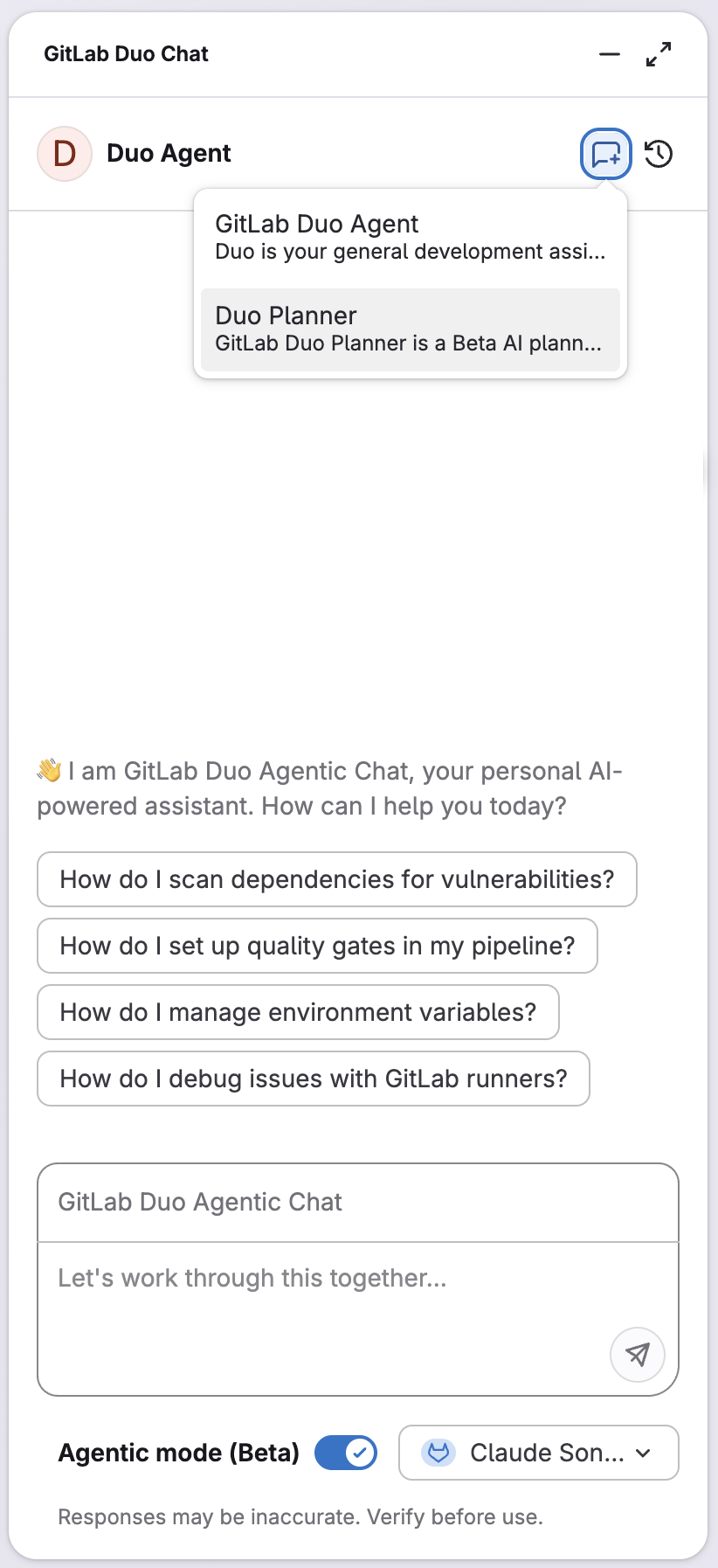
<p>Duo Planner is available as a custom agent in the Duo Chat side panel, with the current page context.</p>
<p>&lt;p&gt;&lt;/p&gt;</p>
<p><img src="https://res.cloudinary.com/about-gitlab-com/image/upload/v1761323689/ener1mkyj9shg6zvtp4f.png" alt="Duo Planner as a custom agent in the Duo Chat side panel"></p>
<p>&lt;p&gt;&lt;/p&gt;</p>
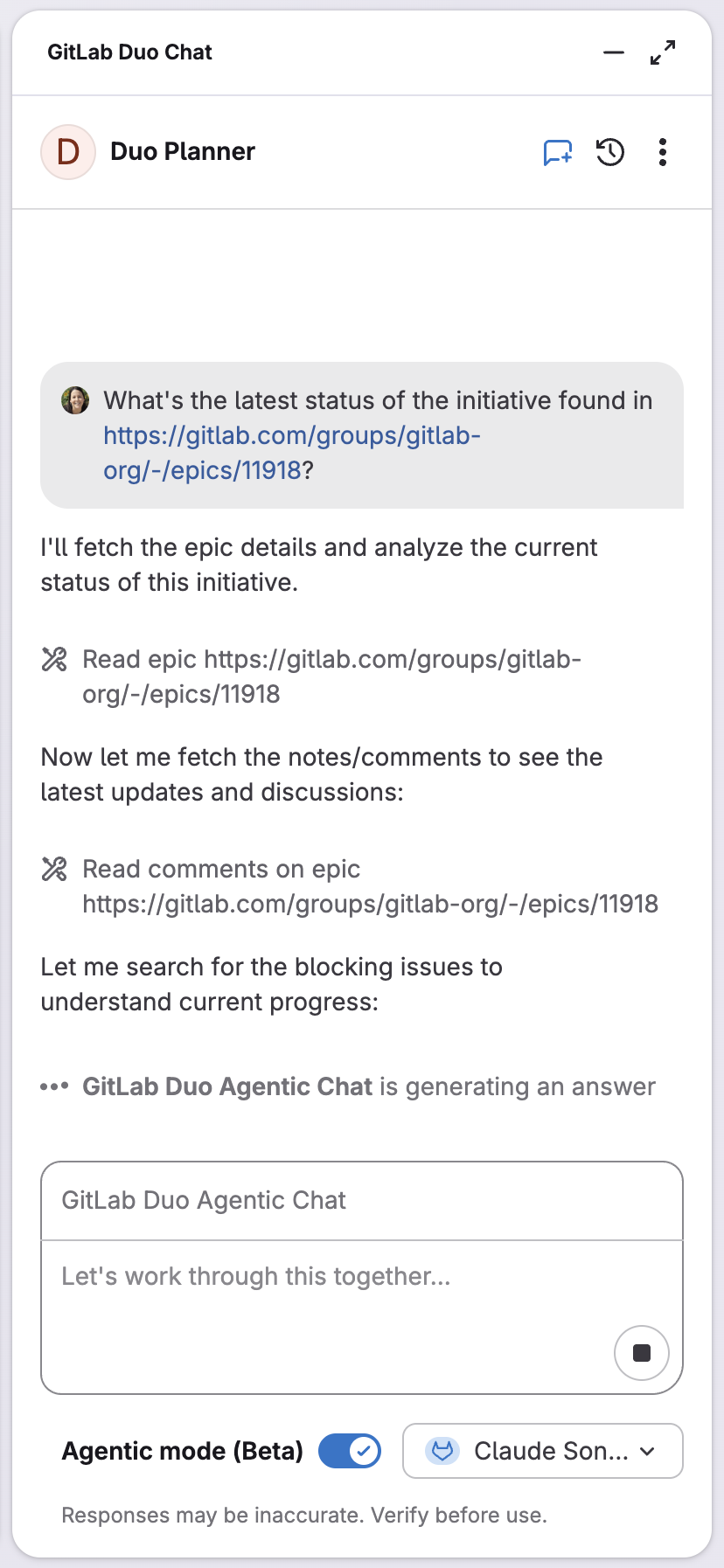
<p>Let’s ask Duo Planner about the status of an initiative by providing the epic link:</p>
<p><img src="https://res.cloudinary.com/about-gitlab-com/image/upload/v1761323689/gzv2xudegtjhtesz1oaz.png" alt="Asking Duo Planner about the status of an initiative by providing the epic link"></p>
<p>&lt;p&gt;&lt;/p&gt;</p>
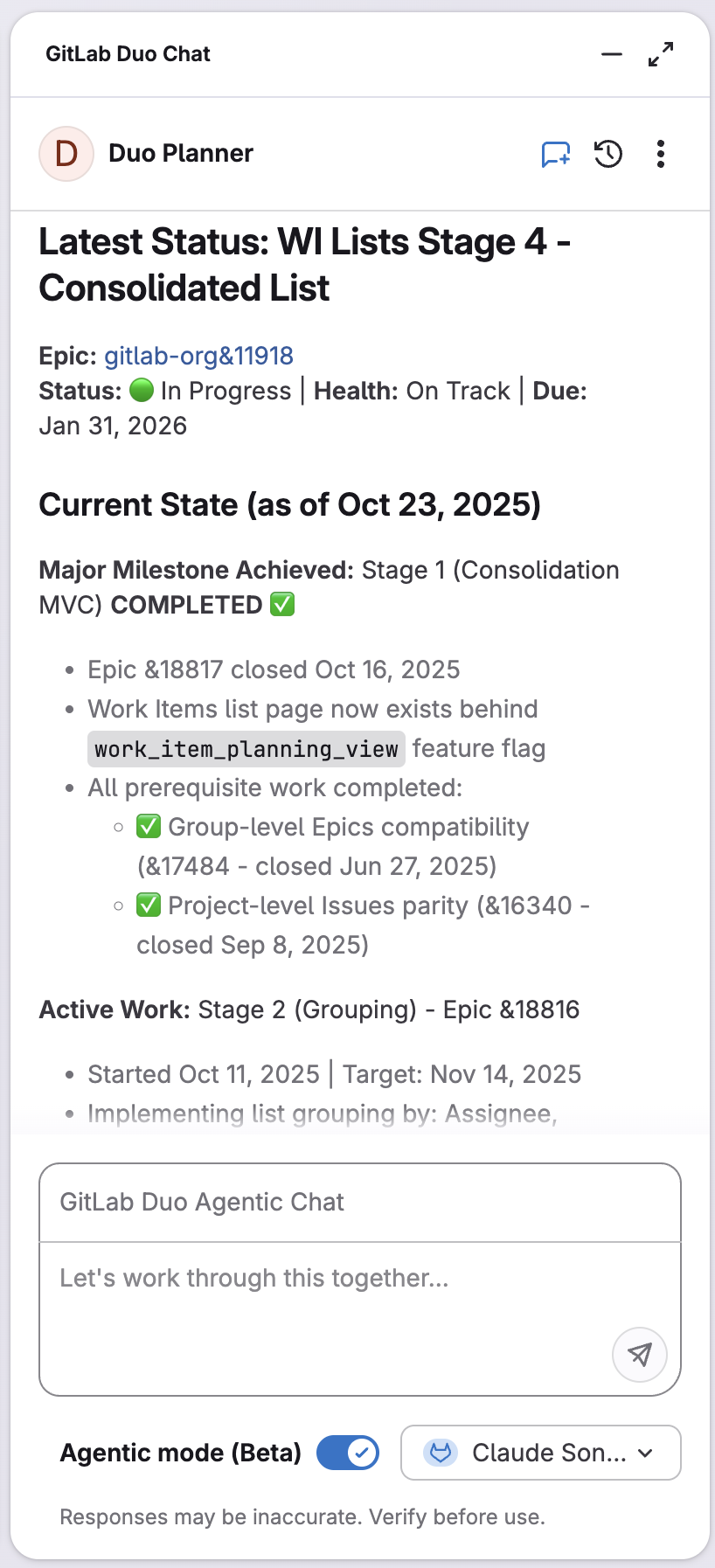
<p>We receive a structured summary with an overview, current status of milestones, in-progress items, dependencies, and blockers, along with actionable recommendations.</p>
<p><img src="https://res.cloudinary.com/about-gitlab-com/image/upload/v1761323690/guoyqe1b9bstmbjzunez.png" alt="Structured summary"></p>
<p>&lt;p&gt;&lt;/p&gt;</p>
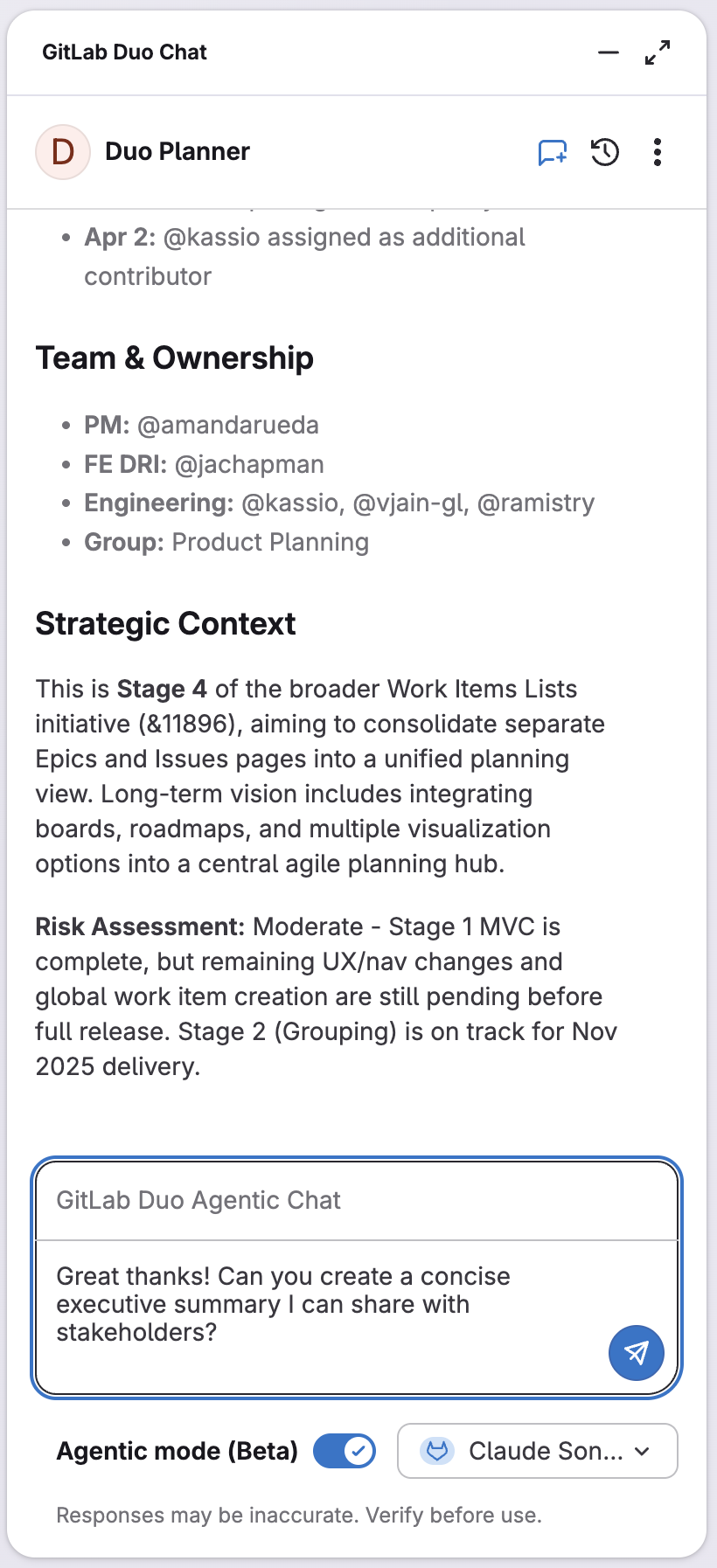
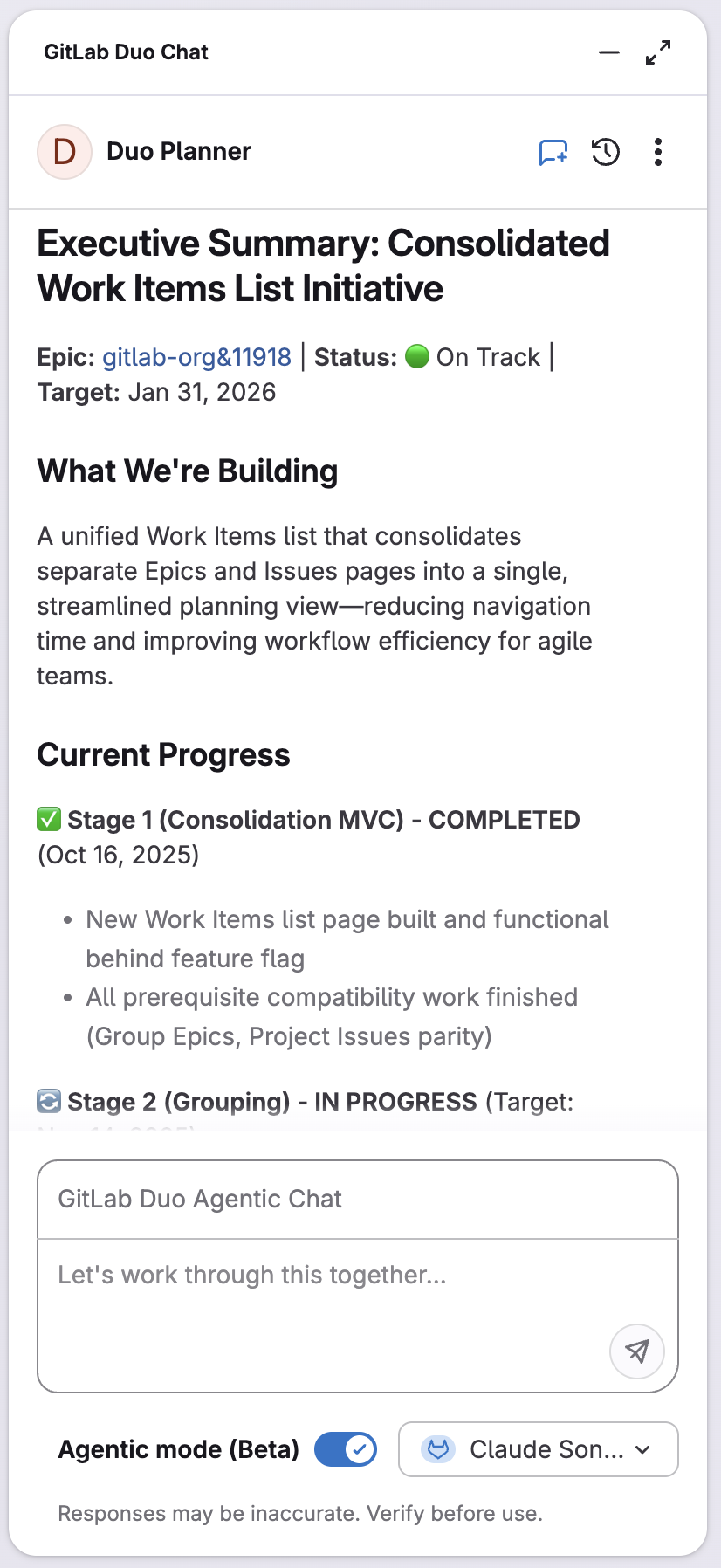
<p>Next, let’s ask for an executive summary to share with stakeholders:
GitLab Duo Planner eliminates hours of manual analysis and reporting effort, helping to make decisions faster and keep all stakeholders updated.</p>
<p><img src="https://res.cloudinary.com/about-gitlab-com/image/upload/v1761323689/xs9zxawqrytfu54ejx2b.png" alt="Ask for executive summary"></p>
<p>&lt;p&gt;&lt;/p&gt;</p>
<p><img src="https://res.cloudinary.com/about-gitlab-com/image/upload/v1761323690/bsbpvjaqnymobzg4knhu.png" alt="Output of executive summary"></p>
<p>&lt;p&gt;&lt;/p&gt;</p>
<p>Here are a few more prompts you can try with GitLab Duo Planner:</p>
<ul>
<li>“Which of the bugs with a “boards” label should we fix first, considering user impact?”</li>
<li>“Rank these epics by strategic value for Q1.”</li>
<li>“Help me prioritize technical debt against new features.”</li>
<li>“What tasks are needed to implement this user story?”</li>
<li>“Suggest a phased approach for this project: (insert URL).”</li>
</ul>
<h2>What's next</h2>
<p>GitLab Duo Planner focuses intentionally on product managers and engineering managers working in Agile environments. Why? Because specificity drives performance. By training Duo Planner deeply on GitLab's planning workflows and Agile frameworks, we deliver reliable, actionable insights rather than generic suggestions.</p>
<p>As we evolve the platform, we envision a family of specialized agents, each optimized for specific workflows while contributing to a unified intelligence layer. Today's planner for software teams is just the beginning of how AI will transform work prioritization across all teams.</p>
<blockquote>
<p>If you’re an existing GitLab customer and would like to try GitLab Duo Planner with a prompt of your own, visit our <a href="https://docs.gitlab.com/user/duo_agent_platform/agents/foundational_agents/planner/">documentation</a> where we cover prerequisites, use cases, and more.</p>
</blockquote>
]]></content>
        <author>
            <name>Aathira Nair</name>
            <uri>https://about.gitlab.com/blog/authors/aathira-nair</uri>
        </author>
        <author>
            <name>Amanda Rueda</name>
            <uri>https://about.gitlab.com/blog/authors/amanda-rueda</uri>
        </author>
        <published>2025-10-28T00:00:00.000Z</published>
    </entry>
    <entry>
        <title type="html"><![CDATA[Modernize Java applications quickly with GitLab Duo with Amazon Q]]></title>
        <id>https://about.gitlab.com/blog/modernize-java-applications-quickly-with-gitlab-duo-with-amazon-q/</id>
        <link href="https://about.gitlab.com/blog/modernize-java-applications-quickly-with-gitlab-duo-with-amazon-q/"/>
        <updated>2025-10-22T00:00:00.000Z</updated>
        <content type="html"><![CDATA[<p>Upgrading applications to newer, supported versions of Java has traditionally been a tedious and time-consuming process. Development teams must spend countless hours learning about deprecated APIs, updated libraries, and new language features. In many cases, significant code rewrites are necessary, turning what should be a straightforward upgrade into a multi-week project that diverts resources from building new features.</p>
<p><a href="https://about.gitlab.com/gitlab-duo/duo-amazon-q/">GitLab Duo with Amazon Q</a> changes this paradigm entirely with AI-powered automation. What once took weeks can now be accomplished in minutes, with full traceability and ready-to-review merge requests that maintain your application's functionality while leveraging modern Java features.</p>
<h2>How it works: Upgrade your Java application</h2>
<p>Let's walk through how you can modernize a Java 8 application to Java 17.</p>
<p><strong>Start with an issue</strong></p>
<p>First, create an issue in your GitLab project describing your modernization goal. You don't need to specify version details - GitLab Duo with Amazon Q is able to detect that your application is currently built with Java 8 and needs to be upgraded. Simply describe that you want to refactor your code to Java 17 in the issue title and description.</p>
<p><strong>Trigger the transformation</strong></p>
<p>Once your issue is created, invoke GitLab Duo with Amazon Q using the <code>/q transform</code> command in a comment on the issue. This simple command sets in motion an automated process that will analyze your entire codebase, create a comprehensive upgrade plan, and generate all necessary code changes.</p>
<p><strong>Automated analysis and implementation</strong></p>
<p>Behind the scenes, Amazon Q analyzes your Java 8 codebase to understand your application's structure, dependencies, and implementation patterns. It identifies deprecated features, determines which Java 17 constructs can replace existing code, and creates a merge request with all the necessary updates. The transformation updates not just your source code files — including CLI, GUI, and model classes — but also your build configuration files like <code>pom.xml</code> with Java 17 settings and dependencies.</p>
<p><strong>Review and verification</strong></p>
<p>The generated merge request provides a complete view of all changes. You can review how your code has been modernized with Java 17 language features and verify that all tests still pass. The beauty of this approach is that all functionality is preserved and your application works exactly the same way, just with improved, more modern code.</p>
<h2>Why use GitLab Duo with Amazon Q</h2>
<p>Leveraging GitLab Duo with Amazon Q for application modernization has a number of advantages for development teams:</p>
<p><strong>Time reduction</strong>: What traditionally takes weeks of developer effort is reduced to hours or minutes, freeing your team to focus on building new features rather than managing technical debt.</p>
<p><strong>Minimized risk</strong>: The automated analysis and transformation process reduces the risk of human error that often accompanies manual code migrations. Every change is traceable and reviewable through GitLab's merge request workflow.</p>
<p><strong>Complete audit trail</strong>: Every transformation is documented through GitLab's version control, providing a clear record of what changed and why, which is essential for compliance and troubleshooting.</p>
<p><strong>Enterprise-grade security</strong>: The integration leverages GitLab's end-to-end security features and AWS's robust cloud infrastructure, helping to ensure your code and data remain protected throughout the modernization process.</p>
<p>Are you ready to see GitLab Duo with Amazon Q in action? Watch our complete walkthrough video demonstrating the Java modernization process from start to finish:</p>
<p>&lt;!-- blank line --&gt;
&lt;figure class=&quot;video_container&quot;&gt;
&lt;iframe src=&quot;https://www.youtube.com/embed/qGyzG9wTsEo?si=47JnSb6flOgZAJcR&quot; frameborder=&quot;0&quot; allowfullscreen=&quot;true&quot;&gt; &lt;/iframe&gt;
&lt;/figure&gt;
&lt;!-- blank line --&gt;</p>
<blockquote>
<p>To learn more about GitLab Duo with Amazon Q visit our <a href="https://about.gitlab.com/gitlab-duo/duo-amazon-q/">web site</a> or reach out to your GitLab representative.</p>
</blockquote>
<h2>Read more</h2>
<ul>
<li><a href="https://about.gitlab.com/blog/agentic-ai-guides-and-resources/">Agentic AI guides and resources</a></li>
<li><a href="https://about.gitlab.com/blog/gitlab-duo-with-amazon-q-devsecops-meets-agentic-ai/">GitLab Duo with Amazon Q: DevSecOps meets agentic AI</a></li>
<li><a href="https://about.gitlab.com/blog/agentic-ai-guides-and-resources/#gitlab-duo-with-amazon-q-tutorials">More GitLab Duo with Amazon Q tutorials</a></li>
</ul>
]]></content>
        <author>
            <name>Cesar Saavedra</name>
            <uri>https://about.gitlab.com/blog/authors/cesar-saavedra</uri>
        </author>
        <published>2025-10-22T00:00:00.000Z</published>
    </entry>
    <entry>
        <title type="html"><![CDATA[Delivering faster and smarter scans with Advanced SAST]]></title>
        <id>https://about.gitlab.com/blog/delivering-faster-and-smarter-scans-with-advanced-sast/</id>
        <link href="https://about.gitlab.com/blog/delivering-faster-and-smarter-scans-with-advanced-sast/"/>
        <updated>2025-10-21T00:00:00.000Z</updated>
        <content type="html"><![CDATA[<p>Static application security testing (SAST) is critical to building secure software, helping teams identify vulnerabilities in code before they can be exploited. Last year, with GitLab 17.4, we <a href="https://about.gitlab.com/blog/gitlab-advanced-sast-is-now-generally-available/">launched Advanced SAST</a> to deliver higher-quality scan results directly in developer workflows. Since then, Advanced SAST has powered millions of scans across over a hundred thousand codebases, reducing risk and helping customers build more secure applications from the start.</p>
<p>We’re building on that foundation with a set of performance enhancements designed to improve accuracy and speed, so developers get results they can trust, without losing their flow. <a href="https://about.gitlab.com/blog/gitlab-18-5-intelligence-that-moves-software-development-forward/">New capabilities</a> include better out-of-the-box precision, the ability to add custom detection rules, and a trio of improvements to accelerate scan times through multi-core scanning, algorithmic optimizations, and diff-based scanning. Together, these improvements make <a href="https://docs.gitlab.com/user/application_security/sast/gitlab_advanced_sast/">Advanced SAST</a> smarter and faster, delivering security that’s developer-friendly by design.</p>
<h2>SAST adoption hinges on both accuracy and speed</h2>
<p>Most SAST programs rarely fail due to inaccurate vulnerability detection; they fail because developers don’t adopt security tooling. Too often, AppSec solutions like SAST deliver accuracy at the expense of the developer experience, or developer experience at the expense of accuracy. In reality, both are necessary. Without accuracy, developers don’t trust the results; without speed and usability, adoption lags.</p>
<p>When both come together, security fits naturally into the development process — and that’s the only way security teams successfully drive SAST adoption at scale. This philosophy guides the GitLab roadmap for Advanced SAST.</p>
<h2>Add custom detection rules for greater accuracy</h2>
<p>The built-in Advanced SAST rules are informed by our in-house security research team, designed to maximize accuracy out of the box. Until now, you could <a href="https://docs.gitlab.com/user/application_security/sast/customize_rulesets/">disable rules</a> or adjust their name, description, or severity, but you couldn’t add new detection logic. With GitLab 18.5, teams can now define their own custom, pattern-based rules to catch organization-specific issues — like flagging banned function calls — while still using GitLab’s curated ruleset as the baseline. Any violations of custom rules are reported in the same place as built-in GitLab rules, so developers can glean information from a single dashboard.</p>
<p>Custom rules are effective at catching straightforward issues that matter to your organization, but they don’t influence the taint analysis that Advanced SAST uses to catch injections and similar flaws. Customizations are managed through simple TOML files, just like other SAST ruleset configurations. The result is higher-quality scan results tuned to your context, giving security teams more control and developers clearer, more actionable findings.</p>
<h2>Faster scans to get developers in the flow</h2>
<p>Speed matters. If a SAST scan takes too long, developers often switch to another task, so adoption suffers.</p>
<p>That’s why we’ve invested in several performance-based enhancements to dramatically reduce scan times without compromising on accuracy, including:</p>
<ul>
<li><strong>Multi-core scanning</strong>: Leverages multiple CPU cores on GitLab Runners</li>
<li><strong>Diff-based scanning</strong>: Scans only the changed code in a merge request</li>
<li><strong>Ongoing optimizations</strong>: Smarter algorithms and engine enhancements</li>
</ul>
<p>These improvements build on each other, delivering faster scans with significant impact:</p>
<ul>
<li>Multi-core scanning typically reduces scan runtime by up to <strong>50%.</strong></li>
<li>Diff-based scanning helps the most in large repositories, where less code is modified in each change. It’s specifically designed to give faster feedback in the code review process by delivering faster scans in merge requests. In our testing, many large repositories now take less than <strong>10 minutes to return results in MRs, where previously scans took more than 20 minutes.</strong></li>
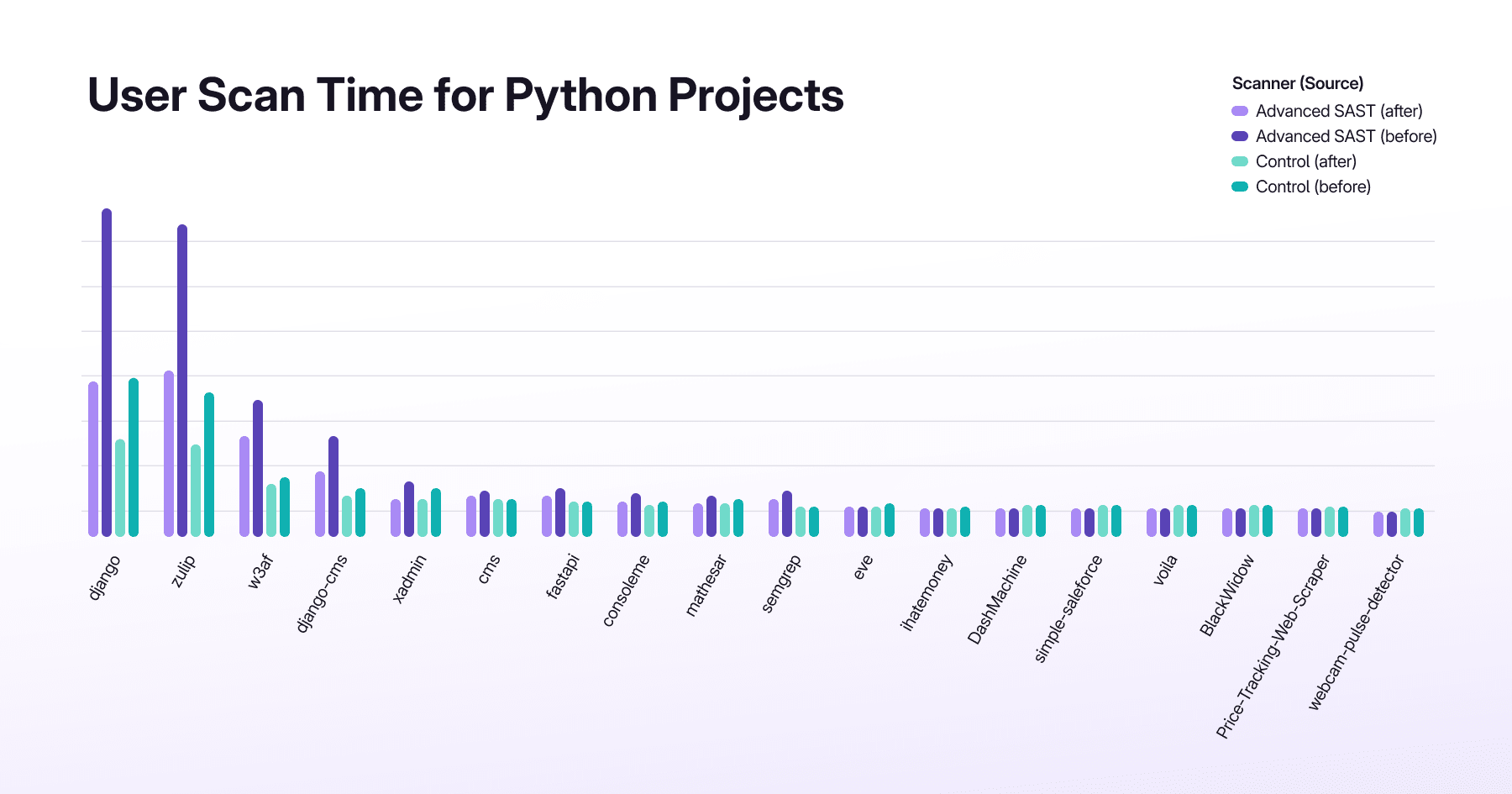
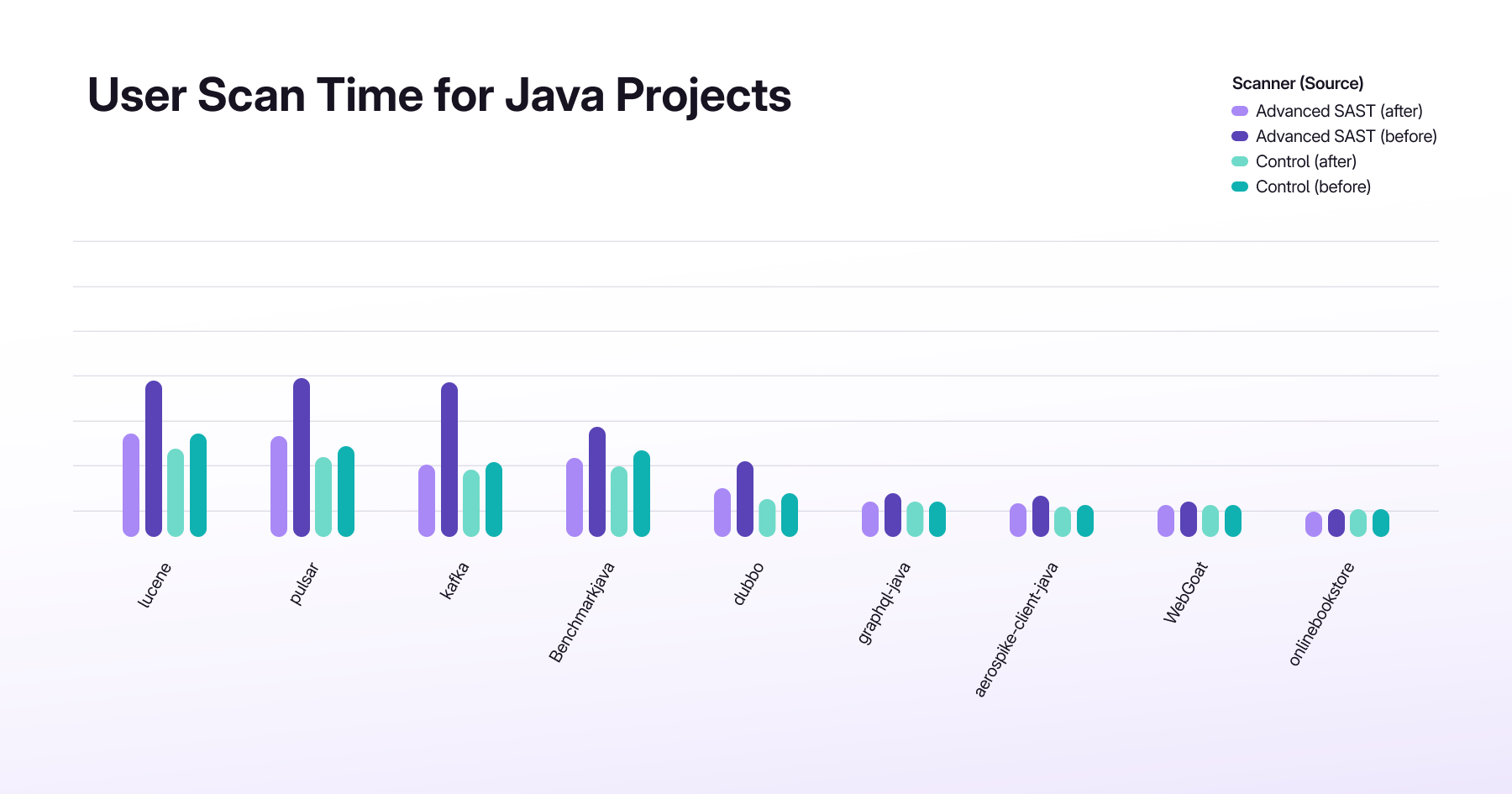
<li>In recent internal testing, algorithmic optimizations <strong>cut scan times by up to 71%</strong> on large open-source codebases, with Apache Lucene (Java) showing the biggest improvement. Other projects, including Django (Python), Kafka, and Zulip, also saw <strong>performance boosts of over 50% in single-core mode</strong>. You can see the results for yourself below.</li>
</ul>
<p>For developers, these improvements mean quicker feedback in merge requests, less waiting on security results, and a smoother path to adoption. And with multi-core scanning and diff-based analysis layered on top, the gains will be even greater.</p>
<p><img src="https://res.cloudinary.com/about-gitlab-com/image/upload/v1760714805/rxl2zzo58j7y0k2ldxeq.png" alt="chart showing Python scan times">
&lt;p&gt;&lt;/p&gt;</p>
<p><img src="https://res.cloudinary.com/about-gitlab-com/image/upload/v1760714805/hz9bsrir6nrqthkjddvi.png" alt="chart showing Java scan times"></p>
<p>&lt;p&gt;&lt;/p&gt;</p>
<blockquote>
<p>These performance gains reflect GitLab’s broader focus on improving the developer experience across our platform. For example, one of our customers recently transitioned to GitLab’s <a href="https://docs.gitlab.com/user/application_security/policies/pipeline_execution_policies/">Pipeline Execution Policies</a> (PEP) to gain greater control and flexibility over how security scans run within their pipelines. By standardizing templates, adding caching, and optimizing pipeline logic, their teams cut dependency scan runtimes from <strong>15–60 minutes down to just 1–2 minutes per job — saving roughly 100,000 compute minutes every day across 15,000 scans</strong>. It’s a clear example of how more customizable and efficient pipeline execution policies lead to faster feedback loops, higher productivity, and broader adoption.</p>
</blockquote>
<p>With these latest enhancements, Advanced SAST gives security and development teams the accuracy, speed, and flexibility they need to keep up with modern software development. By reducing false positives, enabling custom detection, and accelerating scan times, we’re making security an enabler — not a blocker — for developers.</p>
<p>Like all of <a href="https://about.gitlab.com/solutions/application-security-testing/">GitLab’s application security capabilities</a>, Advanced SAST is built directly into our DevSecOps platform, making security a natural part of how developers build, test, deploy, and secure software.</p>
<p>The result: faster adoption, fewer bottlenecks, and more secure applications delivered from the start.</p>
<blockquote>
<p>Get started with Advanced SAST today! Sign up for a <a href="https://about.gitlab.com/free-trial/">free trial of GitLab Ultimate</a>.</p>
</blockquote>
<h2>Learn more</h2>
<ul>
<li><a href="https://about.gitlab.com/blog/gitlab-advanced-sast-is-now-generally-available/">GitLab Advanced SAST is now generally available</a></li>
<li><a href="https://about.gitlab.com/blog/comprehensive-guide-to-gitlab-dast/">A comprehensive guide to GitLab DAST</a></li>
<li><a href="https://about.gitlab.com/solutions/application-security-testing/">GitLab Security Testing solutions</a></li>
</ul>
]]></content>
        <author>
            <name>Salman Ladha</name>
            <uri>https://about.gitlab.com/blog/authors/salman-ladha</uri>
        </author>
        <published>2025-10-21T00:00:00.000Z</published>
    </entry>
    <entry>
        <title type="html"><![CDATA[GitLab 18.5: Intelligence that moves software development forward]]></title>
        <id>https://about.gitlab.com/blog/gitlab-18-5-intelligence-that-moves-software-development-forward/</id>
        <link href="https://about.gitlab.com/blog/gitlab-18-5-intelligence-that-moves-software-development-forward/"/>
        <updated>2025-10-21T00:00:00.000Z</updated>
        <content type="html"><![CDATA[<p>Software development teams are drowning in noise. Thousands of vulnerabilities flood security dashboards, but only a fraction pose real risk. Developers context-switch between planning backlogs, triaging security findings, reviewing code, and responding to CI/CD failures — losing hours to manual work. <a href="https://about.gitlab.com/releases/2025/10/16/gitlab-18-5-released/">GitLab 18.5</a> calms this chaos.</p>
<p>At the heart of this release is a valuable improvement in overall usability of GitLab and how AI integrates into your user experience. A new panel-based UI makes it easier to see data in context, and allows GitLab Duo Chat to be persistently visible across the platform, wherever it is needed. Purpose-built agents tackle vulnerability triage and backlog management, and popular AI tools integrate with agentic workflows even more seamlessly than before. We’ve also extended our market-leading security capabilities to help you better identify exploitable vulnerabilities versus theoretical ones, distinguish active credentials from expired ones, and scan only changed code to keep developers in flow.</p>
<h2>What’s new in 18.5</h2>
<p>18.5 represents our biggest release so far this year — watch our introduction to the release, and read more details below.
&lt;div style=&quot;padding:56.25% 0 0 0;position:relative;&quot;&gt;&lt;iframe src=&quot;https://player.vimeo.com/video/1128975773?badge=0&amp;autopause=0&amp;player_id=0&amp;app_id=58479&quot; frameborder=&quot;0&quot; allow=&quot;autoplay; fullscreen; picture-in-picture; clipboard-write; encrypted-media; web-share&quot; referrerpolicy=&quot;strict-origin-when-cross-origin&quot; style=&quot;position:absolute;top:0;left:0;width:100%;height:100%;&quot; title=&quot;GitLab_18.5 Release_101925_MP_v2&quot;&gt;&lt;/iframe&gt;&lt;/div&gt;&lt;script src=&quot;https://player.vimeo.com/api/player.js&quot;&gt;&lt;/script&gt;</p>
<p>&lt;p&gt;&lt;/p&gt;</p>
<h3>Modern user experience with quick access to GitLab Duo everywhere</h3>
<p>GitLab 18.5 delivers a modernized user experience with a more intuitive interface driven by a new panel-based layout.</p>
<p>With panels, key information appears side by side so that you can work contextually, without losing your place. For example, when you click on an issue in the issues list, its details automatically open in a side panel. You can also launch the GitLab Duo panel on the right, bringing Duo wherever you are in GitLab. This lets you ask contextual questions or give instructions, right alongside your work.</p>
<p>Several usability improvements make navigation easier. The global search box now appears at the top center for improved accessibility. Global navigation elements, including Issues, Merge Requests, To-Dos, and your avatar have moved to the top right. Additionally, the left sidebar is now collapsible and expandable, giving you more control over your workspace.</p>
<p>Teams using experimental and GitLab Duo beta features will be the first to receive the new interface, followed by all GitLab.com users who will be able to turn this experience on using the toggle located under your user icon. To learn more about this feature, reference our documentation <a href="https://docs.gitlab.com/user/interface_redesign/#turn-new-navigation-on-or-off">here</a>. Please share your feedback or report any issues <a href="https://gitlab.com/gitlab-org/gitlab/-/issues/577554">here</a>, you're helping us shape a better GitLab!</p>
<h3>Updates to GitLab Duo Agent Platform</h3>
<p><strong>Security Analyst Agent: Transform manual vulnerability triage into intelligent automation</strong></p>
<p>GitLab Duo <a href="https://docs.gitlab.com/user/duo_agent_platform/agents/foundational_agents/security_analyst_agent/">Security Analyst Agent</a> automates vulnerability management workflows through AI-powered analysis, helping transform hours of manual triage into intelligent automation. Building on the Vulnerability Management Tools available through GitLab Duo Agentic Chat, Security Analyst Agent orchestrates multiple tools, applying security policies, and creating custom flows for recurring workflows automatically.</p>
<p>Security teams can access enriched vulnerability data, including CVE details, static reachability analysis, and code flow information, while executing operations like dismissing false positives, confirming threats, adjusting severity levels, and creating linked issues for remediation — all through conversational AI. The agent reduces repetitive clicking through vulnerability dashboards and replaces custom scripts with simple natural language commands.</p>
<p>For example, when a security scan reveals dozens of vulnerabilities, simply prompt: &quot;Dismiss vulnerabilities with reachable=FALSE and create issues for critical findings.&quot; Security Analyst Agent analyzes reachability data, applies security policies, and completes bulk operations in moments — helping decrease work that would otherwise take hours.</p>
<p>While individual Vulnerability Management Tools can be accessed directly through Agentic Chat for specific tasks, Security Analyst Agent orchestrates these tools intelligently and automates complex multi-step workflows. Note that Vulnerability Management Tools are available through Agentic Chat on GitLab Self-managed and GitLab.com instances, and Security Analyst Agent is available on GitLab.com only for 18.5, while availability in Self-managed and Dedicated environments will come with our next release.
Watch this demo:</p>
<p>&lt;div style=&quot;padding:56.25% 0 0 0;position:relative;&quot;&gt;&lt;iframe src=&quot;https://player.vimeo.com/video/1128975984?badge=0&amp;autopause=0&amp;player_id=0&amp;app_id=58479&quot; frameborder=&quot;0&quot; allow=&quot;autoplay; fullscreen; picture-in-picture; clipboard-write; encrypted-media; web-share&quot; referrerpolicy=&quot;strict-origin-when-cross-origin&quot; style=&quot;position:absolute;top:0;left:0;width:100%;height:100%;&quot; title=&quot;18.5 Security Demo&quot;&gt;&lt;/iframe&gt;&lt;/div&gt;&lt;script src=&quot;https://player.vimeo.com/api/player.js&quot;&gt;&lt;/script&gt;</p>
<p>&lt;p&gt;&lt;/p&gt;</p>
<p><strong>GitLab Duo Planner: Turn backlog chaos into strategic clarity</strong></p>
<p>Managing complex software delivery requires constant context-switching between planning tasks. <a href="https://docs.gitlab.com/user/duo_agent_platform/agents/foundational_agents/planner/">GitLab Duo Planner</a> addresses the real-world planning challenges we see teams face every day. Duo Planner acts as your teammate with awareness of your project context, including how you manage issues, epics, and merge requests. Unlike generic AI assistants, it's purpose-built with deep knowledge of GitLab's planning workflows coupled with Agile and prioritization frameworks to help you balance effort, risk, and strategic alignment.</p>
<p>GitLab Duo Planner can turn vague ideas into structured planning hierarchies, identify stale backlog items, and draft executive updates. For example, when refining your backlog with hundreds of issues accumulated over months, simply prompt: &quot;Identify stale backlog items and suggest priorities.&quot; Within seconds, you'll receive a structured summary showing issues without recent activity, items missing key details, duplicate work, and recommended priorities based on labels and milestones, complete with actionable recommendations.</p>
<p>For teams managing complex roadmaps, the Planner aims to eliminate hours of manual analysis and context-switching, helping Product Managers and engineering leads make faster, more informed decisions. As of 18.5, GitLab Duo Planner is currently “read-only,” meaning that it can analyze, plan, and suggest, but cannot yet take direct action to modify anything. Please see our <a href="https://docs.gitlab.com/user/duo_agent_platform/agents/foundational_agents/planner/">documentation</a> for more information.</p>
<p><strong>Extensible Agent Catalog: Popular AI tools as native GitLab agents</strong></p>
<p>GitLab 18.5 introduces popular AI agents directly into the <a href="https://docs.gitlab.com/user/duo_agent_platform/ai_catalog/">AI Catalog</a>, making external tools like Claude, OpenAI Codex, Google Gemini CLI, Amazon Q Developer, and OpenCode available as native GitLab agents. Users can now discover, configure, and deploy these agents through the same unified catalog interface used for GitLab's built-in agents, with automatic syncing of foundational agents across organization catalogs.</p>
<p>This eliminates the complexity of manual agent setup by providing a point-and-click catalog experience while maintaining enterprise-grade security through GitLab's authentication and audit systems. GitLab Duo Enterprise subscriptions now include built-in usage of Claude and Codex within GitLab, allowing you to use your existing GitLab subscription for these tools without requiring separate API keys or additional billing setup. Other agents may still require separate subscriptions and configuration while we finalize our integration plans.</p>
<p><strong>Self-hosted GitLab Duo Agent Platform (Beta): Address data sovereignty requirements without sacrificing AI power</strong></p>
<p>GitLab 18.5 moves GitLab Duo Agent Platform's self-hosted capabilities from experimental to beta, enabling organizations to execute AI agents and flows entirely within their own infrastructure — critical for regulated industries and data sovereignty requirements. The beta release includes improved timeout configurations and AI Gateway settings, allowing teams to use AI agents for code reviews, bug fixes, and feature implementations, while providing enterprise-grade security for sensitive code.</p>
<h2>Smarter, faster security: Prioritize real risks and keep developers in the flow</h2>
<p>GitLab 18.5 introduces new application security capabilities that help teams focus on exploitable risk, reduce noise, and strengthen software supply chain security. These updates continue our commitment to building security directly into the development process — delivering precision, speed, and insight without disrupting developer flow.</p>
<p><strong>Static Reachability Analysis</strong></p>
<p>With over <a href="https://www.cvedetails.com/">37,000 new CVEs</a> issued this year, security teams face an overwhelming volume of vulnerabilities and struggle to understand which ones are truly exploitable. Static Reachability Analysis, now in limited availability, brings library-level precision by helping to identify whether vulnerable code is actually invoked in your application, not just present in dependencies.</p>
<p>Paired with our <a href="https://docs.gitlab.com/user/application_security/vulnerabilities/risk_assessment_data/">recently released</a> Exploit Prediction Scoring System (EPSS) and Known Exploited Vulnerability (KEV) data, security teams can more effectively accelerate vulnerability triage and prioritize real risks to help strengthen overall supply chain security. In 18.5, we’re adding support for Java, alongside existing support for Python, JavaScript, and TypeScript.</p>
<p><strong>Secret Validity Checks</strong></p>
<p>Just as Static Reachability Analysis helps teams prioritize exploitable vulnerabilities from open source dependencies, Secret Validity Checks bring the same insight to exposed secrets — currently available in beta on GitLab.com and GitLab Self-Managed. For GitLab-issued security tokens, instead of manually verifying whether a leaked credential or API key is active, GitLab automatically distinguishes active secrets from expired ones directly in the <a href="https://docs.gitlab.com/user/application_security/vulnerability_report/">Vulnerability Report</a>. This helps enable security and development teams to focus remediation efforts on genuine risks. Support for AWS- and GCP-issued secrets is planned for future releases.</p>
<p><strong>Custom rules for Advanced SAST</strong></p>
<p>Advanced SAST runs on rules informed by our in-house security research team, designed to maximize accuracy out of the box. However, some teams required additional flexibility to tune the SAST engine for their specific organization. With Custom Rules for Advanced SAST, AppSec teams can define atomic, pattern-based detection logic to help capture security issues specific to their organization — like flagging banned function calls — while still using GitLab’s curated ruleset as the baseline. Customizations are managed through simple TOML files, just like other SAST ruleset configurations. While these rules will not support taint analysis, they do give organizations greater flexibility in achieving accurate SAST results.</p>
<p><strong>Advanced SAST C and C++ language support</strong></p>
<p>We’re expanding our language coverage for Advanced SAST to include C and C++, which are widely used languages in embedded systems software development. To enable scanning, projects must generate a compilation database that captures compiler commands and includes paths used during builds. This works to ensure the scanner can accurately parse and analyze source files, delivering precise, context-aware results that help security teams identify real vulnerabilities in the development process. The implementation requirements for C and C++ require specific configurations, which can be found in our <a href="https://docs.gitlab.com/user/application_security/sast/cpp_advanced_sast/">documentation</a>. Advanced SAST C and C++ support are currently available in beta.</p>
<p><strong>Diff-based SAST scanning</strong></p>
<p>Traditional SAST scans re-analyze entire codebases with every commit, slowing pipelines and disrupting developer flow. The developer experience is a critical consideration that can make or break the adoption of application security testing. Diff-based SAST scanning aims to speed up scan times by focusing only on the code changed in a merge request, reducing redundant analysis and surfacing relevant results tied to the developer’s work. By aligning scans with actual code changes, GitLab delivers faster, more focused feedback that helps keep developers in flow while maintaining strong security coverage.</p>
<h2>Simplify API configurations</h2>
<p>API-driven workflows offer power and flexibility, but they can also create unnecessary complexity for tasks that teams need to perform regularly. The new Maven Virtual Registry interface brings a UI layer to these operations.</p>
<h3>Maven Virtual Registry interface</h3>
<p>The new web-based interface for managing Maven Virtual Registries turns complex API configurations into visual simplicity, providing a more intuitive experience for package administrators and platform engineers.</p>
<p>Previously, teams configured and maintained virtual registries only through API calls, which made routine maintenance time-consuming and required specialized platform knowledge. The new interface removes that barrier, helping to make everyday tasks faster and easier.</p>
<p>With this update, you can now:</p>
<ul>
<li>Create virtual registries to simplify dependency configuration</li>
<li>Create and order upstreams to help improve performance and compliance</li>
<li>Browse and clear stale cache entries directly in the UI</li>
</ul>
<p>This visual experience helps reduce operational overhead and provides development teams with clearer insight into how dependencies are resolved, enabling them to make better decisions about build performance and security policies.</p>
<p>Watch a demo:</p>
<p>&lt;!-- blank line --&gt;
&lt;figure class=&quot;video_container&quot;&gt;
&lt;iframe src=&quot;https://www.youtube.com/embed/CiOZJPhAvaI?si=cYaoR_OIgqFKbyM2&quot; frameborder=&quot;0&quot; allowfullscreen=&quot;true&quot;&gt; &lt;/iframe&gt;
&lt;/figure&gt;
&lt;!-- blank line --&gt;</p>
<p>&lt;p&gt;&lt;/p&gt;</p>
<p>We invite enterprise customers to join the <a href="https://gitlab.com/gitlab-org/gitlab/-/issues/543045">Maven Virtual Registry Beta program</a> and share feedback to help shape the final release.</p>
<h2>AI that adapts to your workflow</h2>
<p>This release represents more than new capabilities — it's about choice and control. Watch the walkthrough video here:</p>
<p>&lt;p&gt;&lt;/p&gt;</p>
<p>&lt;div style=&quot;padding:56.25% 0 0 0;position:relative;&quot;&gt;&lt;iframe src=&quot;https://player.vimeo.com/video/1128992281?badge=0&amp;autopause=0&amp;player_id=0&amp;app_id=58479&quot; frameborder=&quot;0&quot; allow=&quot;autoplay; fullscreen; picture-in-picture; clipboard-write; encrypted-media; web-share&quot; referrerpolicy=&quot;strict-origin-when-cross-origin&quot; style=&quot;position:absolute;top:0;left:0;width:100%;height:100%;&quot; title=&quot;18.5-tech-demo&quot;&gt;&lt;/iframe&gt;&lt;/div&gt;&lt;script src=&quot;https://player.vimeo.com/api/player.js&quot;&gt;&lt;/script&gt;</p>
<p>&lt;p&gt;&lt;/p&gt;</p>
<p>GitLab Premium and Ultimate users can start using these capabilities today on <a href="https://GitLab.com">GitLab.com</a> and self-managed environments, with availability for GitLab Dedicated customers planned for next month.</p>
<p>GitLab Duo Agent Platform is currently in <strong>beta</strong> — enable beta and experimental features to experience how full-context AI can transform the way your teams build software. New to GitLab? <a href="https://about.gitlab.com/free-trial/devsecops/">Start your free trial</a> and see why the future of development is AI-powered, secure, and orchestrated through the world’s most comprehensive DevSecOps platform.</p>
<p><em><strong>Note:</strong> Platform capabilities that are in beta are available as part of the GitLab Beta program. They are free to use during the beta period, and when generally available, they will be made available with a paid add-on option for GitLab Duo Agent Platform.</em></p>
<h3>Stay up to date with GitLab</h3>
<p>To make sure you’re getting the latest features, security updates, and performance improvements, we recommend keeping your GitLab instance up to date. The following resources can help you plan and complete your upgrade:</p>
<ul>
<li><a href="https://gitlab-com.gitlab.io/support/toolbox/upgrade-path/">Upgrade Path Tool</a> – enter your current version and see the exact upgrade steps for your instance</li>
<li><a href="https://docs.gitlab.com/update/upgrade_paths/">Upgrade Documentation</a> – detailed guides for each supported version, including requirements, step-by-step instructions, and best practices</li>
</ul>
<p>By upgrading regularly, you’ll ensure your team benefits from the newest GitLab capabilities and remains secure and supported.</p>
<p>For organizations that want a hands-off approach, consider <a href="https://content.gitlab.com/viewer/d1fe944dddb06394e6187f0028f010ad#1">GitLab’s Managed Maintenance service</a>. With Managed Maintenance, your team stays focused on innovation while GitLab experts keep your Self-Managed instance reliably upgraded, secure, and ready to lead in DevSecOps. Ask your account manager for more information.</p>
<p><em>This blog post contains &quot;forward‑looking statements&quot; within the meaning of Section 27A of the Securities Act of 1933, as amended, and Section 21E of the Securities Exchange Act of 1934. Although we believe that the expectations reflected in these statements are reasonable, they are subject to known and unknown risks, uncertainties, assumptions and other factors that may cause actual results or outcomes to differ materially. Further information on these risks and other factors is included under the caption &quot;Risk Factors&quot; in our filings with the SEC. We do not undertake any obligation to update or revise these statements after the date of this blog post, except as required by law.</em></p>
]]></content>
        <author>
            <name>Bill Staples</name>
            <uri>https://about.gitlab.com/blog/authors/bill-staples</uri>
        </author>
        <published>2025-10-21T00:00:00.000Z</published>
    </entry>
    <entry>
        <title type="html"><![CDATA[Claude Haiku 4.5 now available in GitLab Duo Agentic Chat]]></title>
        <id>https://about.gitlab.com/blog/claude-haiku-4-5-now-available-in-gitlab-duo-agentic-chat/</id>
        <link href="https://about.gitlab.com/blog/claude-haiku-4-5-now-available-in-gitlab-duo-agentic-chat/"/>
        <updated>2025-10-20T00:00:00.000Z</updated>
        <content type="html"><![CDATA[<p>GitLab now offers Claude Haiku 4.5, Anthropic's fastest model combining high intelligence with exceptional speed, directly in the GitLab Duo model selector.</p>
<p>Users have the flexibility to choose Claude Haiku 4.5 alongside other leading models, enhancing their GitLab Duo experience with near-frontier performance at remarkable speed. With strong performance on <a href="https://www.anthropic.com/news/claude-haiku-4-5">SWE-bench Verified (73.3%)</a> and more than 2x the speed of Claude Sonnet 4.5, GitLab users can apply Claude Haiku 4.5 to accelerate their development workflows with rapid, intelligent responses.</p>
<h2>GitLab Duo Agent Platform + Claude Haiku 4.5</h2>
<p><a href="https://about.gitlab.com/gitlab-duo/agent-platform/">GitLab Duo Agent Platform</a> extends the value of Claude Haiku 4.5 by enabling multi-agent orchestration, where Claude Haiku 4.5 can serve as a fast sub-agent executing parallel tasks while more powerful models handle high-level planning. This combination creates efficient agentic workflows, where speed meets intelligence across the software development lifecycle. The result is faster iterations, cost-effective AI assistance, and responsive experiences, all delivered inside the GitLab workflow developers already use every day.</p>
<h2>Where you can use Claude Haiku 4.5</h2>
<p>Claude Haiku 4.5 is now available as a model option in GitLab Duo Agent Platform Agentic Chat on GitLab.com. You can choose Claude Haiku 4.5 from the model selection dropdown to leverage its speed and coding capabilities for your development tasks.</p>
<p><strong>Note:</strong> Ability to select Claude Haiku 4.5 in supported IDEs will be available soon.</p>
<p>Key capabilities:</p>
<ul>
<li><strong>Superior coding performance:</strong> Achieves 73% on SWE-bench Verified, matching the intelligence level of models that were cutting-edge just months ago.</li>
<li><strong>Lightning-fast responses:</strong> More than 2x faster than Sonnet 4.5, perfect for real-time pair programming.</li>
<li><strong>Enhanced computer use:</strong> Outperforms Claude Sonnet 4 at autonomous task execution.</li>
<li><strong>Context awareness:</strong> First Haiku model with native context window tracking for better task persistence.</li>
<li><strong>Extended thinking:</strong> Pause and reason through complex problems before generating responses.</li>
</ul>
<h2>Get started today</h2>
<p>GitLab Duo Pro and Enterprise customers can access Claude Haiku 4.5 today. Visit our <a href="https://docs.gitlab.com/user/gitlab_duo/">documentation</a> to learn more about GitLab Duo capabilities and models.</p>
<p>Questions or feedback? Share your experience with us through the GitLab community.</p>
<blockquote>
<p>Want to try GitLab Ultimate with Duo Enterprise? <a href="https://about.gitlab.com/gitlab-duo/">Sign up for a free trial today.</a></p>
</blockquote>
<h2>Read more</h2>
<ul>
<li><a href="https://about.gitlab.com/blog/greater-ai-choice-in-gitlab-duo-claude-sonnet-4-5-arrives/">Greater AI choice in GitLab Duo: Claude Sonnet 4.5 arrives</a></li>
<li><a href="https://about.gitlab.com/blog/gitlab-18-4-ai-native-development-with-automation-and-insight/">GitLab 18.4: AI-native development with automation and insight</a></li>
<li><a href="https://about.gitlab.com/blog/gitlab-duo-chat-gets-agentic-ai-makeover/">GitLab Duo Chat gets agentic AI makeover</a></li>
</ul>
]]></content>
        <author>
            <name>Tim Zallmann</name>
            <uri>https://about.gitlab.com/blog/authors/tim-zallmann</uri>
        </author>
        <published>2025-10-20T00:00:00.000Z</published>
    </entry>
    <entry>
        <title type="html"><![CDATA[Variable and artifact sharing in GitLab parent-child pipelines]]></title>
        <id>https://about.gitlab.com/blog/variable-and-artifact-sharing-in-gitlab-parent-child-pipelines/</id>
        <link href="https://about.gitlab.com/blog/variable-and-artifact-sharing-in-gitlab-parent-child-pipelines/"/>
        <updated>2025-10-16T00:00:00.000Z</updated>
        <content type="html"><![CDATA[<p>Software projects have different evolving needs and requirements. Some have
said that <em>software is never finished, merely abandoned</em>. Some software
projects are small and others are large with complex integrations. Some have
dependencies on external projects, while others are self-contained.
Regardless of the size and complexity, the need to validate and ensure
functionality remains paramount.</p>
<p>CI/CD pipelines can help with the challenge of building and validating software projects consistently, but, much like the software itself, these pipelines can become complex with many dependencies. This is where ideas like <a href="https://docs.gitlab.com/ci/pipelines/downstream_pipelines/#parent-child-pipelines">parent-child pipelines</a> and data exchange in CI/CD setups become incredibly important.</p>
<p>In this article, we will cover common CI/CD data exchange challenges users may encounter with parent-child pipelines in GitLab — and how to solve them. You'll learn how to turn complex CI/CD processes into more manageable setups.</p>
<h2>Using parent-child pipelines</h2>
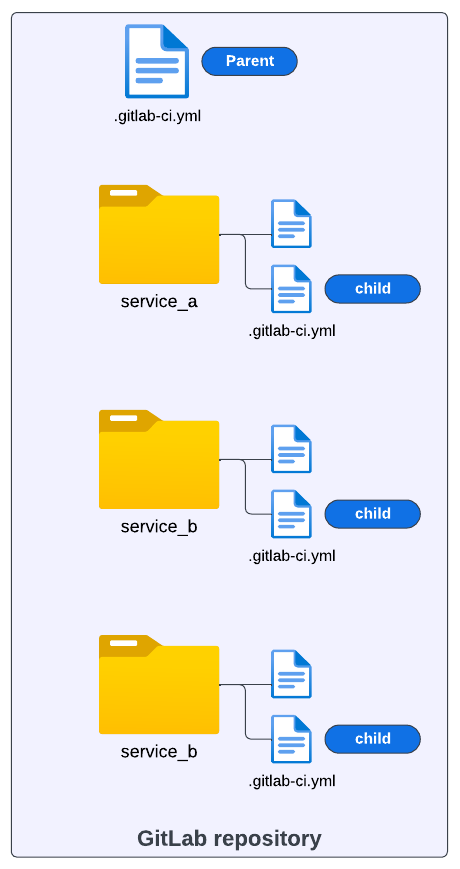
<p>The pipeline setup in the image below illustrates a scenario where a project could require a large, complex pipeline. The whole project resides in one repository and contains different modules. Each module requires its own set of build and test automation steps.</p>
<p>One approach to address the CI/CD configuration in a scenario like this is to break down the larger pipeline into smaller ones (i.e., child pipelines) and keep a common CI/CD process that is shared across all modules in charge of the whole orchestration (i.e., parent pipeline).</p>
<p><img src="https://res.cloudinary.com/about-gitlab-com/image/upload/v1760617772/hizwvhmgxn6exbmvsnrv.png" alt="CI/CD configuration"></p>
<p>The parent-child pipeline pattern allows a single pipeline to orchestrate one or many downstream pipelines. Similar to how a single pipeline coordinates the execution of multiple <a href="https://docs.gitlab.com/ci/jobs/">jobs</a>, the parent pipeline coordinates the running of full pipelines with one or more jobs.</p>
<p>This pattern has been shown to be helpful in a variety of use cases:</p>
<ul>
<li>
<p>Breaking down large, complex pipelines into smaller, manageable pieces</p>
</li>
<li>
<p>Conditionally executing certain pipelines as part of a larger CI/CD process</p>
</li>
<li>
<p>Executing pipelines in parallel</p>
</li>
<li>
<p>Helping manage user permissions to access and run certain pipelines</p>
</li>
</ul>
<p>GitLab’s current CI/CD structure supports this pattern and makes it simple to implement parent-child pipelines. While there are many benefits when using the parent-child pipeline pattern with GitLab, one question we often get is how to share data between the parent and child pipelines. In the next sections, we’ll go over how to make use of GitLab variables and artifacts to address this concern.</p>
<h3>Sharing variables</h3>
<p>There are cases where it is necessary to pass the output from a parent pipeline job to a child pipeline. These outputs can be shared as variables, <a href="https://docs.gitlab.com/ci/jobs/job_artifacts/">artifacts</a>, and <a href="https://docs.gitlab.com/ci/inputs/">inputs</a>.</p>
<p>Consider a case where we create a custom variable <code>var_1</code> during the runtime of a job:</p>
<pre><code>
stages:
  - build
  - triggers

# This job only creates a variable 

create_var_job:
  stage: build
  script:
    - var_1=&quot;Hi, I'm a Parent pipeline variable&quot;
    - echo &quot;var_1=$var_1&quot; &gt;&gt; var.env
  artifacts:
    reports:
      dotenv: var.env
</code></pre>
<p>Notice that the variable is created as part of the script steps in the job (during runtime). In this example, we are using a simple string <code>&quot;Hi, I'm a Parent pipeline variable&quot;</code> to illustrate the main syntax required to later share this variable with a child pipeline. Let's break down the <code>create_var_job</code>  and analyze the main steps from this GitLab job</p>
<p>First, we need to save <code>var_1</code> as <code>dotenv</code>:</p>
<pre><code>  script:
    - var_1=&quot;Hi, I'm a pipeline variable&quot;
    - echo &quot;var_1=$var_1&quot; &gt;&gt; var.env
</code></pre>
<p>After saving <code>var_1</code> as <code>var.env</code>, the next important step is to make this variable available as an artifact produced by the <code>create_var_job</code>. To do that, we use the following syntax:</p>
<pre><code>
artifacts:
    reports:
      dotenv: var.env
</code></pre>
<p>Up to this point, we have created a variable during runtime and saved it as a <code>dotenv</code> report. Now let's add the job that should trigger the child pipeline:</p>
<pre><code>
telco_service_a:
  stage: triggers
  trigger:
    include: service_a/.gitlab-ci.yml
  rules:
    - changes:
        - service_a/*
</code></pre>
<p>The goal of <code>telco_service_a</code>  job is to find the <code>.gitlab-ci.yml</code> configuration of the child pipeline,  which is defined in this case as <code>service_a,</code> and trigger its execution. Let's examine this job:</p>
<pre><code>
telco_service_a:
  stage: triggers
  trigger:
    include: service_a/.gitlab-ci.yml
</code></pre>
<p>We see it belongs to another <code>stage</code> of the pipeline named <code>triggers.</code>This job will run only after <code>create_var_job</code> from the first stage successfully finishes and where the variable  <code>var_1</code> we want to pass is created.</p>
<p>After defining the stage, we use the reserved words <code>trigger</code> and <code>include</code> to tell GitLab where to search for the child pipeline configuration, as illustrated in the YAML below:</p>
<pre><code>  trigger:
    include: service_a/.gitlab-ci.yml
</code></pre>
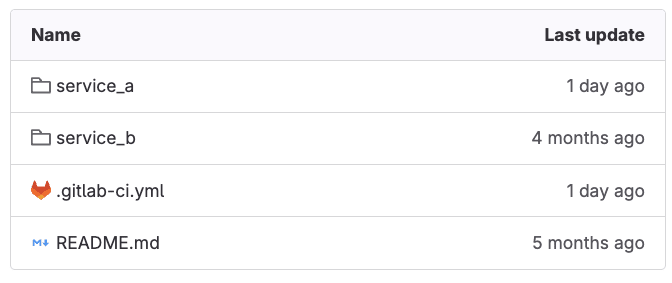
<p>Our child-pipeline YAML configuration is under <code>service_a/.gitlab-ci.yml</code> folder in the GitLab repository, for this example.</p>
<p><img src="https://res.cloudinary.com/about-gitlab-com/image/upload/v1760617772/ujkirpbifthpuujkcm6f.png" alt="child-pipeline YAML configuration"></p>
<p>&lt;p&gt;&lt;/p&gt;</p>
<p>&lt;center&gt;&lt;i&gt;Child pipelines folders with configurations&lt;/i&gt;&lt;/center&gt;</p>
<p>&lt;p&gt;&lt;/p&gt;</p>
<p>Take into consideration that the repository structure depicted above can vary. What matters is properly pointing the  <code>triggers: include</code> properties at the location of your child-pipeline configuration in your repository.</p>
<p>Finally, we use <code>rules: changes</code> to indicate to GitLab that this child pipeline should be triggered only if there is any change in any file in the <code>service_a/.gitlab-ci.yml</code> directory, as illustrated in the following code snippet:</p>
<pre><code>
rules:
    - changes:
        - service_a/*
</code></pre>
<p>Using this rule helps to optimize cost by triggering the child pipeline job only when necessary. This approach is particularly valuable in a monorepo architecture where specific modules contain numerous components, allowing us to avoid running their dedicated pipelines when no changes have been made to their respective codebases.</p>
<h4>Configuring the parent pipeline</h4>
<p>Up to this point, we have put together our parent pipeline. Here's the full code snippet for this segment:</p>
<pre><code>
# Parent Pipeline Configuration

# This pipeline creates a custom variable and triggers a child pipeline


stages:
  - build
  - trigger

create_var_job:
  stage: build
  script:
    - var_1=&quot;Hi, I'm a Parent pipeline variable&quot;
    - echo &quot;var_1=$var_1&quot; &gt;&gt; var.env
  artifacts:
    reports:
      dotenv: var.env

telco_service_a:
  stage: triggers
  trigger:
    include: service_a/.gitlab-ci.yml
  rules:
    - changes:
        - service_a/*
</code></pre>
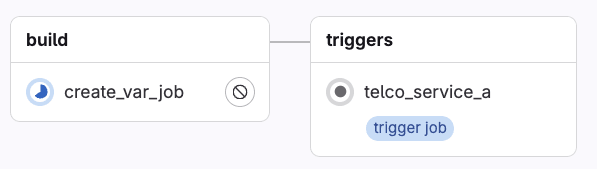
<p>When GitLab executes the YAML configuration in the GitLab UI, the parent pipeline gets rendered as follows:</p>
<p><img src="https://res.cloudinary.com/about-gitlab-com/image/upload/v1760617771/e1azkkr0rnzd42dzkw1x.png" alt="parent pipeline rendering"></p>
<p>Notice the label &quot;trigger job,&quot; which indicates this job will start the execution of another pipeline configuration.</p>
<h4>Configuring the child pipeline</h4>
<p>Moving forward, let's now focus on the child pipeline configuration, where we expect to inherit and print the value of the <code>var_1</code> created in the parent pipeline.</p>
<p>The pipeline configuration in <code>service_a/.gitlab_ci.yml</code> has the following definition:</p>
<pre><code>
stages:
  - build

build_a:
  stage: build
  script:
    - echo &quot;this job inherits the variable from the Parent pipeline:&quot;
    - echo $var_1
  needs:
    - project: gitlab-da/use-cases/7-4-parent-child-pipeline
      job: create_var_job
      ref: main
      artifacts: true
</code></pre>
<p>Like before, let's break down this pipeline and highlight the main parts to achieve our goal. This pipeline only contains one stage (i.e., <code>build)</code> and one job (i.e., <code>build_a)</code>. The script in the job contains two steps:</p>
<pre><code>
build_a:
  stage: build
  script:
    - echo &quot;this job inherits the variable from the Parent pipeline:&quot;
    - echo $var_1
</code></pre>
<p>These two steps print output during the execution. The most interesting one is the second step, <code>echo $var_1</code>, where we expect to print the variable value inherited from the parent pipeline. Remember, this was a simple string with value: <code>&quot;Hi, I'm a Parent pipeline variable.&quot;</code></p>
<h4>Inheriting variables using needs</h4>
<p>To set and link this job to inherit variables from the parent pipeline, we use the reserved GitLab CI properties <code>needs</code> as depicted in the following snippet:</p>
<pre><code>
needs:
    - project: gitlab-da/use-cases/7-4-parent-child-pipeline
      job: create_var_job
      ref: main
      artifacts: true
</code></pre>
<p>Using the &quot;needs&quot; keyword, we define dependencies that must be completed before running this job. In this case, we pass four different values. Let's walk through each one  of them:</p>
<ul>
<li>
<p><strong>Project:</strong> The complete namespace of the project where the main <code>gitlab-ci.yml</code> containing the parent pipeline YAML is located. Make sure to include the absolute path.</p>
</li>
<li>
<p><strong>Job:</strong> The specific job name in the parent pipeline from where we want to inherit the variable.</p>
</li>
<li>
<p><strong>Ref:</strong> The name of the branch where the main <code>gitlab-ci.yml</code> containing the parent pipeline YAML is located.</p>
</li>
<li>
<p><strong>Artifacts:</strong> Where we set a boolean value, indicating that artifacts from the parent pipeline job should be downloaded and made available to this child pipeline job.</p>
</li>
</ul>
<p><strong>Note:</strong> This specific approach using the needs property is only available to GitLab Premium and Ultimate users. We will cover another example for GitLab community users later on.</p>
<h4>Putting it all together</h4>
<p>Now let's assume we make a change to any of the files under <code>service_a</code> folder and commit the changes to the repository. When GitLab detects the change, the rule we set up will trigger the child job pipeline execution. This gets displayed in the GitLab UI as follows:</p>
<p><img src="https://res.cloudinary.com/about-gitlab-com/image/upload/v1760617771/e1azkkr0rnzd42dzkw1x.png" alt="Rule triggering the child job pipeline execution"></p>
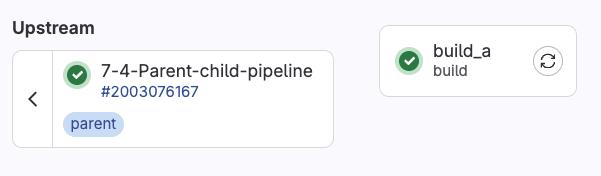
<p>Clicking on the <code>telco_service_a</code>  will take us to the jobs in the child pipeline:</p>
<p><img src="https://res.cloudinary.com/about-gitlab-com/image/upload/v1760617773/vftjkg7ct2wqmew1e3yk.png" alt="Jobs in pipeline"></p>
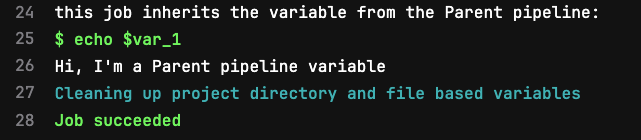
<p>We can see the parent-child relationship, and finally, by clicking on the <code>build_a job</code>, we can visually verify the variable inheritance in the job execution log:</p>
<p><img src="https://res.cloudinary.com/about-gitlab-com/image/upload/v1760617758/hxfkfmev9hebbqhgcvoh.png" alt="Verifying the variable inheritance in the job execution log"></p>
<p>This output confirms the behavior we expected. The custom runtime variable <code>var_1</code> created in the parent job is inherited in the child job, unpacked from the <code>dotenv</code> report, and its value accessible as can be confirmed in Line 26 above.</p>
<p>This use case illustrates how to share custom variables that can contain any value between pipelines. This example is intentionally simple and can be extrapolated to more realistic scenarios. Take, for instance, the following CI/CD configuration, where the custom variable we need to share is the tag of a Docker image:</p>
<pre><code>
# Pipeline 


build-prod-image:
  tags: [ saas-linux-large-amd64 ]
  image: docker:20.10.16
  stage: build
  services:
    - docker:20.10.16-dind
  
  script:
    - docker login -u $CI_REGISTRY_USER -p $CI_REGISTRY_PASSWORD $CI_REGISTRY
    - docker build -t $PRODUCTION_IMAGE .
    - docker push $PRODUCTION_IMAGE
    - echo &quot;UPSTREAM_CONTAINER_IMAGE=$PRODUCTION_IMAGE&quot; &gt;&gt; prodimage.env

  artifacts:
    reports:
      dotenv: prodimage.env

  rules:
     - if: '$CI_COMMIT_BRANCH == &quot;main&quot;'
       when: always
     - when: never
</code></pre>
<p>And use the variable with the Docker image tag, in another job that updates a Helm manifest file:</p>
<pre><code>
update-helm-values:
    stage: update-manifests
    image:
        name: alpine:3.16
        entrypoint: [&quot;&quot;]
  
    before_script:
         - apk add --no-cache git curl bash yq
         - git remote set-url origin https://${CI_USERNAME}:${GITOPS_USER}@${SERVER_PATH}/${PROJECT_PATH}
         - git config --global user.email &quot;gitlab@gitlab.com&quot;
         - git config --global user.name &quot;GitLab GitOps&quot;
         - git pull origin main
    script:
          - cd src
          - echo $UPSTREAM_CONTAINER_IMAGE
          - yq eval -i &quot;.spec.template.spec.containers[0].image |= \&quot;$UPSTREAM_CONTAINER_IMAGE\&quot;&quot; store-deployment.yaml
          - cat store-deployment.yaml
          - git pull origin main
          - git checkout -B main
          - git commit -am '[skip ci] prod image update'
          - git push origin main
    needs:
      - project: gitlab-da/use-cases/devsecops-platform/simply-find/simply-find-front-end
        job: build-prod-image
        ref: main
        artifacts: true
</code></pre>
<p>Mastering how to share variables between pipelines while maintaining the relationship between them enables us to create more sophisticated workflow orchestration that can meet our software building needs.</p>
<h3>Using GitLab Package Registry to share artifacts</h3>
<p>While the needs feature mentioned above works great for Premium and Ultimate users, GitLab also has features to help achieve similar results for Community Edition users. One suggested approach is to store artifacts in the <a href="https://docs.gitlab.com/user/packages/package_registry/">GitLab Package Registry</a>.</p>
<p>Using a combination of the variables provided in GitLab CI/CD jobs and the GitLab API, you can upload artifacts to the GitLab Package Registry from a parent pipeline. In the child pipeline, you can then access the uploaded artifact from the package registry using the same variables and API to access the artifact. Let’s take a look at the example pipeline and some supplementary scripts that illustrate this:</p>
<p><strong>gitlab-ci.yml (parent pipeline)</strong></p>
<pre><code>
# Parent Pipeline Configuration

# This pipeline creates an artifact, uploads it to Package Registry, and triggers a child pipeline


stages:
  - create-upload
  - trigger

variables:
  PACKAGE_NAME: &quot;pipeline-artifacts&quot;
  PACKAGE_VERSION: &quot;$CI_PIPELINE_ID&quot;
  ARTIFACT_FILE: &quot;artifact.txt&quot;

# Job 1: Create and upload artifact to Package Registry

create-and-upload-artifact:
  stage: create-upload
  image: alpine:latest
  before_script:
    - apk add --no-cache curl bash
  script:
    - bash scripts/create-artifact.sh
    - bash scripts/upload-to-registry.sh
  rules:
    - if: $CI_PIPELINE_SOURCE == &quot;push&quot;

# Job 2: Trigger child pipeline

trigger-child:
  stage: trigger
  trigger:
    include: child-pipeline.yml
    strategy: depend
  variables:
    PARENT_PIPELINE_ID: $CI_PIPELINE_ID
    PACKAGE_NAME: $PACKAGE_NAME
    PACKAGE_VERSION: $PACKAGE_VERSION
    ARTIFACT_FILE: $ARTIFACT_FILE
  rules:
    - if: $CI_PIPELINE_SOURCE == &quot;push&quot;
</code></pre>
<p><strong>child-pipeline.yml</strong></p>
<pre><code>
# Child Pipeline Configuration

# This pipeline downloads the artifact from Package Registry and processes it


stages:
  - download-process

variables:
  # These variables are passed from the parent pipeline
  PACKAGE_NAME: &quot;pipeline-artifacts&quot;
  PACKAGE_VERSION: &quot;$PARENT_PIPELINE_ID&quot;
  ARTIFACT_FILE: &quot;artifact.txt&quot;

# Job 1: Download and process artifact from Package Registry

download-and-process-artifact:
  stage: download-process
  image: alpine:latest
  before_script:
    - apk add --no-cache curl bash
  script:
    - bash scripts/download-from-registry.sh
    - echo &quot;Processing downloaded artifact...&quot;
    - cat $ARTIFACT_FILE
    - echo &quot;Artifact processed successfully!&quot;
</code></pre>
<p><strong>upload-to-registry.sh</strong></p>
<pre><code>
#!/bin/bash


set -e


# Configuration

PACKAGE_NAME=&quot;${PACKAGE_NAME:-pipeline-artifacts}&quot;

PACKAGE_VERSION=&quot;${PACKAGE_VERSION:-$CI_PIPELINE_ID}&quot;

ARTIFACT_FILE=&quot;${ARTIFACT_FILE:-artifact.txt}&quot;


# Validate required variables

if [ -z &quot;$CI_PROJECT_ID&quot; ]; then
    echo &quot;Error: CI_PROJECT_ID is not set&quot;
    exit 1
fi


if [ -z &quot;$CI_JOB_TOKEN&quot; ]; then
    echo &quot;Error: CI_JOB_TOKEN is not set&quot;
    exit 1
fi


if [ -z &quot;$CI_API_V4_URL&quot; ]; then
    echo &quot;Error: CI_API_V4_URL is not set&quot;
    exit 1
fi


if [ ! -f &quot;$ARTIFACT_FILE&quot; ]; then
    echo &quot;Error: Artifact file '$ARTIFACT_FILE' not found&quot;
    exit 1
fi


# Construct the upload URL

UPLOAD_URL=&quot;${CI_API_V4_URL}/projects/${CI_PROJECT_ID}/packages/generic/${PACKAGE_NAME}/${PACKAGE_VERSION}/${ARTIFACT_FILE}&quot;


# Upload the file using curl

response=$(curl -w &quot;%{http_code}&quot; -o /tmp/upload_response.json \
    --header &quot;JOB-TOKEN: $CI_JOB_TOKEN&quot; \
    --upload-file &quot;$ARTIFACT_FILE&quot; \
    &quot;$UPLOAD_URL&quot;)

if [ &quot;$response&quot; -eq 201 ]; then
    echo &quot;Upload successful!&quot;
else
    echo &quot;Upload failed with HTTP code: $response&quot;
    exit 1
fi

</code></pre>
<p><strong>download-from-regsitry.sh</strong></p>
<pre><code>
#!/bin/bash


set -e


# Configuration

PACKAGE_NAME=&quot;${PACKAGE_NAME:-pipeline-artifacts}&quot;

PACKAGE_VERSION=&quot;${PACKAGE_VERSION:-$PARENT_PIPELINE_ID}&quot;

ARTIFACT_FILE=&quot;${ARTIFACT_FILE:-artifact.txt}&quot;


# Validate required variables

if [ -z &quot;$CI_PROJECT_ID&quot; ]; then
    echo &quot;Error: CI_PROJECT_ID is not set&quot;
    exit 1
fi


if [ -z &quot;$CI_JOB_TOKEN&quot; ]; then
    echo &quot;Error: CI_JOB_TOKEN is not set&quot;
    exit 1
fi


if [ -z &quot;$CI_API_V4_URL&quot; ]; then
    echo &quot;Error: CI_API_V4_URL is not set&quot;
    exit 1
fi


if [ -z &quot;$PACKAGE_VERSION&quot; ]; then
    echo &quot;Error: PACKAGE_VERSION is not set&quot;
    exit 1
fi


# Construct the download URL

DOWNLOAD_URL=&quot;${CI_API_V4_URL}/projects/${CI_PROJECT_ID}/packages/generic/${PACKAGE_NAME}/${PACKAGE_VERSION}/${ARTIFACT_FILE}&quot;


# Download the file using curl

response=$(curl -w &quot;%{http_code}&quot; -o &quot;$ARTIFACT_FILE&quot; \
    --header &quot;JOB-TOKEN: $CI_JOB_TOKEN&quot; \
    --fail-with-body \
    &quot;$DOWNLOAD_URL&quot;)

if [ &quot;$response&quot; -eq 200 ]; then
    echo &quot;Download successful!&quot;
else
    echo &quot;Download failed with HTTP code: $response&quot;
    exit 1
fi

</code></pre>
<p>In this example, the parent pipeline uploads a file to the GitLab Package Registry by calling a script named <code>upload-to-registry.sh</code>. The script gives the artifact a name and version and constructs the API call to upload the file to the package registry. The parent pipeline is able to authenticate using a <code>$CI_JOB_TOKEN</code> to push the artifact.txt file to the registry.</p>
<p>The child pipeline operates the same as the parent pipeline by using a script to construct the API call to download the artifact.txt file from the package registry. It also is able to authenticate to the registry using the <code>$CI_JOB_TOKEN</code>.</p>
<p>Since the GitLab Package Registry is available to all GitLab users, it helps to serve as a central location for storing and versioning artifacts. It is a great option for users working with many kinds of artifacts and needing to version artifacts for workflows even beyond CI/CD.</p>
<h3>Using inputs to pass variables to a child pipeline</h3>
<p>If you made it this far in this tutorial, and you have plans to start creating new pipeline configurations, you might want to start by evaluating if your use case can benefit from using <strong>inputs</strong> to pass variables to other pipelines.</p>
<p>Using inputs is a recommended way to pass variables when you need to define specific values in a CI/CD job and have those values remain fixed during the pipeline run. Inputs might offer certain advantages over the method we implemented before. For example, with inputs, you can include data validation through options (i.e., values must be one of these: [‘staging', ‘prod’]), variable descriptions, type checking, and assign default values before the pipeline run.</p>
<h4>Configuring CI/CD inputs</h4>
<p>Consider the following parent pipeline configuration:</p>
<pre><code>
# .gitlab-ci.yml (main file)

stages:
 - trigger

trigger-staging:
 stage: trigger
 trigger:
   include:
     - local: service_a/.gitlab-ci.yml
       inputs:
         environment: staging
         version: &quot;1.0.0&quot;
</code></pre>
<p>Let's zoom in at the main difference between the code snippet above and the previous parent pipeline examples in this tutorial:</p>
<pre><code>
trigger:
   include:
     - local: service_a/.gitlab-ci.yml
       inputs:
         environment: staging
         version: &quot;1.0.0&quot;
</code></pre>
<p>The main difference is using the reserved word &quot;inputs&quot;. This part of the YAML configuration can be read in natural language as: “trigger the child pipeline defined in <code>service_a.gitlab-ci.yml</code> and make sure to pass ‘environment: staging’ and ‘version:1.0.0’ as input variables that the child pipeline will know how to use.</p>
<h4>Reading CI/CD inputs in child pipelines</h4>
<p>Moving to the child pipeline, it must contain in its declaration a spec that defines the inputs it can take. For each input, it is possible to add a little description, a set of predefined options the input value can take, and the type of value it will take. This is illustrated as follows:</p>
<pre><code>
# target pipeline or child-pipeline in this case


spec:
  inputs:
    environment:
      description: &quot;Deployment environment&quot;
      options: [staging, production]
    version:
      type: string
      description: &quot;Application version&quot;


---


stages:
  - deploy
# Jobs that will use the inputs

deploy:
  stage: deploy
  script:
     -  echo &quot;Deploying version $[[ inputs.version ]] to $[[ inputs.environment ]]&quot;

</code></pre>
<p>Notice from the code snippet that after defining the spec, there is a YAML document separator &quot;---&quot;  followed by the actual child pipeline definition where we access the variables <code>$[[ inputs.version ]]</code> and <code>$[[ inputs.environment ]]&quot;</code> from the defined inputs using input interpolation.</p>
<h2>Get hands-on with parent-child pipelines, artifacts, and more</h2>
<p>We hope this article has helped with navigating the challenge of sharing variables and artifacts in parent-child pipeline setups.</p>
<p>To try these examples for yourself, feel free to view or fork the <a href="https://gitlab.com/gitlab-da/use-cases/devsecops-platform/devops-platform-wave/scenarios/scenario7-deep-dive-into-build-automation-and-ci/7-4-parent-child-pipeline/-/tree/main">Premium/Ultimate</a> and the <a href="https://gitlab.com/gitlab-da/playground/dhelfand/parent-child-pipeline-with-package-registry-artifacts">GitLab Package Registry</a> examples of sharing artifacts.</p>
<p>You can also sign up for a <a href="https://about.gitlab.com/free-trial/">30-day free trial of GitLab Ultimate</a> to experience all the features GitLab has to offer. Thanks for reading!</p>
]]></content>
        <author>
            <name>William Arias</name>
            <uri>https://about.gitlab.com/blog/authors/william-arias</uri>
        </author>
        <author>
            <name>Daniel Helfand</name>
            <uri>https://about.gitlab.com/blog/authors/daniel-helfand</uri>
        </author>
        <published>2025-10-16T00:00:00.000Z</published>
    </entry>
    <entry>
        <title type="html"><![CDATA[How we built a structured Streamlit Application Framework in Snowflake]]></title>
        <id>https://about.gitlab.com/blog/how-we-built-a-structured-streamlit-application-framework-in-snowflake/</id>
        <link href="https://about.gitlab.com/blog/how-we-built-a-structured-streamlit-application-framework-in-snowflake/"/>
        <updated>2025-10-10T00:00:00.000Z</updated>
        <content type="html"><![CDATA[<p>Recently, the GitLab Data team transformed scattered
<a href="https://streamlit.io/">Streamlit</a> applications into a unified, secure, and
scalable solution for our Snowflake environment. To accomplish this, we
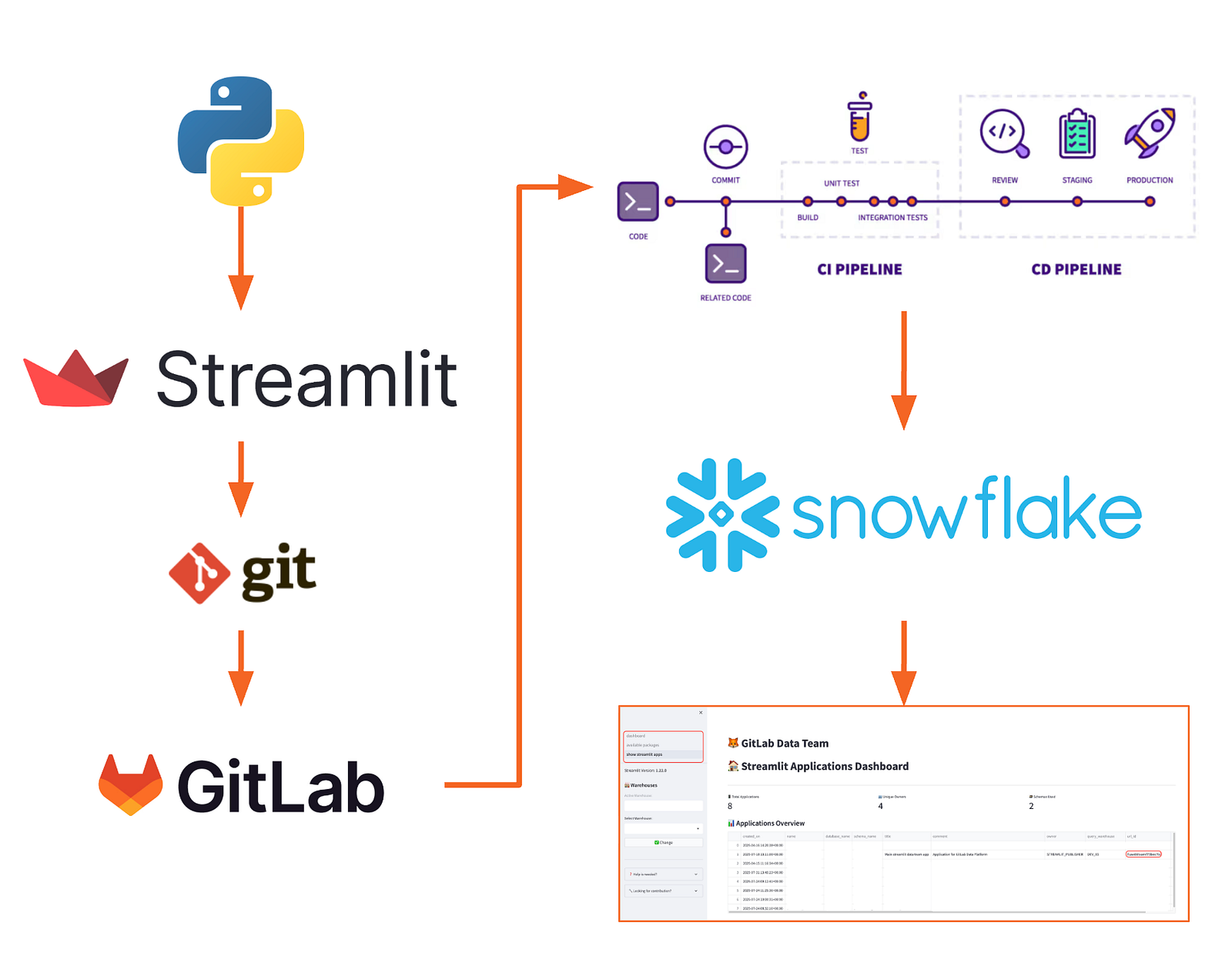
packed Python, Snowflake, and Streamlit together with GitLab. Follow along
on this journey and discover the results we achieved, and learn how you can,
too.</p>
<h2>The challenge</h2>
<p>Imagine this scenario: Your organization has dozens of Streamlit applications across different environments, running various Python versions, connecting to sensitive data with inconsistent security practices. Some apps work, others break mysteriously, and nobody knows who built what or how to maintain them.</p>
<p>This was exactly the challenge our data team faced. Applications were being created in isolation, with no standardization, no security oversight, and no clear deployment process. The result? A compliance nightmare and a maintenance burden that was growing exponentially.</p>
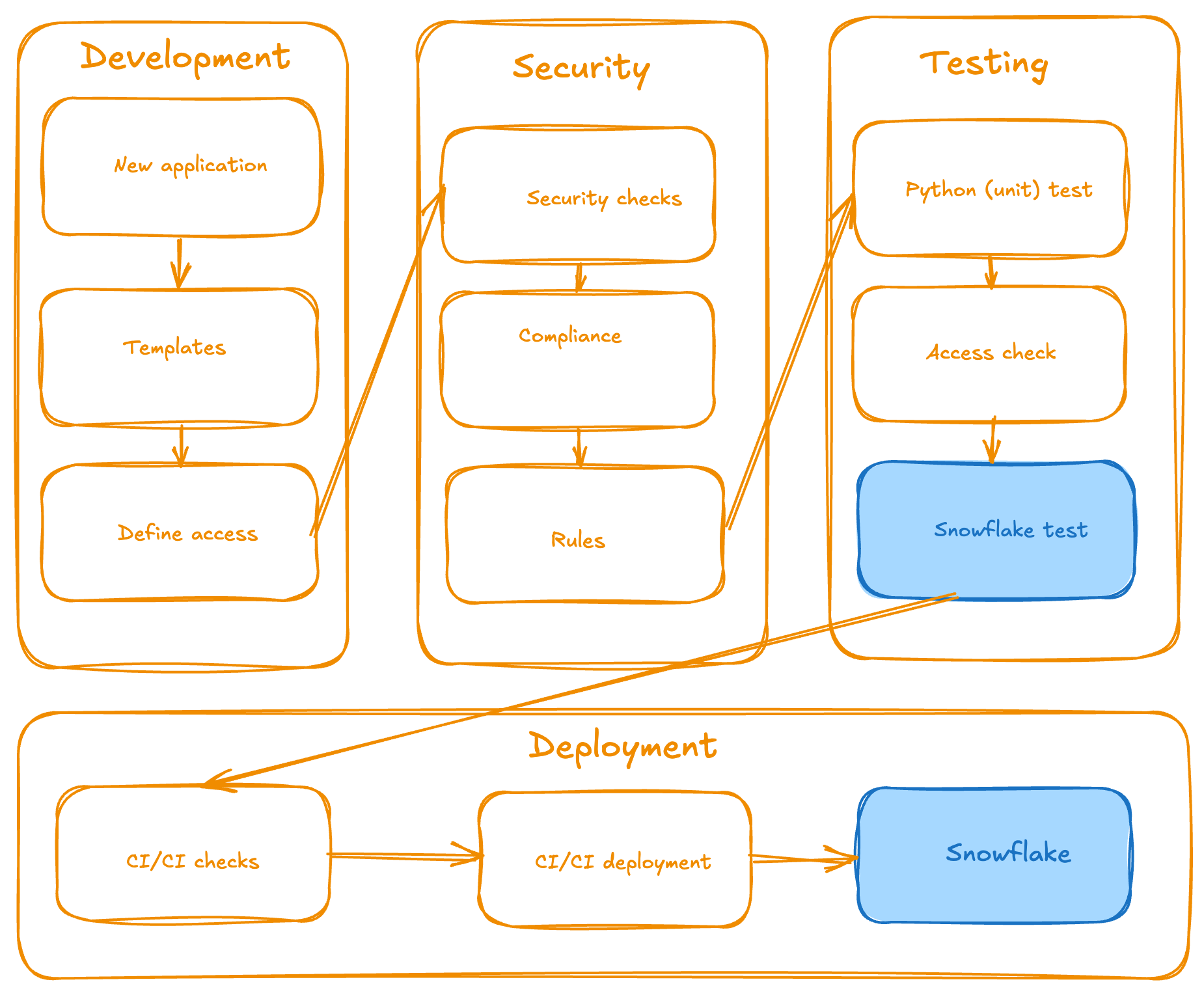
<p><img src="https://res.cloudinary.com/about-gitlab-com/image/upload/v1760035999/i50lpkrwy9bok056rdak.png" alt="Functional architectural design (high level)"></p>
<p>&lt;p&gt;&lt;/p&gt;</p>
<p>&lt;center&gt;&lt;i&gt;Functional architectural design (high level)&lt;/i&gt;&lt;/center&gt;</p>
<h2>How we started</h2>
<p>We leveraged our unique position as customer zero by building this entire framework on GitLab's own CI/CD infrastructure and project management tools. Here are the ingredients we started with:</p>
<ol>
<li>
<p><a href="https://about.gitlab.com/platform/">GitLab</a> (product)</p>
</li>
<li>
<p><a href="https://about.gitlab.com/platform/">Snowflake</a> - our single source of truth (SSOT) for the data warehouse activities (and more than that)</p>
</li>
<li>
<p><a href="https://streamlit.io/">Streamlit</a> - an open-source tool for visual applications that has pure Python code under the hood</p>
</li>
</ol>
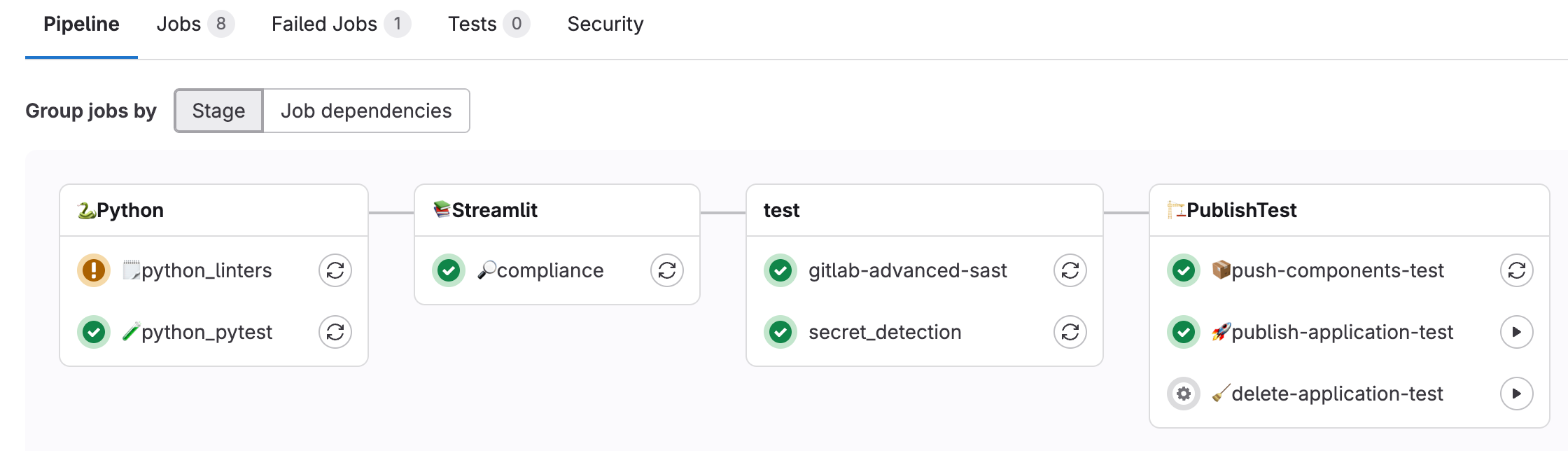
<p>This provided us with immediate access to enterprise-grade DevSecOps capabilities, enabling us to implement automated testing, code review processes, and deployment pipelines from the outset. By utilizing GitLab's built-in features for issue tracking, merge requests, and automated deployments (CI/CD pipelines), we can iterate rapidly and validate the framework against real-world enterprise requirements. This internal-first approach ensured our solution was battle-tested on GitLab's own infrastructure before any external implementation.</p>
<h3>The lessons we learned</h3>
<p>The most critical lesson we learned from building the Streamlit Application Framework in Snowflake is that <strong>structure beats chaos every time</strong> — implement governance early rather than retrofitting it later when maintenance becomes exponential.</p>
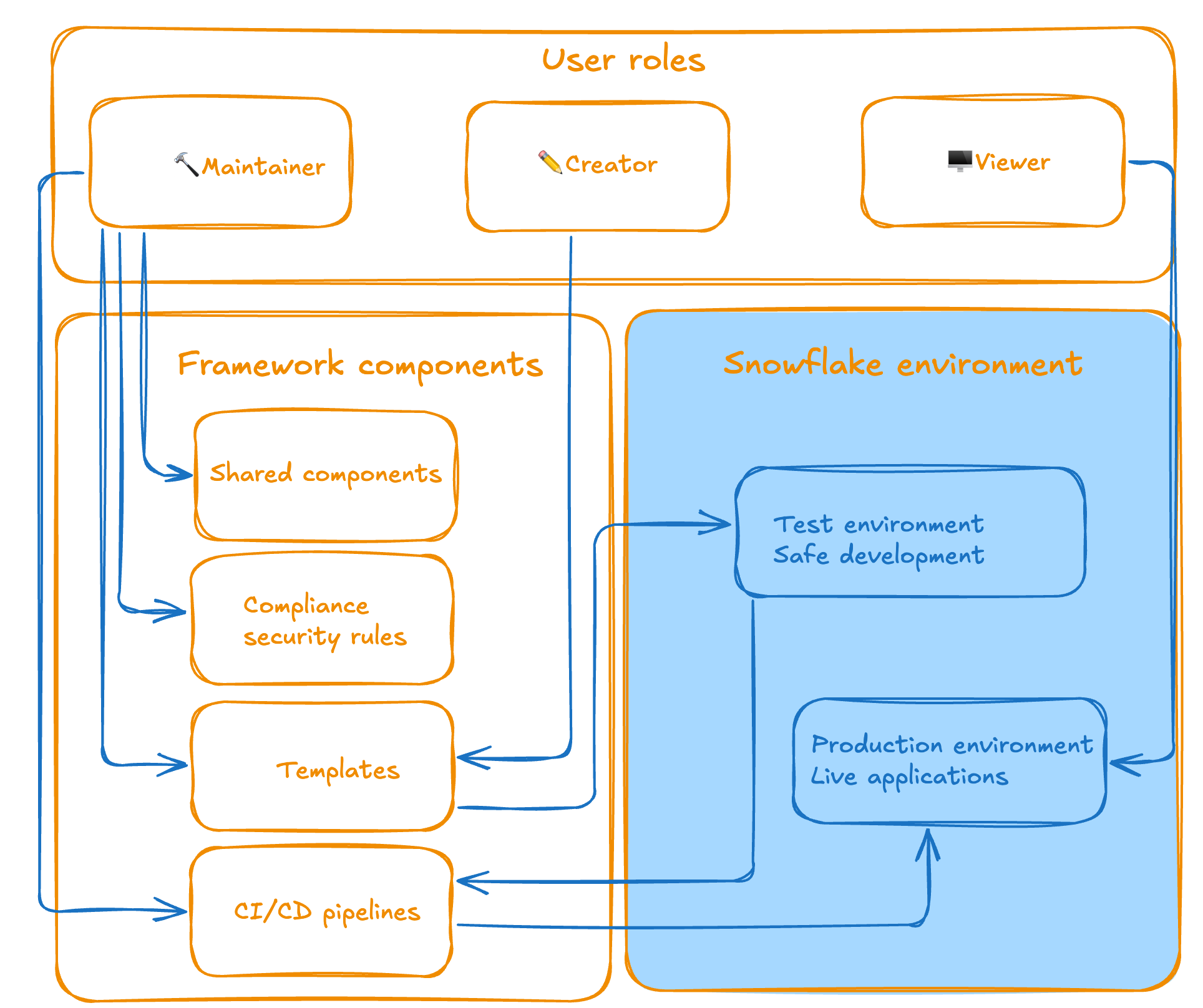
<p>You also need to clearly define roles and responsibilities, separating infrastructure concerns from application development, so that each team can focus on its strengths.</p>
<p>Security and compliance cannot be afterthoughts; they must be built into templates and automated processes from day one, as it's far easier to enforce consistent standards upfront than to force them after the fact. Invest heavily in automation and CI/CD pipelines, as manual processes don't scale and introduce human error.</p>
<p><img src="https://res.cloudinary.com/about-gitlab-com/image/upload/v1760035998/qt9gfemxjnj8kjumkuh7.png" alt="Architecture of the framework (general overview)"></p>
<p>&lt;p&gt;&lt;/p&gt;</p>
<p>&lt;center&gt;&lt;i&gt;Architecture of the framework (general overview)&lt;/i&gt;&lt;/center&gt;</p>
<h2>How the Streamlit Application Framework changes everything</h2>
<p>The Streamlit Application Framework turns a scattered approach into a structure. It gives developers freedom within secure guardrails, while automating deployment and eliminating maintenance complexity.</p>
<h3>Three clear roles, one unified process</h3>
<p>The framework introduces a structured approach with three distinct roles:</p>
<ol>
<li>
<p><strong>Maintainers</strong> (Data team members and contributors) handle the infrastructure, including CI/CD pipelines, security templates, and compliance rules. They ensure the framework runs smoothly and stays secure.</p>
</li>
<li>
<p><strong>Creators</strong> (those who need to build applications) can focus on what they do best: creating visualizations, connecting to Snowflake data, and building user experiences. They have full flexibility to create new applications from scratch, add new pages to existing apps, integrate additional Python libraries, and build complex data visualisations — all without worrying about deployment pipelines or security configurations.</p>
</li>
<li>
<p><strong>Viewers</strong> (end users) access polished, secure applications without any technical overhead. All they need is Snowflake access.</p>
</li>
</ol>
<p><img src="https://res.cloudinary.com/about-gitlab-com/image/upload/v1760035999/oatqyx3ug7vsgzishpma.png" alt="Roles overview and their functionality"></p>
<p>&lt;p&gt;&lt;/p&gt;</p>
<p>&lt;center&gt;&lt;i&gt;Overview of roles and their functions&lt;/i&gt;&lt;/center&gt;</p>
<h2>Automate everything</h2>
<p>By implementing CI/CD, days of manual deployments and configuration headaches are gone. The framework provides:</p>
<ul>
<li><strong>One-click environment preparation:</strong> With a set of <code>make</code> commands, the environment is installed and ready in a few seconds.</li>
</ul>
<pre><code class="language-yaml">
================================================================================

✅ Snowflake CLI successfully installed and configured!

Connection: gitlab_streamlit

User: YOU@GITLAB.COM

Account: gitlab

================================================================================

Using virtualenv: /Users/YOU/repos/streamlit/.venv

📚 Installing project dependencies...

Installing dependencies from lock file

No dependencies to install or update

✅ Streamlit environment prepared!

</code></pre>
<ul>
<li>
<p><strong>Automated CI/CD pipelines:</strong> Handle testing, code review, and deployment from development to production.</p>
</li>
<li>
<p><strong>Secure sandbox environments:</strong> Provide for safe development and testing before production deployment.</p>
</li>
</ul>
<pre><code class="language-yaml">
╰─$ make streamlit-rules

🔍 Running Streamlit compliance check...

================================================================================

CODE COMPLIANCE REPORT

================================================================================

Generated: 2025-07-09 14:01:16

Files checked: 1


SUMMARY:

✅ Passed: 1

❌ Failed: 0

Success Rate: 100.0%


APPLICATION COMPLIANCE SUMMARY:

📱 Total Applications Checked: 1

⚠️ Applications with Issues: 0

📊 File Compliance Rate: 100.0%


DETAILED RESULTS BY APPLICATION:

...

</code></pre>
<ul>
<li><strong>Template-based application creation:</strong> Ensures consistency across all applications and pages.</li>
</ul>
<pre><code class="language-yaml">
╰─$ make streamlit-new-page STREAMLIT_APP=sales_dashboard STREAMLIT_PAGE_NAME=analytics

📝 Generating new Streamlit page: analytics for app: sales_dashboard

📃 Create new page from template:

Page name: analytics

App directory: sales_dashboard

Template path: page_template.py

✅ Successfully created 'analytics.py' in 'sales_dashboard' directory from template

</code></pre>
<ul>
<li>
<p><strong>Poetry-based dependency management:</strong> Prevents version conflicts and maintains clean environments.</p>
</li>
<li>
<p><strong>Organized project structure:</strong> Has dedicated folders for applications, templates, compliance rules, and configuration management.</p>
</li>
</ul>
<pre><code class="language-yaml">
├── src/

│   ├── applications/     # Folder for Streamlit applications

│   │   ├── main_app/     # Main dashboard application

│   │   ├── components/   # Shared components

│   │   └── &lt;your_apps&gt;/  # Your custom application

│   │   └── &lt;your_apps2&gt;/ # Your 2nd custom application

│   ├── templates/        # Application and page templates

│   ├── compliance/       # Compliance rules and checks

│   └── setup/            # Setup and configuration utilities

├── tests/                # Test files

├── config.yml            # Environment configuration

├── Makefile              # Build and deployment automation

└── README.md             # Main README.md file

</code></pre>
<ul>
<li><strong>Streamlined workflow:</strong> Takes local development through testing schema to production, all automated through GitLab CI/CD pipelines.</li>
</ul>
<p><img src="https://res.cloudinary.com/about-gitlab-com/image/upload/v1760035998/usyma2jkgiazu9iay1au.png" alt="GitLab CI/CD pipelines for full automation of the process"></p>
<p>&lt;p&gt;&lt;/p&gt;
&lt;center&gt;&lt;i&gt;GitLab CI/CD pipelines for full automation of the process&lt;/i&gt;&lt;/center&gt;</p>
<h2>Security and compliance by design</h2>
<p>Instead of bolting on security as an afterthought, the structured Streamlit Application Framework builds it in from the ground up. Every application adheres to the same security standards, and compliance requirements are automatically enforced. Audit trails are maintained throughout the development lifecycle.</p>
<p>We introduce our compliance rules and verify them with a single command. For instance, we can list which classes and methods are mandatory to use, which files you should have, and which roles are allowed and which are forbidden to share the application with. The rules are flexible and descriptive; all you need to do is define them in a YAML file:</p>
<pre><code class="language-yaml">
class_rules:
  - name: &quot;Inherit code for the page from GitLabDataStreamlitInit&quot;
    description: &quot;All Streamlit apps must inherit from GitLabDataStreamlitInit&quot;
    severity: &quot;error&quot;
    required: true
    class_name: &quot;*&quot;
    required_base_classes:
      - &quot;GitLabDataStreamlitInit&quot;
    required_methods:
      - &quot;__init__&quot;
      - &quot;set_page_layout&quot;
      - &quot;setup_ui&quot;
      - &quot;run&quot;

function_rules:
  - name: &quot;Main function required&quot;
    description: &quot;Must have a main() function&quot;
    severity: &quot;error&quot;
    required: true
    function_name: &quot;main&quot;

import_rules:
  - name: &quot;Import GitLabDataStreamlitInit&quot;
    description: &quot;Must import the mandatory base class&quot;
    severity: &quot;error&quot;
    required: true
    module_name: &quot;gitlab_data_streamlit_init&quot;
    required_items:
      - &quot;GitLabDataStreamlitInit&quot;
  - name: &quot;Import streamlit&quot;
    description: &quot;Must import streamlit library&quot;
    severity: &quot;error&quot;
    required: true
    module_name: &quot;streamlit&quot;

file_rules:
  - name: &quot;Snowflake configuration required (snowflake.yml)&quot;
    description: &quot;Each application must have a snowflake.yml configuration file&quot;
    severity: &quot;error&quot;
    required: true
    file_pattern: &quot;**/applications/**/snowflake.yml&quot;
    base_path: &quot;&quot;
  - name: &quot;Snowflake environment required (environment.yml)&quot;
    description: &quot;Each application must have a environment.yml configuration file&quot;
    severity: &quot;error&quot;
    required: true
    file_pattern: &quot;**/applications/**/environment.yml&quot;
    base_path: &quot;&quot;
  - name: &quot;Share specification required (share.yml)&quot;
    description: &quot;Each application must have a share.yml file&quot;
    severity: &quot;warning&quot;
    required: true
    file_pattern: &quot;**/applications/**/share.yml&quot;
    base_path: &quot;&quot;
  - name: &quot;README.md required (README.md)&quot;
    description: &quot;Each application should have a README.md file with a proper documentation&quot;
    severity: &quot;error&quot;
    required: true
    file_pattern: &quot;**/applications/**/README.md&quot;
    base_path: &quot;&quot;
  - name: &quot;Starting point recommended (dashboard.py)&quot;
    description: &quot;Each application must have a dashboard.py as a starting point&quot;
    severity: &quot;warning&quot;
    required: true
    file_pattern: &quot;**/applications/**/dashboard.py&quot;
    base_path: &quot;&quot;

sql_rules:
  - name: &quot;SQL files must contain only SELECT statements&quot;
    description: &quot;SQL files and SQL code in other files should only contain SELECT statements for data safety&quot;
    severity: &quot;error&quot;
    required: true
    file_extensions: [&quot;.sql&quot;, &quot;.py&quot;]
    select_only: true
    forbidden_statements:
      - ....
    case_sensitive: false
  - name: &quot;SQL queries should include proper SELECT statements&quot;
    description: &quot;When SQL is present, it should contain proper SELECT statements&quot;
    severity: &quot;warning&quot;
    required: false
    file_extensions: [&quot;.sql&quot;, &quot;.py&quot;]
    required_statements:
      - &quot;SELECT&quot;
    case_sensitive: false

share_rules:
  - name: &quot;Valid functional roles in share.yml&quot;
    description: &quot;Share.yml files must contain only valid functional roles from the approved list&quot;
    severity: &quot;error&quot;
    required: true
    file_pattern: &quot;**/applications/**/share.yml&quot;
    valid_roles:
      - ...
    safe_data_roles:
      - ...
  - name: &quot;Share.yml file format validation&quot;
    description: &quot;Share.yml files must follow the correct YAML format structure&quot;
    severity: &quot;error&quot;
    required: true
    file_pattern: &quot;**/applications/**/share.yml&quot;
    required_keys:
      - &quot;share&quot;
    min_roles: 1
    max_roles: 10
</code></pre>
<p>With one command running:</p>
<pre><code class="language-bash">
╰─$ make streamlit-rules

</code></pre>
<p>We can verify all the rules we have created and validate that the developers (who are building a Streamlit application) are following the policy specified by the creators (who determine the policies and building blocks of the framework), and that all the building blocks are in the right place. This ensures consistent behavior across all Streamlit applications.</p>
<pre><code class="language-yaml">
🔍 Running Streamlit compliance check...

================================================================================

CODE COMPLIANCE REPORT

================================================================================

Generated: 2025-08-18 17:05:12

Files checked: 4


SUMMARY:

✅ Passed: 4

❌ Failed: 0

Success Rate: 100.0%


APPLICATION COMPLIANCE SUMMARY:

📱 Total Applications Checked: 1

⚠️ Applications with Issues: 0

📊 File Compliance Rate: 100.0%


DETAILED RESULTS BY APPLICATION:

================================================================================

✅ PASS APPLICATION: main_app

------------------------------------------------------------

📁 FILES ANALYZED (4):

✅ dashboard.py

📦 Classes: SnowflakeConnectionTester

🔧 Functions: main

📥 Imports: os, pwd, gitlab_data_streamlit_init, snowflake.snowpark.exceptions, streamlit


✅ show_streamlit_apps.py

📦 Classes: ShowStreamlitApps

🔧 Functions: main

📥 Imports: pandas, gitlab_data_streamlit_init, snowflake_session, streamlit


✅ available_packages.py

📦 Classes: AvailablePackages

🔧 Functions: main

📥 Imports: pandas, gitlab_data_streamlit_init, streamlit


✅ share.yml

👥 Share Roles: snowflake_analyst_safe


📄 FILE COMPLIANCE FOR MAIN_APP:

✅ Required files found:

✓ snowflake.yml

✓ environment.yml

✓ share.yml

✓ README.md

✓ dashboard.py


RULES CHECKED:

----------------------------------------

Class Rules (1):

- Inherit code for the page from GitLabDataStreamlitInit (error)


Function Rules (1):

- Main function required (error)


Import Rules (2):

- Import GitLabDataStreamlitInit (error)

- Import streamlit (error)


File Rules (5):

- Snowflake configuration required (snowflake.yml) (error)

- Snowflake environment required (environment.yml) (error)

- Share specification required (share.yml) (warning)

- README.md required (README.md) (error)

- Starting point recommended (dashboard.py) (warning)


SQL Rules (2):

- SQL files must contain only SELECT statements (error)

🗄 SELECT-only mode enabled

🚨 Forbidden: INSERT, UPDATE, DELETE, DROP, ALTER...

- SQL queries should include proper SELECT statements (warning)


Share Rules (2):

- Valid functional roles in share.yml (error)

👥 Valid roles: 15 roles defined

🔒 Safe data roles: 11 roles

- Share.yml file format validation (error)

------------------------------------------------------------

✅ Compliance check passed

-----------------------------------------------------------

</code></pre>
<h2>Developer experience that works</h2>
<p>Whether you prefer your favorite IDE, a web-based development environment, or Snowflake Snowsight, the experience remains consistent. The framework provides:</p>
<ul>
<li><strong>Template-driven development:</strong> New applications and pages are created through standardized templates, ensuring consistency and best practices from day one. No more scattered design and elements.</li>
</ul>
<pre><code class="language-yaml">
╰─$ make streamlit-new-app NAME=sales_dashboard

🔧 Configuration Environment: TEST

📝 Configuration File: config.yml

📜 Config Loader Script: ./setup/get_config.sh

🐍 Python Version: 3.12

📁 Applications Directory: ./src/applications

🗄 Database: ...

📊 Schema: ...

🏗 Stage: ...

🏭 Warehouse: ...

🆕 Creating new Streamlit app: sales_dashboard

Initialized the new project in ./src/applications/sales_dashboard

</code></pre>
<ul>
<li><strong>Poetry package management:</strong> All dependencies are managed through Poetry, creating isolated environments that won't disrupt your existing Python setup.</li>
</ul>
<pre><code class="language-toml">
[tool.poetry]

name = &quot;GitLab Data Streamlit&quot;

version = &quot;0.1.1&quot;

description = &quot;GitLab Data Team Streamlit project&quot;

authors = [&quot;GitLab Data Team &lt;*****@gitlab.com&gt;&quot;]

readme = &quot;README.md&quot;


[tool.poetry.dependencies]

python = &quot;&lt;3.13,&gt;=3.12&quot;

snowflake-snowpark-python = &quot;==1.32.0&quot;

snowflake-connector-python = {extras = [&quot;development&quot;, &quot;pandas&quot;, &quot;secure-local-storage&quot;], version = &quot;^3.15.0&quot;}

streamlit = &quot;==1.22.0&quot;

watchdog = &quot;^6.0.0&quot;

types-toml = &quot;^0.10.8.20240310&quot;

pytest = &quot;==7.0.0&quot;

black = &quot;==25.1.0&quot;

importlib-metadata = &quot;==4.13.0&quot;

pyyaml = &quot;==6.0.2&quot;

python-qualiter = &quot;*&quot;

ruff = &quot;^0.1.0&quot;

types-pyyaml = &quot;^6.0.12.20250516&quot;

jinja2 = &quot;==3.1.6&quot;


[build-system]

requires = [&quot;poetry-core&quot;]

build-backend = &quot;poetry.core.masonry.api&quot;

</code></pre>
<ul>
<li><strong>Multi-page application support:</strong> Creators can easily build complex applications with multiple pages and add new libraries as needed. Multi-page applications are part of the framework and a developer is focusing on the logic, not the design and structuring.</li>
</ul>
<p><img src="https://res.cloudinary.com/about-gitlab-com/image/upload/v1760035999/at1q2xgmjthkrgju4okm.png" alt="Multipage application example (in Snowflake)"></p>
<p>&lt;p&gt;&lt;/p&gt;</p>
<p>&lt;center&gt;&lt;i&gt;Multipage application example (in Snowflake)&lt;/i&gt;&lt;/center&gt;</p>
<p>&lt;p&gt;&lt;/p&gt;</p>
<ul>
<li><strong>Seamless Snowflake integration:</strong> Built-in connectors and authentication handling for secure data access provide the same experience, whether in local development or directly in Snowflake.</li>
</ul>
<pre><code class="language-yaml">
make streamlit-push-test APPLICATION_NAME=sales_dashboard

📤 Deploying Streamlit app to test environment: sales_dashboard

...

------------------------------------------------------------------------------------------------------------

🔗 Running share command for application: sales_dashboard

Running commands to grant shares

🚀 Executing: snow streamlit share sales_dashboard with SOME_NICE_ROLE

✅ Command executed successfully

📊 Execution Summary: 1/1 commands succeeded

</code></pre>
<ul>
<li>
<p><strong>Comprehensive Makefile:</strong> All common commands are wrapped in simple Makefile commands, from local development to testing and deployment, including CI/CD pipelines.</p>
</li>
<li>
<p><strong>Safe local development:</strong> Everything runs in isolated Poetry environments, protecting your system while providing production-like experiences.</p>
</li>
</ul>
<p><img src="https://res.cloudinary.com/about-gitlab-com/image/upload/v1760035999/phmubsb34hn2mfefjvqh.png" alt="Same experience despite the environment (example of the local development)"></p>
<p>&lt;p&gt;&lt;/p&gt;</p>
<p>&lt;center&gt;&lt;i&gt;Same experience despite the environment (example of the local development)&lt;/i&gt;&lt;/center&gt;</p>
<p>&lt;p&gt;&lt;/p&gt;</p>
<ul>
<li><strong>Collaboration via code:</strong> All applications and components are wrapped up in one repository, which allows the entire organization to collaborate on the same resources and avoid double work and redundant setup.</li>
</ul>
<h2>How you can get started</h2>
<p>If you're facing similar challenges with scattered Streamlit applications, here's how to begin and move quickly:</p>
<ol>
<li>
<p><strong>Assess your current state:</strong> Inventory your existing applications and identify pain points.</p>
</li>
<li>
<p><strong>Define your roles:</strong> Separate maintainer responsibilities from creator and end users' needs.</p>
</li>
<li>
<p><strong>Start with templates:</strong> Create standardized application templates that enforce your security and compliance requirements.</p>
</li>
<li>
<p><strong>Implement CI/CD:</strong> Automate your deployment pipeline to reduce manual errors and ensure consistency.</p>
</li>
</ol>
<p><img src="https://res.cloudinary.com/about-gitlab-com/image/upload/v1760036003/mzge9s1fhkhnx38y1a3i.png" alt="Deploy the application in Snowflake"></p>
<p>&lt;p&gt;&lt;/p&gt;</p>
<p>&lt;center&gt;&lt;i&gt;The application deployed in Snowflake&lt;/i&gt;&lt;/center&gt;</p>
<h2>The bigger picture</h2>
<p>This framework represents more than just a technical solution — it's a paradigm shift toward treating data applications as first-class citizens in your enterprise (data) architecture.</p>
<p>By providing structure without sacrificing flexibility, the GitLab Data team created an environment where anyone in the company with minimal technical knowledge can innovate rapidly while maintaining the highest standards of security and compliance.</p>
<h3>What's next?</h3>
<p>We're continuing to enhance the framework based on user feedback and emerging needs. Future improvements include expanded template libraries, enhanced monitoring capabilities, more flexibility, and a smoother user experience.</p>
<p><strong>The goal isn't just to solve today's problems, but to create a foundation that scales with your organization's growing data application needs.</strong></p>
<h2>Summary</h2>
<p><a href="https://handbook.gitlab.com/handbook/enterprise-data/">The GitLab Data Team</a> transformed dozens of scattered, insecure Streamlit applications with no standardization into a unified, enterprise-grade framework that separates roles cleanly:</p>
<ol>
<li>
<p><strong>Maintainers</strong> handle infrastructure and security.</p>
</li>
<li>
<p><strong>Creators</strong> focus on building applications without deployment headaches.</p>
</li>
<li>
<p><strong>Viewers</strong> access polished, compliant apps.</p>
</li>
</ol>
<p>And we used these building blocks:</p>
<ol>
<li>
<p>Automated <strong>CI/CD</strong> pipelines</p>
</li>
<li>
<p>Fully collaborative and versioned code in <strong>git</strong></p>
</li>
<li>
<p><strong>Template-based</strong> development</p>
</li>
<li>
<p>Built-in <strong>security</strong> compliance, testing</p>
</li>
<li>
<p><strong>Poetry-managed</strong> environments</p>
</li>
</ol>
<p>We eliminated the maintenance nightmare while enabling rapid innovation — proving that you can have both structure and flexibility when you treat data applications as first-class enterprise assets rather than throwaway prototypes.</p>
]]></content>
        <author>
            <name>Radovan Bacovic</name>
            <uri>https://about.gitlab.com/blog/authors/radovan-bacovic</uri>
        </author>
        <published>2025-10-10T00:00:00.000Z</published>
    </entry>
    <entry>
        <title type="html"><![CDATA[Optimize GitLab object storage for scale and performance]]></title>
        <id>https://about.gitlab.com/blog/optimize-gitlab-object-storage-for-scale-and-performance/</id>
        <link href="https://about.gitlab.com/blog/optimize-gitlab-object-storage-for-scale-and-performance/"/>
        <updated>2025-10-08T00:00:00.000Z</updated>
        <content type="html"><![CDATA[<p>Managing GitLab at scale requires strategic object storage configuration.</p>
<p>Here's how to configure object storage for maximum performance, security,</p>
<p>and reliability across your GitLab components.</p>
<h2>Use consolidated form for GitLab components</h2>
<p>For artifacts, LFS, uploads, packages, and other GitLab data, eliminate credential duplication with the consolidated form:</p>
<pre><code>gitlab_rails['object_store']['enabled'] = true

gitlab_rails['object_store']['connection'] = {
  'provider' =&gt; 'AWS',
  'region' =&gt; 'us-east-1',
  'use_iam_profile' =&gt; true
}

gitlab_rails['object_store']['objects']['artifacts']['bucket'] = 'gitlab-artifacts'

gitlab_rails['object_store']['objects']['lfs']['bucket'] = 'gitlab-lfs'

# ... additional buckets for each object type

</code></pre>
<p>This reduces complexity while enabling encrypted S3 buckets and proper Content-MD5 headers.</p>
<h2>Configure container registry separately</h2>
<p>The container registry requires its own configuration since it doesn't support the consolidated form:</p>
<pre><code>registry['storage'] = {
  's3_v2' =&gt; {  # Use the new v2 driver
    'bucket' =&gt; 'gitlab-registry',
    'region' =&gt; 'us-east-1',
    # Omit access keys to use IAM roles
  }
}

</code></pre>
<p><strong>Note:</strong> The s3_v1 driver is deprecated and will be removed in GitLab 19.0. Migrate to s3_v2 for better performance and reliability.</p>
<h2>Disable proxy download for performance</h2>
<p>Set <code>proxy_download</code> to <strong>false</strong> (default) for direct downloads:</p>
<pre><code># For GitLab objects - can be set globally

gitlab_rails['object_store']['proxy_download'] = false

# Or configure per bucket for granular control

gitlab_rails['object_store']['objects']['artifacts']['proxy_download'] = false

gitlab_rails['object_store']['objects']['lfs']['proxy_download'] = false

gitlab_rails['object_store']['objects']['uploads']['proxy_download'] = true  # Example: keep proxy for uploads

# Container registry defaults to redirect mode (direct downloads)

# Only disable if your environment requires it:

registry['storage']['redirect']['disable'] = false  # Keep as false

</code></pre>
<p><strong>Important:</strong> The <code>proxy_download</code> option can be configured globally at the object-store level or individually per bucket. This gives you flexibility to optimize based on your specific use case — for example, you might want direct downloads for large artifacts and LFS files, but proxy smaller uploads through GitLab for additional security controls.</p>
<p>This dramatically reduces server load and egress costs by letting clients download directly from object storage.</p>
<h2>Choose identity-based authentication</h2>
<p><strong>AWS:</strong> Use IAM roles instead of access keys:</p>
<pre><code># GitLab objects

gitlab_rails['object_store']['connection'] = {
  'provider' =&gt; 'AWS',
  'use_iam_profile' =&gt; true
}

# Container registry

registry['storage'] = {
  's3_v2' =&gt; {
    'bucket' =&gt; 'gitlab-registry',
    'region' =&gt; 'us-east-1'
    # No access keys = IAM role authentication
  }
}

</code></pre>
<p><strong>Google Cloud Platform:</strong> Enable application default credentials:</p>
<pre><code>
gitlab_rails['object_store']['connection'] = {
  'provider' =&gt; 'Google',
  'google_application_default' =&gt; true
}

</code></pre>
<p><strong>Azure:</strong> Use workload identities by omitting storage access keys.</p>
<h2>Add encryption layers</h2>
<p>Enable server-side encryption for additional security:</p>
<pre><code># GitLab objects

gitlab_rails['object_store']['storage_options'] = {
  'server_side_encryption' =&gt; 'AES256'
}

# Container registry

registry['storage'] = {
  's3_v2' =&gt; {
    'bucket' =&gt; 'gitlab-registry',
    'encrypt' =&gt; true
  }
}

</code></pre>
<p>For AWS KMS encryption, specify the key ARN in <code>server_side_encryption_kms_key_id</code>.</p>
<h2>Use separate buckets for organization</h2>
<p>Create dedicated buckets for each component:</p>
<ul>
<li>
<p><strong>gitlab-artifacts</strong> - CI/CD job artifacts</p>
</li>
<li>
<p><strong>gitlab-lfs</strong> - Git LFS objects</p>
</li>
<li>
<p><strong>gitlab-uploads</strong> - User uploads</p>
</li>
<li>
<p><strong>gitlab-packages</strong> - Package registry</p>
</li>
<li>
<p><strong>gitlab-registry</strong> - Container images</p>
</li>
</ul>
<p>This isolation improves security, enables granular access controls, and simplifies cost tracking.</p>
<h2>Key configuration differences</h2>
<table>
<thead>
<tr>
<th>Component</th>
<th>Consolidated Form</th>
<th>Identity Auth</th>
<th>Encryption</th>
<th>Direct Downloads</th>
</tr>
</thead>
<tbody>
<tr>
<td>Artifacts, LFS, Packages</td>
<td>✅ Supported</td>
<td>✅ use_iam_profile</td>
<td>✅ storage_options</td>
<td>✅ proxy_download: false</td>
</tr>
<tr>
<td>Container Registry</td>
<td>❌ Separate config</td>
<td>✅ Omit access keys</td>
<td>✅ encrypt: true</td>
<td>✅ redirect enabled by default</td>
</tr>
</tbody>
</table>
<h2>Migration path</h2>
<ol>
<li>
<p><strong>Start with GitLab objects:</strong> Use the consolidated form for immediate complexity reduction.</p>
</li>
<li>
<p><strong>Configure registry separately:</strong> Use s3_v2 driver with IAM authentication.</p>
</li>
<li>
<p><strong>Enable encryption:</strong> Add server-side encryption for both components.</p>
</li>
<li>
<p><strong>Optimize performance:</strong> Ensure direct downloads are enabled with appropriate <code>proxy_download</code> settings.</p>
</li>
<li>
<p><strong>Set up lifecycle policies:</strong> Configure S3 lifecycle rules to clean up incomplete multipart uploads.</p>
</li>
</ol>
<h2>Additional resources</h2>
<p>For a complete AWS S3 configuration example, see the <a href="https://docs.gitlab.com/administration/object_storage/#aws-s3">GitLab documentation on AWS S3 object storage setup</a>.</p>
<p>For more details on configuring proxy_download parameters per bucket, refer to the <a href="https://docs.gitlab.com/administration/object_storage/#configure-the-parameters-of-each-object">GitLab object storage configuration documentation</a>.</p>
<p><em>These configurations will scale with your growth while maintaining security and performance. The separation between GitLab object storage and container registry configurations reflects their different underlying architectures, but both benefit from the same optimization principles.</em></p>
]]></content>
        <author>
            <name>Tim Rizzi</name>
            <uri>https://about.gitlab.com/blog/authors/tim-rizzi</uri>
        </author>
        <published>2025-10-08T00:00:00.000Z</published>
    </entry>
    <entry>
        <title type="html"><![CDATA[Streamline enterprise artifact management with GitLab]]></title>
        <id>https://about.gitlab.com/blog/streamline-enterprise-artifact-management-with-gitlab/</id>
        <link href="https://about.gitlab.com/blog/streamline-enterprise-artifact-management-with-gitlab/"/>
        <updated>2025-10-08T00:00:00.000Z</updated>
        <content type="html"><![CDATA[<p>For the past six years, I've worked on artifact management at GitLab and have had hundreds of conversations with platform engineers trying to solve the same challenge: managing artifacts when they've become a sprawling, expensive mess. What started as simple Docker registries and Maven repositories has evolved into a complex web of tools, policies, and operational overhead that's consuming more time and budget than anyone anticipated.</p>
<p>I recently spoke with a platform engineer at a Fortune 500 company who told me, &quot;I spend more time managing artifact repositories than I do on actual platform improvements.&quot; That conversation reminded me why we need an honest discussion about the real costs of fragmented artifact management — and what platform teams can realistically do about it. This article will help you better understand the problem and how GitLab can help you solve it through strategic consolidation.</p>
<h2>Real-world impact: The numbers</h2>
<p>Based on data from our customers and industry research, fragmented artifact management typically results in the following costs for a midsize organization (500+ developers):</p>
<ul>
<li><strong>Licensing:</strong> $50,000-200,000 annually across multiple tools</li>
<li><strong>Operational overhead:</strong> 2-3 FTE's equivalent time spent on artifact management tasks</li>
<li><strong>Storage inefficiency:</strong> 20%-30% higher storage costs due to duplication and poor lifecycle management</li>
<li><strong>Developer productivity loss:</strong> 15-20 minutes daily per developer due to artifact-related friction</li>
</ul>
<p>For large enterprises, these numbers multiply significantly. One customer calculated they were spending over $500,000 annually just on the operational overhead of managing seven different artifact storage systems.</p>
<p>The hidden costs compound daily:</p>
<p><strong>Time multiplication:</strong> Every lifecycle policy, security rule, or access control change must be implemented across multiple systems. What should be a 15-minute configuration becomes hours of work.</p>
<p><strong>Security gap risks:</strong> Managing security policies across disparate systems creates blind spots. Vulnerability scanning, access controls, and audit trails become fragmented.</p>
<p><strong>Context switching tax:</strong> Developers lose productivity when they can't find artifacts or need to remember which system stores what.</p>
<h2>The multiplication problem</h2>
<p>The artifact management landscape has exploded. Where teams once managed a single Maven repository, today's platform engineers juggle:</p>
<ul>
<li>Container registries (Docker Hub, ECR, GCR, Azure ACR)</li>
<li>Package repositories (JFrog Artifactory, Sonatype Nexus)</li>
<li>Language-specific registries (npm, PyPI, NuGet, Conan)</li>
<li>Infrastructure artifacts (Terraform modules, Helm charts)</li>
<li>ML model registries (MLflow, Weights &amp; Biases)</li>
</ul>
<p>Each tool comes with its own authentication system, lifecycle policies, security scanning, and operational requirements. For organizations with hundreds or thousands of projects, this creates an exponential management burden.</p>
<h2>GitLab's strategic approach: Depth over breadth</h2>
<p>When we started building GitLab's artifact management capabilities six years ago, we faced a classic product decision: support every artifact format imaginable or go deep on the formats that matter most to enterprise teams. We chose depth, and that decision has shaped everything we've built since.</p>
<h3>Our core focus areas</h3>
<p>Instead of building shallow support for 20+ formats, we committed to delivering enterprise-grade capabilities for a strategic set:</p>
<ul>
<li><strong>Maven</strong> (Java ecosystem)</li>
<li><strong>npm</strong> (JavaScript/Node.js)</li>
<li><strong>Docker/OCI</strong> (container images)</li>
<li><strong>PyPI</strong> (Python packages)</li>
<li><strong>NuGet</strong> (C#/.NET packages)</li>
<li><strong>Generic packages</strong> (any binary artifact)</li>
<li><strong>Terraform modules</strong> (infrastructure as code)</li>
</ul>
<p>These seven formats account for approximately 80% of artifact usage in enterprise environments, based on our customer data.</p>
<h3>What 'enterprise-grade' actually means</h3>
<p>By focusing on fewer formats, we can deliver capabilities that work in production environments with hundreds of developers, terabytes of artifacts, and strict compliance requirements:</p>
<p><strong><a href="https://docs.gitlab.com/user/packages/virtual_registry/">Virtual registries</a>:</strong> Proxy and cache upstream dependencies for reliable builds and supply chain control. Currently production-ready for Maven, with npm and Docker coming in early 2026.</p>
<p><strong>Lifecycle management</strong>: Automated cleanup policies that prevent storage costs from spiraling while preserving artifacts for compliance. Available at the project level today, organization-level policies planned for mid-2026.</p>
<p><strong><a href="https://docs.gitlab.com/user/application_security/">Security integration</a>:</strong> Built-in vulnerability scanning, dependency analysis, and policy enforcement. Our upcoming Dependency Firewall (planned for late 2026) will provide supply chain security control across all formats.</p>
<p><strong><a href="https://docs.gitlab.com/ci/">Deep CI/CD integration</a>:</strong> Complete traceability from source commit to deployed artifact, with build provenance and security scan results embedded in artifact metadata.</p>
<h2>Current capabilities: Battle-tested features</h2>
<p><strong>Maven virtual registries:</strong> Our flagship enterprise capability, proven with 15+ enterprise customers. Most complete <a href="https://about.gitlab.com/blog/tutorial-secure-and-optimize-your-maven-repository-in-gitlab/">Maven virtual registry</a> setup within two months, with minimal GitLab support required.</p>
<p><strong>Locally-hosted repositories:</strong> All seven supported formats offer complete upload, download, versioning, and access control capabilities supporting critical workloads at organizations with thousands of developers.</p>
<p><strong>Protected artifacts:</strong> Comprehensive protection preventing unauthorized modifications, supporting fine-grained access controls across all formats.</p>
<p><strong>Project-level lifecycle policies:</strong> Automated cleanup and retention policies for storage cost control and compliance.</p>
<h3>Performance and scale characteristics</h3>
<p>Based on current production deployments:</p>
<ul>
<li><strong>Throughput:</strong> 10,000+ artifact downloads per minute/per instance</li>
<li><strong>Storage:</strong> Customers successfully managing 50+ TB of artifacts</li>
<li><strong>Concurrent users:</strong> 1,000+ developers accessing artifacts simultaneously</li>
<li><strong>Availability:</strong> 99.99% uptime for <a href="http://GitLab.com">GitLab.com</a> for more than 2 years</li>
</ul>
<h2>Strategic roadmap: Next 18 months</h2>
<h3>Q1 2026</h3>
<ul>
<li><strong>npm virtual registries:</strong> Enterprise proxy/cache for JavaScript packages</li>
<li><strong>Docker virtual registries:</strong> Container registry proxy capabilities</li>
</ul>
<h3>Q2 2026</h3>
<ul>
<li><strong>Organization-level lifecycle policies (Beta):</strong> Centralized cleanup policies with project overrides</li>
<li><strong>NuGet virtual registries (Beta):</strong> .NET package proxy support</li>
<li><strong>PyPI virtual registries (Beta):</strong> Completing virtual registry support for Python</li>
</ul>
<h3>Q3 2026</h3>
<ul>
<li><strong>Advanced Analytics Dashboard:</strong> Storage optimization and usage insights</li>
</ul>
<h3>Q4 2026</h3>
<ul>
<li><strong>Dependency Firewall (Beta):</strong> Supply chain security control for all artifact types</li>
</ul>
<h2>When to choose GitLab: Decision framework</h2>
<p><strong>GitLab is likely the right choice if:</strong></p>
<ul>
<li>80%+ of your artifacts are in our seven supported formats</li>
<li>You're already using GitLab for source code or CI/CD</li>
<li>You value integrated workflows over standalone feature richness</li>
<li>You want to reduce the operational complexity of managing multiple systems</li>
<li>You need complete traceability from source to deployment</li>
</ul>
<h3>Migration considerations</h3>
<p><strong>Typical timeline:</strong> 2-4 months for complete migration from Artifactory/Nexus</p>
<p><strong>Common challenges:</strong> Virtual registry configuration, access control mapping, and developer workflow changes</p>
<p><strong>Success factors:</strong> Phased approach, comprehensive testing, and developer training</p>
<p>Most successful migrations follow this pattern:</p>
<ol>
<li><strong>Assessment</strong> (2-4 weeks): Catalog current artifacts and usage patterns</li>
<li><strong>Pilot</strong> (4-6 weeks): Migrate one team/project end-to-end</li>
<li><strong>Rollout</strong> (6-12 weeks): Gradual migration with parallel systems</li>
<li><strong>Optimization</strong> (ongoing): Implement advanced features and policies</li>
</ol>
<h2>Better artifact management can start today</h2>
<p>GitLab's artifact management isn't trying to be everything to everyone. We've made strategic trade-offs: deep capabilities for core enterprise formats rather than shallow support for everything.</p>
<p>If your artifact needs align with our supported formats and you value integrated workflows, we can significantly reduce your operational overhead while improving developer experience.</p>
<p>Our goal is to help you make informed decisions about your artifact management strategy with a clear understanding of capabilities and our roadmap.</p>
<p>Please reach out to me at <a href="mailto:trizzi@gitlab.com">trizzi@gitlab.com</a> to learn more about GitLab artifact management. I can discuss specific requirements and connect you with our technical team for a deeper evaluation.</p>
<p><em>This blog contains information related to upcoming products, features, and functionality. It is important to note that the information in this blog post is for informational purposes only. Please do not rely on this information for purchasing or planning purposes. As with all projects, the items mentioned in this blog and linked pages are subject to change or delay. The development, release, and timing of any products, features, or functionality remain at the sole discretion of GitLab.</em></p>
]]></content>
        <author>
            <name>Tim Rizzi</name>
            <uri>https://about.gitlab.com/blog/authors/tim-rizzi</uri>
        </author>
        <published>2025-10-08T00:00:00.000Z</published>
    </entry>
    <entry>
        <title type="html"><![CDATA[Atlassian ending Data Center as GitLab maintains deployment choice]]></title>
        <id>https://about.gitlab.com/blog/atlassian-ending-data-center-as-gitlab-maintains-deployment-choice/</id>
        <link href="https://about.gitlab.com/blog/atlassian-ending-data-center-as-gitlab-maintains-deployment-choice/"/>
        <updated>2025-10-07T00:00:00.000Z</updated>
        <content type="html"><![CDATA[<p>Change is never easy, especially when it's not your choice. Atlassian's announcement that <a href="https://www.atlassian.com/blog/announcements/atlassian-ascend">all Data Center products will reach end-of-life by March 28, 2029</a>, means thousands of organizations must now reconsider their DevSecOps deployment and infrastructure. But you don't have to settle for deployment options that don't fit your needs. GitLab maintains your freedom to choose — whether you need self-managed for compliance, cloud for convenience, or hybrid for flexibility — all within a single AI-powered DevSecOps platform that respects your requirements.</p>
<p>While other vendors force migrations to cloud-only architectures, GitLab remains committed to supporting the deployment choices that match your business needs. Whether you're managing sensitive government data, operating in air-gapped environments, or simply prefer the control of self-managed deployments, we understand that one size doesn't fit all.</p>
<h2>The cloud isn't the answer for everyone</h2>
<p>For the many companies that invested millions of dollars in Data Center deployments, including those that migrated to Data Center <a href="https://about.gitlab.com/blog/atlassian-server-ending-move-to-a-single-devsecops-platform/">after its Server products were discontinued</a>, this announcement represents more than a product sunset. It signals a fundamental shift away from customer-centric architecture choices, forcing enterprises into difficult positions: accept a deployment model that doesn't fit their needs, or find a vendor that respects their requirements.</p>
<p>Many of the organizations requiring self-managed deployments represent some of the world's most important organizations: healthcare systems protecting patient data, financial institutions managing trillions in assets, government agencies safeguarding national security, and defense contractors operating in air-gapped environments.</p>
<p>These organizations don't choose self-managed deployments for convenience; they choose them for compliance, security, and sovereignty requirements that cloud-only architectures simply cannot meet. Organizations operating in closed environments with restricted or no internet access aren't exceptions — they represent a significant portion of enterprise customers across various industries.</p>
<p><img src="https://res.cloudinary.com/about-gitlab-com/image/upload/v1759928476/ynl7wwmkh5xyqhszv46m.jpg" alt="GitLab vs. Atlassian comparison table"></p>
<h2>The real cost of forced cloud migration goes beyond dollars</h2>
<p>While cloud-only vendors frame mandatory migrations as &quot;upgrades,&quot; organizations face substantial challenges beyond simple financial costs:</p>
<ul>
<li>
<p><strong>Lost integration capabilities:</strong> Years of custom integrations with legacy systems, carefully crafted workflows, and enterprise-specific automations become obsolete. Organizations with deep integrations to legacy systems often find cloud migration technically infeasible.</p>
</li>
<li>
<p><strong>Regulatory constraints:</strong> For organizations in regulated industries, cloud migration isn't just complex — it's often not permitted. Data residency requirements, air-gapped environments, and strict regulatory frameworks don't bend to vendor preferences. The absence of single-tenant solutions in many cloud-only approaches creates insurmountable compliance barriers.</p>
</li>
<li>
<p><strong>Productivity impacts:</strong> Cloud-only architectures often require juggling multiple products: separate tools for planning, code management, CI/CD, and documentation. Each tool means another context switch, another integration to maintain, another potential point of failure. GitLab research shows <a href="https://about.gitlab.com/developer-survey/">30% of developers spend at least 50% of their job maintaining and/or integrating their DevSecOps toolchain</a>. Fragmented architectures exacerbate this challenge rather than solving it.</p>
</li>
</ul>
<h2>GitLab offers choice, commitment, and consolidation</h2>
<p>Enterprise customers deserve a trustworthy technology partner. That's why we've committed to supporting a range of deployment options — whether you need on-premises for compliance, hybrid for flexibility, or cloud for convenience, the choice remains yours. That commitment continues with <a href="https://about.gitlab.com/gitlab-duo/">GitLab Duo</a>, our AI solution that supports developers at every stage of their workflow.</p>
<p>But we offer more than just deployment flexibility. While other vendors might force you to cobble together their products into a fragmented toolchain, GitLab provides everything in a <strong>comprehensive AI-native DevSecOps platform</strong>. Source code management, CI/CD, security scanning, Agile planning, and documentation are all managed within a single application and a single vendor relationship.</p>
<p>This isn't theoretical. When <a href="https://about.gitlab.com/customers/airbus/">Airbus</a> and <a href="https://about.gitlab.com/customers/iron-mountain/">Iron Mountain</a> evaluated their existing fragmented toolchains, they consistently identified challenges: poor user experience, missing functionalities like built-in security scanning and review apps, and management complexity from plugin troubleshooting. <strong>These aren't minor challenges; they're major blockers for modern software delivery.</strong></p>
<h2>Your migration path: Simpler than you think</h2>
<p>We've helped thousands of organizations migrate from other vendors, and we've built the tools and expertise to make your transition smooth:</p>
<ul>
<li>
<p><strong>Automated migration tools:</strong> Our <a href="https://docs.gitlab.com/user/project/import/bitbucket_server/">Bitbucket Server importer</a> brings over repositories, pull requests, comments, and even Large File Storage (LFS) objects. For Jira, our <a href="https://docs.gitlab.com/user/project/import/jira/">built-in importer</a> handles issues, descriptions, and labels, with professional services available for complex migrations.</p>
</li>
<li>
<p><strong>Proven at scale:</strong> A 500 GiB repository with 13,000 pull requests, 10,000 branches, and 7,000 tags is likely to <a href="https://docs.gitlab.com/user/project/import/bitbucket_server/">take just 8 hours to migrate</a> from Bitbucket to GitLab using parallel processing.</p>
</li>
<li>
<p><strong>Immediate ROI:</strong> A <a href="https://about.gitlab.com/resources/study-forrester-tei-gitlab-ultimate/">Forrester Consulting Total Economic Impact™ study commissioned by GitLab</a> found that investing in GitLab Ultimate confirms these benefits translate to real bottom-line impact, with a three-year 483% ROI, 5x time saved in security related activities, and 25% savings in software toolchain costs.</p>
</li>
</ul>
<h2>Start your journey to a unified DevSecOps platform</h2>
<p>Forward-thinking organizations aren't waiting for vendor-mandated deadlines. They're evaluating alternatives now, while they have time to migrate thoughtfully to platforms that protect their investments and deliver on promises.</p>
<p>Organizations invest in self-managed deployments because they need control, compliance, and customization. When vendors deprecate these capabilities, they remove not just features but the fundamental ability to choose environments matching business requirements.</p>
<p>Modern DevSecOps platforms should offer complete functionality that respects deployment needs, consolidates toolchains, and accelerates software delivery, without forcing compromises on security or data sovereignty.</p>
<p><a href="https://about.gitlab.com/sales/">Talk to our sales team</a> today about your migration options, or explore our <a href="https://about.gitlab.com/move-to-gitlab-from-atlassian/">comprehensive migration resources</a> to see how thousands of organizations have already made the switch.</p>
<p>You also can <a href="https://about.gitlab.com/free-trial/devsecops/">try GitLab Ultimate with GitLab Duo Enterprise</a> for free for 30 days to see what a unified DevSecOps platform can do for your organization.</p>
]]></content>
        <author>
            <name>Emilio Salvador</name>
            <uri>https://about.gitlab.com/blog/authors/emilio-salvador</uri>
        </author>
        <published>2025-10-07T00:00:00.000Z</published>
    </entry>
    <entry>
        <title type="html"><![CDATA[How GitLab transforms embedded systems testing cycles]]></title>
        <id>https://about.gitlab.com/blog/how-gitlab-transforms-embedded-systems-testing-cycles/</id>
        <link href="https://about.gitlab.com/blog/how-gitlab-transforms-embedded-systems-testing-cycles/"/>
        <updated>2025-10-02T00:00:00.000Z</updated>
        <content type="html"><![CDATA[<p>Embedded developers know this cycle well: write code, wait days or weeks to test on a hardware test bench, discover bugs, fix them, then wait again. Virtual testing environments promise faster feedback, but most implementations create new problems such as environment sprawl and escalating costs.</p>
<p>GitLab's managed lifecycle environments solve these virtual testing challenges. Through virtual environment automation, GitLab accelerates embedded development cycles without the configuration complexity and cost overruns.</p>
<h2>Virtual testing challenges</h2>
<p>Virtual testing environments — simulated hardware setups that replicate embedded system behavior and real-world conditions — offer the potential to reduce hardware bottlenecks. Teams can test firmware on simulated processors, run model-in-the-loop (MIL) tests in MATLAB/Simulink, or verify software on virtual embedded systems without waiting for physical hardware access.</p>
<p>However, teams often implement virtual environments using one of two common approaches, both of which create unsustainable challenges.</p>
<h3>Flawed approach 1: Pipeline lifecycle environments</h3>
<p><strong>Pipeline lifecycle environments re-create the entire testing setup for every CI/CD run.</strong> When code changes trigger your CI/CD pipeline, the system provisions infrastructure, installs software simulations, and configures everything from scratch before running tests.</p>
<p>This approach works for simple scenarios but becomes inefficient as complexity rises. Consider software-in-the-loop (SIL) testing in a complex virtual environment, for example. Each pipeline run requires complete environment re-creation, including virtual processor provisioning, toolchain installations, and target configurations. <strong>These processes can eat up considerable time.</strong></p>
<p>Moreover, as embedded systems require more sophisticated virtual hardware configurations, the provisioning <strong>costs quickly add up.</strong></p>
<p>To avoid these rebuild costs and delays, many teams turn to long-lived environments that persist between test runs. But they come with downsides.</p>
<h3>Flawed approach 2: Long-lived environments</h3>
<p><strong>Long-lived environments persist indefinitely</strong> to avoid constant rebuilding. Developers request these environments from IT or DevOps teams, wait for approval, then need someone to manually provision the infrastructure. These environments are then tied to individual developers/teams rather than specific code changes, and they support ongoing development work across multiple projects.</p>
<p>While this eliminates rebuild overhead, <strong>it creates environment sprawl.</strong> Environments accumulate without a clear termination date. Infrastructure costs climb as environments consume resources indefinitely.</p>
<p>Long-lived environments also suffer from <strong>&quot;config rot&quot;</strong> — environments retain settings, cached data, or software versions from previous tests that can affect subsequent results. A test that should fail ends up passing due to the residue of previous testing.</p>
<p>Ultimately, managing long-lived environments is a manual process that slows development velocity and increases operational overhead.</p>
<p><strong>GitLab offers a third approach</strong> through “managed lifecycle environments.” This approach captures the benefits of both long-lived and pipeline lifecycle environments while avoiding the drawbacks.</p>
<h2>Solution: Managed lifecycle environments</h2>
<p>GitLab's managed lifecycle environments tie virtual testing setups to merge requests (<a href="https://docs.gitlab.com/user/project/merge_requests/">MRs</a>) rather than pipeline runs or individual developers. You can also think of them as “managed MR test environments.” When you create an MR for a new feature, GitLab automatically orchestrates the provisioning of necessary virtual testing environments. These environments persist throughout the entire feature development process.</p>
<h3>Key benefits</h3>
<ul>
<li>
<p><strong>Persistent environments without rebuilding:</strong> The same virtual environment handles multiple pipeline runs as you iterate on your feature. Whether you're running MIL tests in MATLAB/Simulink or SIL tests on specialized embedded processors, the environment remains configured and ready.</p>
</li>
<li>
<p><strong>Automatic cleanup:</strong> When you merge your feature and delete the branch, GitLab automatically triggers environment cleanup, eliminating environment sprawl.</p>
</li>
<li>
<p><strong>Single source of truth:</strong> The MR records all build results, test outcomes, and environment metadata in one location. Team members can track progress and collaborate without shuffling between different tools or spreadsheets.</p>
</li>
</ul>
<p>Watch this overview video to see how managed lifecycle environments work in practice:</p>
<p>&lt;!-- blank line --&gt;
&lt;figure class=&quot;video_container&quot;&gt;
&lt;iframe src=&quot;https://www.youtube.com/embed/9tfyVPK5DuI?si=Kj_xXNo02bnFBDhy&quot; frameborder=&quot;0&quot; allowfullscreen=&quot;true&quot;&gt; &lt;/iframe&gt;
&lt;/figure&gt;
&lt;!-- blank line --&gt;</p>
<p>GitLab automates the entire testing workflow. Each time you run firmware tests, GitLab orchestrates testing in the appropriate virtual environment, records results, and provides full visibility into every pipeline run. This approach transforms complex virtual testing from a manual, error-prone process into automated, reliable workflows.</p>
<p><strong>The result:</strong> Teams get reusable environments without runaway costs. And they increase efficiency while maintaining clean, isolated testing setups for each feature.</p>
<p>See a demonstration of managed lifecycle environments for testing firmware on virtual hardware:</p>
<p>&lt;!-- blank line --&gt;
&lt;figure class=&quot;video_container&quot;&gt;
&lt;iframe src=&quot;https://www.youtube.com/embed/iWdY-kTlpH4?si=D6rpoulr9sv6Sl6E&quot; frameborder=&quot;0&quot; allowfullscreen=&quot;true&quot;&gt; &lt;/iframe&gt;
&lt;/figure&gt;
&lt;!-- blank line --&gt;</p>
<h2>Business impact</h2>
<p>GitLab's managed lifecycle environments deliver measurable improvements across embedded development workflows. Teams running MIL testing in MATLAB/Simulink and SIL testing on specialized processors like Infineon AURIX or BlackBerry QNX systems no longer face the tradeoff between constant environment rebuilds or uncontrolled environment sprawl. Instead, these complex virtual testing setups persist throughout feature development while automatically cleaning up when complete, enabling:</p>
<ul>
<li>Faster product development cycles</li>
<li>Shorter time-to-market</li>
<li>Lower infrastructure costs</li>
<li>Higher quality assurance</li>
</ul>
<h2>Start transforming virtual testing today</h2>
<p><a href="https://learn.gitlab.com/embedded-en/whitepaper-unlocking-agility-embedded-development"><strong>Download “Unlocking agility and avoiding runaway costs in embedded development”</strong></a> for a deeper exploration of managed lifecycle environments and learn how to accelerate embedded development workflows dramatically.</p>
]]></content>
        <author>
            <name>Matt DeLaney</name>
            <uri>https://about.gitlab.com/blog/authors/matt-delaney</uri>
        </author>
        <author>
            <name>Darwin Sanoy</name>
            <uri>https://about.gitlab.com/blog/authors/darwin-sanoy</uri>
        </author>
        <published>2025-10-02T00:00:00.000Z</published>
    </entry>
    <entry>
        <title type="html"><![CDATA[Greater AI choice in GitLab Duo: Claude Sonnet 4.5 arrives]]></title>
        <id>https://about.gitlab.com/blog/greater-ai-choice-in-gitlab-duo-claude-sonnet-4-5-arrives/</id>
        <link href="https://about.gitlab.com/blog/greater-ai-choice-in-gitlab-duo-claude-sonnet-4-5-arrives/"/>
        <updated>2025-09-29T00:00:00.000Z</updated>
        <content type="html"><![CDATA[<p>GitLab now offers Claude Sonnet 4.5, Anthropic’s most advanced model for coding and real-world agents, directly in the GitLab Duo model selector.</p>
<p>Users now have the flexibility to choose Claude Sonnet 4.5 alongside other leading models, enhancing their <a href="https://about.gitlab.com/gitlab-duo/">GitLab Duo</a> experience with upgrades in tool orchestration, context editing, and domain-specific capabilities. With top performance on <a href="https://www.anthropic.com/news/claude-sonnet-4-5">SWE-bench Verified (77.2%</a>) and strengths in cybersecurity, finance, and research-heavy workflows, GitLab users can apply Claude Sonnet 4.5 to bring sharper insights and deeper context to their development work.</p>
<p>&quot;Having Claude Sonnet 4.5 in GitLab is a big win for developers. It’s a really capable coding model, and, when you use it with the GitLab Duo Agent Platform, you get smarter help right in your workflows. It’s the kind of step that makes development easier,&quot; said Taylor McCaslin, Principal, Strategy and Operations for AI Partnerships at GitLab.</p>
<h2>GitLab Duo Agent Platform + Claude Sonnet 4.5</h2>
<p><a href="https://about.gitlab.com/gitlab-duo/agent-platform/">GitLab Duo Agent Platform</a> extends the value of Claude Sonnet 4.5 by orchestrating agents, connecting them to internal systems, and integrating them throughout the software lifecycle. This combination creates a uniquely GitLab experience — where advanced reasoning and problem-solving meet platform-wide context and security. The result is faster development, more accurate outcomes, and stronger organizational coverage, all delivered inside the GitLab workflow developers already use every day.</p>
<h2>Where you can use Claude Sonnet 4.5</h2>
<p>Claude Sonnet 4.5 is now available as a model option in GitLab Duo Agent Platform Agentic Chat on GitLab.com. You can choose Claude Sonnet 4.5 from the model selection dropdown to leverage its advanced coding capabilities for your development tasks.</p>
<p><img src="https://res.cloudinary.com/about-gitlab-com/image/upload/v1759180378/sopuv0msxrmhzt2dyxdi.png" alt="Dropdown selection for Claude Sonnet 4.5 in GitLab Duo"></p>
<p><strong>Note:</strong> Ability to select Claude Sonnet 4.5 in supported IDEs will be available soon.</p>
<h2>Get started</h2>
<p>GitLab Duo Pro and Enterprise customers can access Claude Sonnet 4.5 today. Visit our <a href="https://docs.gitlab.com/user/gitlab_duo/">documentation</a> to learn more about GitLab Duo capabilities and models.</p>
<p>Questions or feedback? Share your experience with us through the GitLab community.</p>
<blockquote>
<p>Want to try GitLab Ultimate with Duo Enterprise? <a href="https://about.gitlab.com/gitlab-duo/">Sign up for a free trial today.</a></p>
</blockquote>
]]></content>
        <author>
            <name>Tim Zallmann</name>
            <uri>https://about.gitlab.com/blog/authors/tim-zallmann</uri>
        </author>
        <published>2025-09-29T00:00:00.000Z</published>
    </entry>
    <entry>
        <title type="html"><![CDATA[Agentic AI guides and resources]]></title>
        <id>https://about.gitlab.com/blog/agentic-ai-guides-and-resources/</id>
        <link href="https://about.gitlab.com/blog/agentic-ai-guides-and-resources/"/>
        <updated>2025-09-26T00:00:00.000Z</updated>
        <content type="html"><![CDATA[<h2>Defining agentic AI</h2>
<p>Agentic AI is a type of artificial intelligence that leverages advanced language models and natural language processing to take independent action. Unlike traditional generative AI tools that require constant human direction, these systems can understand requests, make decisions, and execute multi-step plans to achieve goals. They tackle complex tasks by breaking them into manageable steps and employ adaptive learning to modify their approach when facing challenges.</p>
<p><a href="https://about.gitlab.com/topics/agentic-ai/">Learn more about agentic AI</a></p>
<h2>Agentic AI insights</h2>
<ul>
<li><a href="https://about.gitlab.com/the-source/ai/transform-development-with-agentic-ai-the-enterprise-guide/">Transform development with agentic AI: The enterprise guide</a></li>
<li><a href="https://about.gitlab.com/blog/gitlab-18-4-ai-native-development-with-automation-and-insight/">GitLab 18.4: AI-native development with automation and insight</a> With GitLab 18.4, teams create custom agents, unlock Knowledge Graph context, and auto-fix pipelines so developers stay focused and in flow.</li>
<li><a href="https://about.gitlab.com/blog/gitlab-18-3-expanding-ai-orchestration-in-software-engineering/">GitLab 18.3: Expanding AI orchestration in software engineering</a> Learn how we're advancing human-AI collaboration with enhanced Flows, enterprise governance, and seamless tool integration.</li>
<li><a href="https://about.gitlab.com/blog/gitlab-duo-agent-platform-public-beta/">GitLab Duo Agent Platform Public Beta: Next-gen AI orchestration and more</a> — Introducing the DevSecOps orchestration platform designed to unlock asynchronous collaboration between developers and AI agents.</li>
<li><a href="https://about.gitlab.com/blog/gitlab-duo-agent-platform-what-is-next-for-intelligent-devsecops/">GitLab Duo Agent Platform: What's next for intelligent DevSecOps</a> — GitLab Duo Agent Platform, a DevSecOps orchestration platform for humans and AI agents, leverages agentic AI for collaboration across the software development lifecycle.</li>
<li><a href="https://about.gitlab.com/the-source/ai/from-vibe-coding-to-agentic-ai-a-roadmap-for-technical-leaders/">From vibe coding to agentic AI: A roadmap for technical leaders</a> — Discover how to implement vibe coding and agentic AI in your development process to increase productivity while maintaining code quality and security.</li>
<li><a href="https://about.gitlab.com/the-source/ai/emerging-agentic-ai-trends-reshaping-software-development/">Emerging agentic AI trends reshaping software development</a> — Discover how agentic AI transforms development from isolated coding to intelligent workflows that enhance productivity while maintaining security.</li>
<li><a href="https://about.gitlab.com/the-source/ai/agentic-ai-unlocking-developer-potential-at-scale/">Agentic AI: Unlocking developer potential at scale</a> — Explore how agentic AI is transforming software development, moving beyond code completion to create AI partners that proactively tackle complex tasks.</li>
<li><a href="https://about.gitlab.com/the-source/ai/ai-trends-for-2025-agentic-ai-self-hosted-models-and-more/">Agentic AI, self-hosted models, and more: AI trends for 2025</a> — Discover key trends in AI for software development, from on-premises model deployments to intelligent, adaptive AI agents.</li>
<li><a href="https://about.gitlab.com/the-source/ai/how-agentic-ai-unlocks-platform-engineering-potential/">How agentic AI unlocks platform engineering potential</a> — Explore how agentic AI elevates platform engineering by automating complex workflows and scaling standardization.</li>
</ul>
<h2>The agentic AI ecosystem</h2>
<ul>
<li><a href="https://about.gitlab.com/topics/agentic-ai/ai-code-analysis/">AI-driven code analysis: The new frontier in code security</a></li>
<li><a href="https://about.gitlab.com/topics/agentic-ai/devops-automation-ai-agents/">DevOps automation &amp; AI agents</a></li>
<li><a href="https://about.gitlab.com/topics/agentic-ai/ai-augmented-software-development/">AI-augmented software development: Agentic AI for DevOps</a></li>
</ul>
<h2>Best practices for implementing agentic AI</h2>
<ul>
<li><a href="https://about.gitlab.com/the-source/ai/implementing-effective-guardrails-for-ai-agents/">Implementing effective guardrails for AI agents</a> — Discover essential security guardrails for AI agents in DevSecOps, from compliance controls and infrastructure protection to user access management.</li>
</ul>
<h2>GitLab's agentic AI offerings</h2>
<h3>GitLab Duo with Amazon Q</h3>
<ul>
<li><a href="https://about.gitlab.com/blog/gitlab-duo-with-amazon-q-agentic-ai-optimized-for-aws/">GitLab Duo with Amazon Q: Agentic AI optimized for AWS generally available</a> — The comprehensive AI-powered DevSecOps platform combined with the deepest set of cloud computing capabilities speeds dev cycles, increases automation, and improves code quality.</li>
<li><a href="https://about.gitlab.com/blog/devsecops-agentic-ai-now-on-gitlab-self-managed-ultimate-on-aws/">DevSecOps + Agentic AI: Now on GitLab Self-Managed Ultimate on AWS</a> — Start using AI-powered, DevSecOps-enhanced agents in your AWS GitLab Self-Managed Ultimate instance. Enjoy the benefits of GitLab Duo and Amazon Q in your organization.</li>
<li><a href="https://about.gitlab.com/partners/technology-partners/aws/">GitLab Duo with Amazon Q partner page</a></li>
</ul>
<p>Watch GitLab Duo with Amazon Q in action:</p>
<p>&lt;div style=&quot;padding:56.25% 0 0 0;position:relative;&quot;&gt;&lt;iframe src=&quot;https://player.vimeo.com/video/1075753390?badge=0&amp;autopause=0&amp;player_id=0&amp;app_id=58479&quot; frameborder=&quot;0&quot; allow=&quot;autoplay; fullscreen; picture-in-picture; clipboard-write; encrypted-media&quot; style=&quot;position:absolute;top:0;left:0;width:100%;height:100%;&quot; title=&quot;Technical Demo: GitLab Duo with Amazon Q&quot;&gt;&lt;/iframe&gt;&lt;/div&gt;&lt;script src=&quot;https://player.vimeo.com/api/player.js&quot;&gt;&lt;/script&gt;</p>
<h4>Guided tour</h4>
<p>Click on the image to start a tour of GitLab Duo with Amazon Q:</p>
<p><a href="https://gitlab.navattic.com/duo-with-q"><img src="https://res.cloudinary.com/about-gitlab-com/image/upload/v1749673568/Blog/Content%20Images/Screenshot_2025-05-07_at_7.24.45_AM.png" alt="GitLab Duo with Amazon Q interactive tour"></a></p>
<h4>GitLab Duo with Amazon Q tutorials</h4>
<ul>
<li><a href="https://about.gitlab.com/blog/enhance-application-quality-with-ai-powered-test-generation/">Enhance application quality with AI-powered test generation</a> — Learn how GitLab Duo with Amazon Q improves the QA process by automatically generating comprehensive unit tests.</li>
<li><a href="https://about.gitlab.com/blog/gitlab-duo-amazon-q-transform-ideas-into-code-in-minutes/">GitLab Duo + Amazon Q: Transform ideas into code in minutes</a> — The new GitLab Duo with Amazon Q integration analyzes your issue descriptions and automatically generates complete working code solutions, accelerating development workflows.</li>
<li><a href="https://about.gitlab.com/blog/accelerate-code-reviews-with-gitlab-duo-and-amazon-q/">Accelerate code reviews with GitLab Duo and Amazon Q</a> — Use AI-powered agents to optimize code reviews by automatically analyzing merge requests and providing comprehensive feedback on bugs, readability, and coding standards.</li>
<li><a href="https://about.gitlab.com/blog/speed-up-code-reviews-let-ai-handle-the-feedback-implementation/">Speed up code reviews: Let AI handle the feedback implementation</a> — Discover how GitLab Duo with Amazon Q automates the implementation of code review feedback through AI, transforming a time-consuming manual process into a streamlined workflow.</li>
</ul>
<h3>GitLab Duo Agent Platform</h3>
<ul>
<li><a href="https://about.gitlab.com/blog/gitlab-duo-chat-gets-agentic-ai-makeover/">GitLab Duo Chat gets agentic AI makeover</a> — Our new Duo Chat experience, currently an experimental release, helps developers onboard to projects, understand assignments, implement changes, and more.
Watch GitLab Duo Agent Platform in action:
&lt;div style=&quot;padding:56.25% 0 0 0;position:relative;&quot;&gt;&lt;iframe src=&quot;https://player.vimeo.com/video/1095679084?badge=0&amp;autopause=0&amp;player_id=0&amp;app_id=58479&quot; frameborder=&quot;0&quot; allow=&quot;autoplay; fullscreen; picture-in-picture; clipboard-write; encrypted-media; web-share&quot; style=&quot;position:absolute;top:0;left:0;width:100%;height:100%;&quot; title=&quot;Agent Platform Demo Clip&quot;&gt;&lt;/iframe&gt;&lt;/div&gt;&lt;script src=&quot;https://player.vimeo.com/api/player.js&quot;&gt;&lt;/script&gt;</li>
</ul>
<h4>GitLab Agent Platform tutorials and use cases</h4>
<ul>
<li><a href="https://about.gitlab.com/blog/vibe-coding-with-gitlab-duo-agent-platform-issue-to-mr-flow/">Vibe coding with GitLab Duo Agent Platform: Issue to MR Flow</a> - Learn how to update your application in minutes with our newest agent Flow that takes developers from idea to code.</li>
<li><a href="https://about.gitlab.com/blog/get-started-with-gitlab-duo-agentic-chat-in-the-web-ui/">Get started with GitLab Duo Agentic Chat in the web UI</a> - Learn about our new GitLab Duo AI feature that automates tasks by breaking down complex problems and executing operations across multiple sources.</li>
<li><a href="https://about.gitlab.com/blog/custom-rules-duo-agentic-chat-deep-dive/">Custom rules in GitLab Duo Agentic Chat for greater developer efficiency</a> — Discover how AI can understand your codebase, follow your conventions, and generate production-ready code with minimal review cycles.</li>
<li><a href="https://about.gitlab.com/blog/accelerate-learning-with-gitlab-duo-agent-platform/">Accelerate learning with GitLab Duo Agent Platform</a> — Learn how agentic AI helped generate comprehensive gRPC documentation in minutes, not hours.</li>
<li><a href="https://about.gitlab.com/blog/fast-and-secure-ai-agent-deployment-to-google-cloud-with-gitlab/">Fast and secure AI agent deployment to Google Cloud with GitLab</a></li>
</ul>
<h2>Learn more with GitLab University</h2>
<ul>
<li><a href="https://university.gitlab.com/pages/ai">Get Started with GitLab Duo coursework</a></li>
<li><a href="https://university.gitlab.com/learning-paths/gitlab-duo-enterprise-learning-path">GitLab Duo Enterprise Learning Path</a></li>
</ul>
<h2>More AI resources</h2>
<ul>
<li><a href="https://about.gitlab.com/developer-survey/2024/ai/">2024 Global DevSecOps Survey: Navigating AI maturity in DevSecOps</a></li>
<li><a href="https://about.gitlab.com/topics/devops/the-role-of-ai-in-devops/">The Role of AI in DevOps</a></li>
<li><a href="https://about.gitlab.com/blog/categories/ai-ml/">The latest AI/ML articles from GitLab</a></li>
<li><a href="https://about.gitlab.com/gitlab-duo/">GitLab Duo</a></li>
<li><a href="https://about.gitlab.com/gitlab-duo/agent-platform/">GitLab Duo Agent Platform</a></li>
</ul>
]]></content>
        <author>
            <name>GitLab</name>
            <uri>https://about.gitlab.com/blog/authors/gitlab</uri>
        </author>
        <published>2025-09-26T00:00:00.000Z</published>
    </entry>
    <entry>
        <title type="html"><![CDATA[GitLab Duo Agent Platform adds support for Model Context Protocol]]></title>
        <id>https://about.gitlab.com/blog/duo-agent-platform-with-mcp/</id>
        <link href="https://about.gitlab.com/blog/duo-agent-platform-with-mcp/"/>
        <updated>2025-09-26T00:00:00.000Z</updated>
        <content type="html"><![CDATA[<p>Artificial intelligence (AI) can accelerate development by generating code,
debugging, and automating routine tasks. But on its own, it’s limited to
trained data or public sources, while developers often need access to
internal systems like project trackers, dashboards, databases, design files
in Figma, or documents in Google Drive.</p>
<p>Now integrated into <a href="https://about.gitlab.com/blog/gitlab-18-3-expanding-ai-orchestration-in-software-engineering/">GitLab Duo Agent Platform</a>, the Model Context Protocol (<a href="https://about.gitlab.com/topics/ai/model-context-protocol/">MCP</a>) gives AI secure access to internal tools so developers can get comprehensive assistance directly within their workflows.</p>
<h2>What is MCP?</h2>
<p>MCP, first introduced by Anthropic in 2024, is an open standard that connects AI with data and tools. It works as a secure two-way channel: MCP clients (AI applications, autonomous agents, or development tools) request data or actions, and MCP servers provide trusted, authorized responses from their connected data sources.</p>
<p>MCP servers act as secure bridges to various systems: They can connect to databases, APIs, file systems, cloud services, or any external tool to retrieve and provide data. This enables AI tools and agents to go beyond their initial training data by allowing them to access real-time information and execute actions, such as rescheduling meetings or checking calendar availability, while maintaining strict security, privacy, and audit controls.</p>
<h2>Why AI use MCP instead of APIs?</h2>
<p>You may ask: Why use MCP if AI can already call system APIs directly? The challenge is that each API has its own authentication, data formats, and behaviors, which would require AI to use custom connectors for every system and continuously maintain them as APIs evolve, making direct integrations complex and error-prone. MCP addresses this by providing a standardized, secure interface that handles authentication, permissions, and data translation. This enables AI tools to connect reliably to any system, while simplifying integration and ensuring consistent, safe behavior.</p>
<h2>GitLab's MCP support</h2>
<p>GitLab extends <a href="https://about.gitlab.com/blog/gitlab-duo-chat-gets-agentic-ai-makeover/">Duo Agentic Chat</a> with MCP support, shattering the barriers that previously isolated AI from the tools developers use every day. This empowers developers to access their entire toolkit directly from their favorite IDE, in natural language, enabling GitLab Duo Agent Platform to deliver comprehensive assistance without breaking developer flow or forcing disruptive context switches.</p>
<p>GitLab provides comprehensive MCP support through two complementary workflows:</p>
<ul>
<li>
<p><strong><a href="https://docs.gitlab.com/user/gitlab_duo/model_context_protocol/mcp_clients/">MCP client workflow</a>:</strong> Duo Agent Platform serves as an MCP client, allowing features to access various external tools and services.</p>
</li>
<li>
<p><strong><a href="https://docs.gitlab.com/user/gitlab_duo/model_context_protocol/mcp_server/">MCP server workflow</a>:</strong> GitLab also provides MCP server capabilities, enabling AI tools and applications like Claude Desktop, Cursor, and other MCP-compatible tools to connect securely to your GitLab instance.</p>
</li>
</ul>
<h2>Interactive walkthrough demo of the MCP client workflow</h2>
<p><strong>Picture this common Monday morning scenario:</strong> Your company's checkout service is throwing timeout errors. Customers can't complete purchases, and you need to investigate fast. Normally, you'd open Jira to review the incident ticket, scroll through Slack for updates, and check Grafana dashboards for error spikes. With GitLab's MCP support, you can do all of this in natural language directly from the chat in your IDE. MCP correlates data across all your systems, giving you the full picture instantly, without leaving your development workflow.</p>
<p>To experience this capability firsthand, we've created an <a href="https://gitlab.navattic.com/mcp">interactive walkthrough</a> illustrating the payment service scenario above. Click the image below to start the demo.</p>
<p><a href="https://gitlab.navattic.com/mcp"><img src="https://res.cloudinary.com/about-gitlab-com/image/upload/v1758206468/osf0wkwe1l45oc6zjdhr.png" alt="MCP walkthrough"></a></p>
<h2>Setting up GitLab MCP client</h2>
<p>Before you can start querying data through <a href="https://docs.gitlab.com/user/gitlab_duo_chat/agentic_chat/">GitLab Duo Agentic Chat</a> or the <a href="https://docs.gitlab.com/user/duo_agent_platform/flows/software_development/">software development flow</a>, you need to configure MCP in your development environment. The steps include:</p>
<ul>
<li>
<p><strong>Turn on Feature preview</strong> — In your Group settings, navigate to <strong>GitLab Duo</strong> in the left sidebar, then check the box for &quot;Turn on experiment and beta GitLab Duo features&quot; under the <strong>Feature preview</strong> section.</p>
</li>
<li>
<p><strong>Turn on MCP for your group</strong> — Enable MCP support in your GitLab group settings to allow Duo features to connect to external systems.</p>
</li>
<li>
<p><strong>Set up MCP servers</strong> — Define the MCP servers in JSON format in the <code>mcp.json</code> file. Create the file in this location:</p>
<ul>
<li><strong>Windows:</strong> <code>C:\Users\&lt;username&gt;\AppData\Roaming\GitLab\duo\mcp.json</code></li>
<li><strong>All other operating systems:</strong> <code>~/.gitlab/duo/mcp.json</code></li>
</ul>
</li>
</ul>
<p>For workspace-specific configurations, see <a href="https://docs.gitlab.com/user/gitlab_duo/model_context_protocol/mcp_clients/#create-workspace-configuration">workspace configuration setup</a>.</p>
<pre><code class="language-json">
{
  &quot;mcpServers&quot;: {
    &quot;server-name&quot;: {
      &quot;type&quot;: &quot;stdio&quot;,
      &quot;command&quot;: &quot;path/to/server&quot;,
      &quot;args&quot;: [&quot;--arg1&quot;, &quot;value1&quot;],
      &quot;env&quot;: {
        &quot;ENV_VAR&quot;: &quot;value&quot;
      }
    },
    &quot;http-server&quot;: {
      &quot;type&quot;: &quot;http&quot;,
      &quot;url&quot;: &quot;http://localhost:3000/mcp&quot;
    },
    &quot;sse-server&quot;: {
      &quot;type&quot;: &quot;sse&quot;,
      &quot;url&quot;: &quot;http://localhost:3000/mcp/sse&quot;
    }
  }
}

</code></pre>
<ul>
<li>Install and configure your IDE — Ensure VSCodium or Visual Studio Code is installed along with the GitLab Workflow extension (Version 6.28.2 or later for basic MCP support, 6.35.6 or later for full support).</li>
</ul>
<p>For full step-by-step instructions, configuration examples, and troubleshooting tips, see the <a href="https://docs.gitlab.com/user/gitlab_duo/model_context_protocol/mcp_clients/">GitLab MCP clients documentation</a>.</p>
<h2>Example project</h2>
<p>To complement the walkthrough, we are sharing the project that served as its <strong>foundation</strong>. This project allows you to reproduce the same flow in your own environment and explore GitLab's MCP capabilities hands-on.</p>
<p>It demonstrates MCP functionality in a simulated enterprise setup, using mock data from Jira, Slack, and Grafana to model an incident response scenario. The included <code>mcp.json</code> configuration shows how to connect to a local MCP server (<code>enterprise-data-v2</code>) or optionally extend the setup with AWS services for cloud integration.</p>
<pre><code class="language-json">
{
  &quot;mcpServers&quot;: {
    &quot;enterprise-data-v2&quot;: {
      &quot;type&quot;: &quot;stdio&quot;, 
      &quot;command&quot;: &quot;node&quot;,
      &quot;args&quot;: [&quot;src/server.js&quot;],
      &quot;cwd&quot;: &quot;/path/to/your/project&quot;
    },
    &quot;aws-knowledge&quot;: {
      &quot;type&quot;: &quot;stdio&quot;
      &quot;command&quot;: &quot;npx&quot;,
      &quot;args&quot;: [&quot;mcp-remote&quot;, &quot;https://knowledge-mcp.global.api.aws&quot;]
    },
    &quot;aws-console&quot;: {
      &quot;type&quot;: &quot;stdio&quot;
      &quot;command&quot;: &quot;npx&quot;, 
      &quot;args&quot;: [&quot;@imazhar101/mcp-aws-server&quot;],
      &quot;env&quot;: {
        &quot;AWS_REGION&quot;: &quot;YOUR_REGION&quot;,
        &quot;AWS_PROFILE&quot;: &quot;default&quot;
      }
    }
  }
}

</code></pre>
<blockquote>
<p><strong>Security note:</strong> The <code>aws-console</code> uses a community-developed MCP server package (<code>@imazhar101/mcp-aws-server</code>) for AWS integration that has not been independently verified.
This is intended for demonstration and learning purposes only. For production use, evaluate packages thoroughly or use official alternatives.</p>
<p>Additionally, configure AWS credentials using AWS CLI profiles or IAM roles rather than hardcoding them in the configuration file. The AWS SDK will automatically discover credentials from your environment, which is the recommended approach for enterprise governance and security compliance.</p>
</blockquote>
<p>To get started, <a href="https://gitlab.com/gitlab-da/use-cases/ai/gitlab-duo-agent-platform/mcp/gitlab-duo-mcp-demo.git">clone the project</a>, install dependencies with <code>npm install</code>, then start the local MCP server with <code>npm start</code>. Create an <code>~/.gitlab/duo/mcp.json</code> file with the configuration above, update the file path to match your local setup, and restart VS Code to load the MCP configuration. Optionally, add your AWS credentials to experience live cloud integration.</p>
<p>Clone the project here: <a href="https://gitlab.com/gitlab-da/use-cases/ai/gitlab-duo-agent-platform/mcp/gitlab-duo-mcp-demo.git">GitLab Duo MCP Demo</a>.</p>
<h2>Example prompts to try with the demo project</h2>
<p>Once you've configured the example project, you can start exploring your data and tools directly from GitLab Duo Agentic Chat in your IDE. Here are some prompts you can try:</p>
<ul>
<li>&quot;What tools can you access through MCP?&quot;</li>
</ul>
<p><img src="https://res.cloudinary.com/about-gitlab-com/image/upload/v1758203432/xmahjenvoa82ov3kttqx.png" alt="What tools can you access through MCP?"></p>
<ul>
<li>&quot;Show me recent Slack discussions about the database issues.&quot;</li>
</ul>
<p><img src="https://res.cloudinary.com/about-gitlab-com/image/upload/v1758203432/wdwp5xzq6umeanb1xwbq.png" alt="Slack discussion about tools to access through MCP"></p>
<h2>GitLab MCP server capabilities</h2>
<p>So far, we've looked at how GitLab Duo Agent Platform acts as an MCP client, connecting to external MCP servers. Now, let's explore the GitLab MCP server capabilities.</p>
<p>The GitLab MCP server lets AI tools like Cursor or Claude Desktop connect securely to your GitLab instance and work with your development data through natural language. Authentication is handled through OAuth 2.0 Dynamic Client Registration, so AI tools can register automatically and access your GitLab data with proper authorization.</p>
<p>Currently, the server supports:</p>
<ul>
<li><strong>Issues</strong> — get details or create new issues</li>
<li><strong>Merge requests</strong> — view details, commits, and file changes</li>
<li><strong>Pipelines</strong> — list jobs and pipelines for merge requests</li>
<li><strong>Server info</strong> — check the MCP server version</li>
</ul>
<p>For the complete list of available tools and capabilities, see the <a href="https://docs.gitlab.com/user/gitlab_duo/model_context_protocol/mcp_server/#available-tools-and-capabilities">MCP server docs</a>.</p>
<h2>Interactive walkthrough: GitLab MCP server in action</h2>
<p>Experience the GitLab MCP server firsthand with our <a href="https://gitlab.navattic.com/gitlab-mcp-server">interactive walkthrough</a>.</p>
<p>It guides you through setting up Cursor with the MCP server and using Cursor Chat to securely connect to your GitLab instance. You'll see how to perform actions like viewing issues, creating a new issue, and checking merge requests, all directly through natural language, without leaving your development environment.</p>
<p><a href="https://gitlab.navattic.com/gitlab-mcp-server"><img src="https://res.cloudinary.com/about-gitlab-com/image/upload/v1758203431/y2zdd71miiw0pkwd0a5a.png" alt="MCP server walkthrough"></a></p>
<h3>How to configure MCP server in your AI tool</h3>
<p><strong>Prerequisites:</strong></p>
<ul>
<li>
<p>Ensure <strong>Node.js</strong> and <strong>npm</strong> are installed</p>
</li>
<li>
<p>Verify that <code>npx</code> is globally accessible by running <code>npx --version</code> in your terminal</p>
</li>
</ul>
<ol>
<li>
<p><strong>Enable feature flags</strong></p>
<ul>
<li>Activate <code>mcp_server</code> and <code>oauth_dynamic_client_registration</code> in your GitLab instance.</li>
</ul>
</li>
<li>
<p><strong>Add GitLab MCP server configuration to your AI tool</strong></p>
<ul>
<li>Add the MCP server entry to your tool's configuration file (<code>mcp.json</code> for Cursor, <code>claude_desktop_config.json</code> for Claude Desktop):</li>
</ul>
</li>
</ol>
<pre><code class="language-json">{
  &quot;mcpServers&quot;: {
    &quot;GitLab&quot;: {
      &quot;command&quot;: &quot;npx&quot;,
      &quot;args&quot;: [
        &quot;mcp-remote&quot;,
        &quot;https://&lt;your-gitlab-instance&gt;/api/v4/mcp&quot;,
        &quot;--static-oauth-client-metadata&quot;,
        &quot;{\&quot;scope\&quot;: \&quot;mcp\&quot;}&quot;
      ]
    }
  }
}
</code></pre>
<h3>Register and authenticate</h3>
<p>On first connection, the AI tool will:</p>
<ul>
<li>
<p>Automatically register as an OAuth application</p>
</li>
<li>
<p>Request authorization for the mcp scope</p>
</li>
</ul>
<h3>Authorize in browser</h3>
<p>When connecting, the MCP client will automatically open your default browser to complete the OAuth flow. Review and approve the request in GitLab to grant access and receive an access token for secure API access.</p>
<p><img src="https://res.cloudinary.com/about-gitlab-com/image/upload/v1758203431/szkjoqkdxstdbdh4eirv.png" alt="Access request"></p>
<h3>Using the MCP server</h3>
<p>Once your AI tool is connected to the MCP server, you can securely fetch and act on GitLab data (issues, merge requests, and pipelines) directly from your development environment using natural language. For example:</p>
<ul>
<li>
<p><code>Get details for issue 42 in project 123</code></p>
</li>
<li>
<p><code>Create a new issue titled &quot;Fix login bug&quot; with description about password special characters</code></p>
</li>
<li>
<p><code>Show me all commits in merge request 15 from the gitlab-org/gitlab project</code></p>
</li>
<li>
<p><code>What files were changed in merge request 25?</code></p>
</li>
<li>
<p><code>Show me all jobs in pipeline 12345</code></p>
</li>
</ul>
<blockquote>
<p>This feature is experimental, controlled by a feature flag, and not yet ready for production use.</p>
</blockquote>
<p>For full step-by-step instructions, configuration examples, and troubleshooting tips, see the <a href="https://docs.gitlab.com/user/gitlab_duo/model_context_protocol/mcp_server/">GitLab MCP server documentation</a>.</p>
<h2>Summary</h2>
<p>GitLab Duo Agent Platform introduces supports for MCP, enabling AI-powered development workflows like never before. With MCP support, GitLab acts as both a client and a server:</p>
<ul>
<li>
<p><strong>MCP Client:</strong> GitLab Duo Agent Platform can securely access data and tools from external systems, bringing rich context directly into the IDE.</p>
</li>
<li>
<p><strong>MCP server:</strong> External AI tools like Cursor or Claude Desktop can connect to your GitLab instance, access project data, and perform actions, all while maintaining strict security and privacy.</p>
</li>
</ul>
<p>This bidirectional support reduces context switching, accelerates developer workflows, and ensures AI can provide meaningful assistance across your entire toolkit.</p>
<h2>Try it today</h2>
<p><a href="https://about.gitlab.com/gitlab-duo/agent-platform/">Try the beta of GitLab Duo Agent Platform</a> and explore MCP capabilities.</p>
<h2>Read more</h2>
<ul>
<li>
<p><a href="https://about.gitlab.com/blog/gitlab-18-4-ai-native-development-with-automation-and-insight/">GitLab 18.4: AI-native development with automation and insight</a></p>
</li>
<li>
<p><a href="https://about.gitlab.com/blog/agentic-ai-guides-and-resources/">Agentic AI guides and resources</a></p>
</li>
<li>
<p><a href="https://about.gitlab.com/topics/ai/model-context-protocol/">What is Model Context Protocol?</a></p>
</li>
</ul>
]]></content>
        <author>
            <name>Itzik Gan Baruch</name>
            <uri>https://about.gitlab.com/blog/authors/itzik-gan baruch</uri>
        </author>
        <published>2025-09-26T00:00:00.000Z</published>
    </entry>
    <entry>
        <title type="html"><![CDATA[GitLab named a Leader in the 2025 Gartner Magic Quadrant for DevOps Platforms]]></title>
        <id>https://about.gitlab.com/blog/gitlab-named-a-leader-in-the-2025-gartner-magic-quadrant-for-devops-platforms/</id>
        <link href="https://about.gitlab.com/blog/gitlab-named-a-leader-in-the-2025-gartner-magic-quadrant-for-devops-platforms/"/>
        <updated>2025-09-25T00:00:00.000Z</updated>
        <content type="html"><![CDATA[<p>For the third consecutive year, GitLab has been named a <strong>Leader in the 2025 Gartner® Magic Quadrant™ for DevOps Platforms</strong>, based on Ability to Execute and Completeness of Vision. More importantly, GitLab ranks 1st in 4 out of 6 use cases — Agile Software Delivery, Cloud-Native Application Delivery, Platform Engineering, and Regulated Delivery — in the accompanying 2025 Gartner® Critical Capabilities for DevOps Platforms report.</p>
<p>We believe this recognition validates our comprehensive platform strategy at a critical moment for software development. Organizations are racing to adopt AI-powered capabilities while maintaining security, compliance, and operational excellence. Success demands a unified platform approach that transforms how teams collaborate and deliver value.</p>
<p>Whether our customers are delivering agile software, building cloud-native applications, or engineering platforms, GitLab empowers them to collaborate in lockstep with AI agents to ship secure and reliable software, faster.</p>
<p><img src="https://res.cloudinary.com/about-gitlab-com/image/upload/v1758812615/sfchvkvtczmzqlaalk7y.png" alt="2025 Gartner® Magic Quadrant™ for DevOps Platforms"></p>
<p>&lt;p&gt;&lt;/p&gt;</p>
<blockquote>
<p><a href="https://about.gitlab.com/gartner-magic-quadrant/">Download the reports</a> to learn more.</p>
</blockquote>
<h2>Faster time to value</h2>
<p>Our mission is to enable everyone to contribute to and co-create the software that powers our world. <a href="https://about.gitlab.com/blog/gitlab-18-4-ai-native-development-with-automation-and-insight/">The rapid pace of our innovation agenda</a> demonstrates that we are far from finished. We have shipped new solutions to our customers every month for 150+ months, and that tradition will continue.</p>
<p>As we lead the industry, we remain committed to helping our customers translate these new capabilities into business value.</p>
<p>We firmly believe that, in this era of accelerating AI-powered innovation across the technology ecosystem, <a href="https://about.gitlab.com/blog/why-are-organizations-moving-to-a-unified-devsecops-platform/">a unified platform approach</a> to tackle our customers’ toughest engineering challenges has never been more important than today. This approach enables organizations to reduce integration overhead, close security gaps, and adopt innovation without disrupting existing software delivery workflows.</p>
<p>Here are a few examples:</p>
<ul>
<li><strong>Accelerate releases with agentic AI:</strong> Fragmented toolchains slow down code reviews and testing. GitLab Duo agents and flows automate tasks like code reviews, test generation, and vulnerability triage in the context of the full platform, helping teams shorten cycle times and improve quality.</li>
<li><strong>Build securely from the start:</strong> Many organizations treat security as an afterthought, leading to costly rework and compliance gaps. GitLab embeds scanning, policy enforcement, and compliance checks into everyday workflows, catching risks earlier without slowing developers down.</li>
<li><strong>Deploy with flexibility:</strong> Teams with strict regulatory or operational constraints need deployment options beyond multi-tenant SaaS. GitLab supports SaaS, self-managed, air-gapped, and <a href="https://about.gitlab.com/press/releases/2025-05-19-gitlab-announces-gitlab-achieves-fedramp-moderate-authorization/">FedRAMP Moderate Authorized</a> environments, ensuring customers maintain control where competitors cannot.</li>
<li><strong>Deliver consistent innovation:</strong> Tool fragmentation makes adopting new features risky and disruptive. GitLab’s monthly releases deliver new capabilities, such as <a href="https://about.gitlab.com/gitlab-duo/agent-platform/">GitLab Duo Agent Platform</a>, expanded AI governance, and cloud integrations that teams can adopt without retooling.</li>
</ul>
<h2>Customer use cases that matter most</h2>
<p>Together with the Magic Quadrant, we think the 2025 Gartner Critical Capabilities for DevOps Platforms report evaluates how well platforms serve real-world customer scenarios. GitLab ranked 1st in 4 out of 6 use cases.</p>
<p>GitLab supports the following areas of innovation:</p>
<ul>
<li><a href="https://about.gitlab.com/platform/"><strong>Integrated toolset</strong></a> for cloud-native delivery and enterprise scale</li>
<li><a href="https://about.gitlab.com/solutions/agile-delivery/"><strong>Advanced planning tools</strong></a> and <a href="https://about.gitlab.com/solutions/application-security-testing/"><strong>extensive security features</strong></a></li>
<li><a href="https://about.gitlab.com/stages-devops-lifecycle/package/"><strong>Package management</strong></a> and feature flags for progressive delivery</li>
<li><a href="https://about.gitlab.com/solutions/analytics-and-insights/"><strong>Value stream metrics</strong></a> for visibility and improvement across the lifecycle</li>
<li><a href="https://about.gitlab.com/gitlab-duo/agent-platform/"><strong>AI-native workflows</strong></a>, embedded directly into daily tasks</li>
</ul>
<p>This versatility translates into real customer value, as Bal Kang, Engineering Platform Lead at NatWest, explains:</p>
<p><em>“Having GitLab Duo AI agents embedded in our system of record for code, tests, CI/CD, and the entire software development lifecycle boosts productivity, velocity, and efficiency. The agents understand intent, break down problems, and take action — becoming true collaborators to our teams.”</em></p>
<p>The shift toward unified platforms represents a fundamental change in how organizations approach software development. We believe this is why, recently, Gartner® also named us <a href="https://about.gitlab.com/blog/gitlab-named-a-leader-in-the-2025-gartner-magic-quadrant-for-ai-code-assistants/">a Leader in the 2025 Magic Quadrant™ for AI Code Assistants</a>.</p>
<p>As companies look to maximize developer productivity securely and accelerate innovation, a comprehensive platform approach becomes more urgent than ever.</p>
<blockquote>
<p><a href="https://about.gitlab.com/gartner-magic-quadrant/">Download the reports</a> to learn more.</p>
</blockquote>
<p><em>Source: Gartner, Magic Quadrant for DevOps Platforms, Keith Mann, Thomas Murphy, Bill Holz, George Spafford, September 22, 2025</em></p>
<p><em>Source: Gartner, Critical Capabilities for DevOps Platforms, Thomas Murphy, Keith Mann, George Spafford, Bill Holz, September 22, 2025</em></p>
<p><em>GARTNER is a registered trademark and service mark of Gartner, Inc. and/or its affiliates in the U.S. and internationally, and MAGIC QUADRANT is a registered trademark of Gartner, Inc. and/or its affiliates and are used herein with permission. All rights reserved.</em></p>
<p><em>Gartner does not endorse any vendor, product or service depicted in its research publications, and does not advise technology users to select only those vendors with the highest ratings or other designation. Gartner research publications consist of the opinions of Gartner’s research organization and should not be construed as statements of fact. Gartner disclaims all warranties, expressed or implied, with respect to this research, including any warranties of merchantability or fitness for a particular purpose.</em>
<em>This graphic was published by Gartner Inc. as part of a larger report and should be evaluated in the context of the entire document. The Gartner document is available upon request from Gartner B.V.</em></p>
]]></content>
        <author>
            <name>Manav Khurana</name>
            <uri>https://about.gitlab.com/blog/authors/manav-khurana</uri>
        </author>
        <published>2025-09-25T00:00:00.000Z</published>
    </entry>
    <entry>
        <title type="html"><![CDATA[GitLab 18.4: AI-native development with automation and insight]]></title>
        <id>https://about.gitlab.com/blog/gitlab-18-4-ai-native-development-with-automation-and-insight/</id>
        <link href="https://about.gitlab.com/blog/gitlab-18-4-ai-native-development-with-automation-and-insight/"/>
        <updated>2025-09-23T00:00:00.000Z</updated>
        <content type="html"><![CDATA[<p>As a developer, you know modern development isn't just about writing code — it's about managing change across the entire software development lifecycle.</p>
<p>In <a href="https://about.gitlab.com/blog/gitlab-18-3-expanding-ai-orchestration-in-software-engineering/">GitLab 18.3</a>, we laid the groundwork for true human-AI collaboration. We introduced leading AI tools such as Claude Code, Codex CLI, Amazon Q CLI, and Gemini CLI as native integrations to GitLab, delivered our first preview of the GitLab Model Context Protocol (<a href="https://about.gitlab.com/topics/ai/model-context-protocol/">MCP</a>) server in partnership with Cursor, and shipped two new flows, Issue to MR and Convert CI File for Jenkins Flows, to help teams tackle every day problems.</p>
<p>With <a href="https://about.gitlab.com/releases/2025/09/18/gitlab-18-4-released/">GitLab 18.4</a> we are expanding your ability to build and share custom agents, collaborate more effectively through Agentic Chat, navigate codebases with the Knowledge Graph, and keep pipelines green with the Fix Failed Pipelines Flow, while also delivering greater security and governance over your AI usage.</p>
<p>&lt;div style=&quot;padding:56.25% 0 0 0;position:relative;&quot;&gt;&lt;iframe src=&quot;https://player.vimeo.com/video/1120293274?badge=0&amp;autopause=0&amp;player_id=0&amp;app_id=58479&quot; frameborder=&quot;0&quot; allow=&quot;autoplay; fullscreen; picture-in-picture; clipboard-write; encrypted-media; web-share&quot; referrerpolicy=&quot;strict-origin-when-cross-origin&quot; style=&quot;position:absolute;top:0;left:0;width:100%;height:100%;&quot; title=&quot;18.4 Release video placeholder&quot;&gt;&lt;/iframe&gt;&lt;/div&gt;&lt;script src=&quot;https://player.vimeo.com/api/player.js&quot;&gt;&lt;/script&gt;</p>
<blockquote>
<p>Have questions on the latest features in the GitLab 18.4 release? <a href="https://www.linkedin.com/events/q-a-code-exploringgitlab18-4and7373772262312906753/theater/">Join us for The Developer Show</a> live on LinkedIn on Sept. 23 at 10:00 am PT, or on-demand shortly after!</p>
</blockquote>
<h2>Build your experience</h2>
<p><em>Start your day by pulling from the AI Catalog — a library of specialized agents that surface priorities, automate routine work, and keep you focused on building.</em></p>
<h3>AI Catalog as your library of specialized agents (Experimental)</h3>
<p>With GitLab 18.4, we're introducing the GitLab Duo AI Catalog — a central library where teams can create, share, and collaborate with custom-built agents across their organization. Every team has ‘their way' of doing things. So creating a custom agent is just like training a fellow engineer on the ‘right way' to do things in your organization.</p>
<p>For example, a custom Product Planning agent can file bugs in the specific format, following your labeling standards, or a Technical Writer agent can draft concise documentation following your conventions, or a Security agent can make sure your security and compliance standards are met for every MR. Instead of functioning as disconnected tools, these agents become part of the natural stream of work inside GitLab — helping accelerate tasks without disrupting established processes.</p>
<p><strong>Note:</strong> This capability is currently only available on GitLab.com as an Experiment. We plan to deliver this to our self-managed customers next month in the 18.5 release.</p>
<h2>Stay in your flow</h2>
<p><em>GitLab Duo Agentic Chat makes collaboration with agents seamless.</em></p>
<h3>Smarter Agentic Chat to streamline collaboration with agents (Beta)</h3>
<p>As the centerpiece of GitLab Duo Agent Platform (Beta), <a href="https://docs.gitlab.com/user/gitlab_duo_chat/agentic_chat/">Agentic Chat</a> gives you a seamless way to collaborate with AI agents. The latest update to Agentic Chat with GitLab 18.4 improves the chat experience and expands how sessions are managed and surfaced.</p>
<ul>
<li>
<p><strong>Chat with custom agent</strong></p>
<p>Let's start with your newly-created custom agent. Once designed, you can immediately put that agent to work through Agentic Chat. For example, you could ask your new agent “give me a list of assignments” to get started with your priorities for the day. Additionally, you now have the ability to start fresh conversations with new agents and resume previous conversations with agents without losing context.</p>
</li>
<li>
<p><a href="https://docs.gitlab.com/user/gitlab_duo/model_selection/#select-a-model-to-use-in-gitlab-duo-agentic-chat"><strong>User model selection</strong></a></p>
<p>With previous releases, you're able to select models at a namespace level, but in 18.4 you can now choose models at the user level for a given chat session. This empowers you to make the call on which LLM is right for the job, or experiment with different LLMs to see which delivers the best answer for your task.</p>
</li>
<li>
<p><strong>Improved formatting and visual design</strong></p>
<p>We hope you love the new visual design for GitLab Duo Agentic Chat, including improved handling of tool call approvals to ensure your experience is more enjoyable.</p>
</li>
<li>
<p><strong>Agent Sessions available through Agentic Chat</strong></p>
<p>Sessions are expanding to become a core part of the Agentic Chat experience. Any agent run or flow now appears in the Sessions overview available from Agentic Chat. Within each session, you'll see rich details like job logs, user information, and tool metadata — providing critical transparency into how agents are working on your behalf.</p>
<p><strong>Note:</strong> Sessions in Agentic Chat is available on GitLab.com only, this enhancement is planned for self-managed customers next month in the 18.5 update.</p>
</li>
</ul>
<h2>Unlock your codebase</h2>
<p><em>With agents, context is king. With Knowledge Graph, you can give your agents more context so they can reason faster and give you better results.</em></p>
<h3>Introducing the GitLab Knowledge Graph (Beta)</h3>
<p>The <a href="https://gitlab-org.gitlab.io/rust/knowledge-graph/">GitLab Knowledge Graph</a> in 18.4 transforms how developers and agents understand and navigate complex codebases. The Knowledge Graph provides a connected map of your entire project, linking files, routes, and references across the software development lifecycle. By leveraging tools such as go-to-definition, codebase search, and reference tracking through in-chat queries, developers gain the ability to ask precise questions like “show me all route files” or “what else does this change impact?”
This deeper context helps teams move faster and with more confidence — whether it's onboarding new contributors, conducting deep research across a project, or exploring how a modification impacts dependent code. The more of your ecosystem that lives in GitLab, the more powerful the Knowledge Graph becomes, giving both humans and AI agents the foundation to build with accuracy, speed, and full project awareness. In future releases, we'll be stitching all of your GitLab data into the Knowledge Graph, including plans, MRs, security vulnerabilities, and more.
This release of the Knowledge Graph focuses on local code indexing, where the <code>gkg</code> CLI turns your codebase into a live, embeddable graph database for RAG. You can install it with a simple one-line script, parse local repositories, and connect via MCP to query your workspace.
Our vision for the Knowledge Graph project is twofold: building a vibrant community edition that developers can run locally today, which will serve as the foundation for a future, fully-integrated Knowledge Graph Service within GitLab.com and self-managed instances.
&lt;div style=&quot;padding:56.25% 0 0 0;position:relative;&quot;&gt;&lt;iframe src=&quot;https://player.vimeo.com/video/1121017374?badge=0&amp;autopause=0&amp;player_id=0&amp;app_id=58479&quot; frameborder=&quot;0&quot; allow=&quot;autoplay; fullscreen; picture-in-picture; clipboard-write; encrypted-media; web-share&quot; referrerpolicy=&quot;strict-origin-when-cross-origin&quot; style=&quot;position:absolute;top:0;left:0;width:100%;height:100%;&quot; title=&quot;18.4 Knowledge Graph Demo&quot;&gt;&lt;/iframe&gt;&lt;/div&gt;&lt;script src=&quot;https://player.vimeo.com/api/player.js&quot;&gt;&lt;/script&gt;</p>
<h2>Automate your pipeline maintenance</h2>
<p><em>Fix pipeline failures faster and stay in the flow with the Fixed Failed Pipelines Flow.</em></p>
<h3>Fix Failed Pipelines Flow with business awareness</h3>
<p>Keeping pipelines green is critical for your development velocity, but traditional approaches focus only on technical troubleshooting without considering the business impact. The <strong>Fix Failed Pipelines Flow</strong> addresses this challenge by combining technical analysis with strategic context. For example, it can automatically prioritize fixing a failed deployment pipeline for a customer-facing service ahead of a nightly test job, or flag build issues in a high-priority release branch differently than experimental feature branches.</p>
<ul>
<li><strong>Business-aware failure detection</strong> monitors pipeline executions while understanding the importance of different workflows and deployment targets.</li>
<li><strong>Contextual root cause analysis</strong> analyzes failure logs alongside business requirements, recent changes, and cross-project dependencies to identify underlying causes.</li>
<li><strong>Strategic fix prioritization</strong> generates appropriate fixes while considering business impact, deadlines, and resource allocation priorities.</li>
<li><strong>Workflow-integrated resolution</strong> automatically creates merge requests with fixes that maintain proper review processes while providing business context for prioritization decisions.</li>
</ul>
<p>This flow keeps pipelines green while maintaining strategic alignment, enabling automated fixes to support business objectives rather than just resolving technical issues in isolation.</p>
<h2>Customize your AI environment</h2>
<p><em>Automation only works if you trust the models behind it. That's why 18.4 delivers governance features like model selection and GitLab-managed keys.</em></p>
<h3>GitLab Duo model selection to optimize feature performance</h3>
<p><a href="https://docs.gitlab.com/user/gitlab_duo/model_selection/">Model selection</a> is now generally available, giving you direct control over which large language models (<a href="https://about.gitlab.com/blog/what-is-a-large-language-model-llm/">LLMs</a>) power GitLab Duo. You and your team can select the models of your choice, apply them across the organization or tailor them per feature. You can set defaults to ensure consistency across namespaces and tools, with governance, compliance, and security requirements in mind.</p>
<p>For customers using GitLab Duo Self-Hosted, newly added support for GPT OSS and GPT-5 provides additional flexibility for AI-powered development workflows.</p>
<p><strong>Note:</strong> GitLab Duo Self-Hosted is not available to GitLab.com customers, and GPT models are not supported on GitLab.com.</p>
<h2>Protect your sensitive context</h2>
<p><em>Alongside governance comes data protection, giving you fine-grained control over what AI can and can't see.</em></p>
<h3>GitLab Duo Context Exclusion for granular data protection</h3>
<p>It's no surprise — you need granular control over what information AI agents can access. <strong>GitLab Duo Context Exclusion</strong> in 18.4 provides project-level settings that let teams exclude specific files or file paths from AI access. Capabilities include:</p>
<ul>
<li><strong>File-specific exclusions</strong> to help protect sensitive files such as password configurations, secrets, and proprietary algorithms.</li>
<li><strong>Path-based rules</strong> to create exclusion patterns based on directory structures or file naming conventions.</li>
<li><strong>Flexible configuration</strong> to apply exclusions at the project level while maintaining development workflow efficiency.</li>
<li><strong>Audit visibility</strong> to track what content is excluded to support compliance with data governance policies.</li>
</ul>
<p>GitLab Duo Context Exclusion helps you protect sensitive data while you accelerate development with agentic AI.</p>
<h2>Extend your AI capabilities with new MCP tools</h2>
<p><em>Expanded MCP tools extend those capabilities even further, connecting your GitLab environment with a broader ecosystem of intelligent agents.</em></p>
<h3>New tools for GitLab MCP server</h3>
<p>Expanding on the initial MCP server introduced in <a href="https://about.gitlab.com/blog/gitlab-18-3-expanding-ai-orchestration-in-software-engineering/">18.3</a>, GitLab 18.4 adds more MCP tools — capabilities that define how MCP clients interact with GitLab. These new tools extend integration possibilities, enabling both first-party and third-party AI agents to take on richer tasks such as accessing project data, performing code operations, or searching across repositories, all while respecting existing security and permissions models. For a full list of MCP tools, including the new additions in 18.4, visit our <a href="https://docs.gitlab.com/user/gitlab_duo/model_context_protocol/mcp_server/">MCP server documentation</a>.</p>
<h2>Experience the future of intelligent software development</h2>
<p>With <a href="https://about.gitlab.com/gitlab-duo/agent-platform/">GitLab Duo Agent Platform</a>, engineers can begin to move from working on one issue at a time in single threaded fashion, to multi-threaded collaboration with asynchronous agents that act like teammates to get work done, faster. We are bringing to market this unique vision with our customer's preferences for independence and choice: run in your preferred cloud environments using the LLMs and AI tools that work best for you, within the security and compliance guardrails you set.</p>
<p>As an integral part of this innovation, GitLab 18.4 is more than a software upgrade — it's about making the day-to-day experience of developers smoother, smarter, and more secure. From reusable agents to business-aware pipeline fixes, every feature is designed to keep teams in flow while balancing speed, security, and control. For a deeper look at how these capabilities come together in practice, check out our walkthrough video.</p>
<p>&lt;div style=&quot;padding:56.25% 0 0 0;position:relative;&quot;&gt;&lt;iframe src=&quot;https://player.vimeo.com/video/1120288083?badge=0&amp;autopause=0&amp;player_id=0&amp;app_id=58479&quot; frameborder=&quot;0&quot; allow=&quot;autoplay; fullscreen; picture-in-picture; clipboard-write; encrypted-media; web-share&quot; referrerpolicy=&quot;strict-origin-when-cross-origin&quot; style=&quot;position:absolute;top:0;left:0;width:100%;height:100%;&quot; title=&quot;A day in the life with GitLab Duo Agent Platform&quot;&gt;&lt;/iframe&gt;&lt;/div&gt;&lt;script src=&quot;https://player.vimeo.com/api/player.js&quot;&gt;&lt;/script&gt;
&lt;p&gt;&lt;/p&gt;</p>
<p>GitLab Premium and Ultimate users can start using these capabilities today on <a href="https://GitLab.com">GitLab.com</a> and self-managed environments, with availability for <a href="https://about.gitlab.com/dedicated/">GitLab Dedicated</a> customers coming next month.</p>
<blockquote>
<p><strong>Enable beta and experimental features in GitLab Duo Agent Platform today</strong> and experience how full-context AI can transform the way your teams build software. New to GitLab? <a href="https://about.gitlab.com/free-trial/devsecops/">Start your free trial</a> and see why the future of development is AI-powered, secure, and orchestrated through the world's most comprehensive DevSecOps platform.</p>
</blockquote>
<h2>Stay up to date with GitLab</h2>
<p>To make sure you're getting the latest features, security updates, and performance improvements, we recommend keeping your GitLab instance up to date. The following resources can help you plan and complete your upgrade:</p>
<ul>
<li><a href="https://gitlab-com.gitlab.io/support/toolbox/upgrade-path/">Upgrade Path Tool</a> – enter your current version and see the exact upgrade steps for your instance</li>
<li><a href="https://docs.gitlab.com/update/upgrade_paths/">Upgrade documentation</a> – detailed guides for each supported version, including requirements, step-by-step instructions, and best practices</li>
</ul>
<p>By upgrading regularly, you'll ensure your team benefits from the newest GitLab capabilities and remains secure and supported.</p>
<p>For organizations that want a hands-off approach, consider <a href="https://content.gitlab.com/viewer/d1fe944dddb06394e6187f0028f010ad#1">GitLab's Managed Maintenance service</a>. With Managed Maintenance, your team stays focused on innovation while GitLab experts keep your Self-Managed instance reliably upgraded, secure, and ready to lead in DevSecOps. Ask your account manager for more information.</p>
<p><em>This blog post contains &quot;forward-looking statements&quot; within the meaning of Section 27A of the Securities Act of 1933, as amended, and Section 21E of the Securities Exchange Act of 1934. Although we believe that the expectations reflected in these statements are reasonable, they are subject to known and unknown risks, uncertainties, assumptions and other factors that may cause actual results or outcomes to differ materially. Further information on these risks and other factors is included under the caption &quot;Risk Factors&quot; in our filings with the SEC. We do not undertake any obligation to update or revise these statements after the date of this blog post, except as required by law.</em></p>
]]></content>
        <author>
            <name>Bill Staples</name>
            <uri>https://about.gitlab.com/blog/authors/bill-staples</uri>
        </author>
        <published>2025-09-23T00:00:00.000Z</published>
    </entry>
    <entry>
        <title type="html"><![CDATA[A comprehensive guide to GitLab DAST]]></title>
        <id>https://about.gitlab.com/blog/comprehensive-guide-to-gitlab-dast/</id>
        <link href="https://about.gitlab.com/blog/comprehensive-guide-to-gitlab-dast/"/>
        <updated>2025-09-17T00:00:00.000Z</updated>
        <content type="html"><![CDATA[<p>Modern businesses entirely depend on web-based platforms for customer interactions, financial
transactions, data processing, and core business operations. As digital transformation
accelerates and remote or hybrid work becomes the norm, the attack surface for web applications has
expanded dramatically, making them prime targets for cybercriminals. Therefore, securing web applications has become more critical than ever.</p>
<p>While static code analysis catches vulnerabilities in source code, it cannot identify
runtime security issues that emerge when applications interact with real-world
environments, third-party services, and complex user workflows. This is where Dynamic
Application Security Testing (<a href="https://docs.gitlab.com/user/application_security/dast/">DAST</a>) becomes invaluable. GitLab's integrated DAST solution provides teams with automated security testing capabilities directly within their CI/CD pipelines, on a schedule, or on-demand, enabling continuous security validation
without disrupting development workflows.</p>
<h2>Why DAST?</h2>
<p>DAST should be implemented because it provides critical runtime security validation by testing applications
in their actual operating environment, identifying vulnerabilities that static analysis cannot detect.
Additionally, GitLab DAST can be seamlessly integrated into shift-left security workflows, and
can enhance compliance assurance along with risk management.</p>
<h3>Runtime vulnerability detection</h3>
<p>DAST excels at identifying security vulnerabilities that only manifest when applications are running.
Unlike static analysis tools that examine code at rest, DAST scanners interact with live applications
as an external attacker would, uncovering issues such as:</p>
<ul>
<li><strong>Authentication and session management flaws</strong> that could allow unauthorized access</li>
<li><strong>Input validation vulnerabilities,</strong> including SQL injection, cross-site scripting (XSS), and command injection</li>
<li><strong>Configuration weaknesses</strong> in web servers, databases, and application frameworks</li>
<li><strong>Business logic flaws</strong> that emerge from complex user interactions</li>
<li><strong>API security issues,</strong> including improper authentication, authorization, and data exposure</li>
</ul>
<p>DAST complements other security testing approaches to provide comprehensive application security coverage. When combined with Static Application Security Testing (<a href="https://docs.gitlab.com/user/application_security/sast/">SAST</a>), Software Composition Analysis (<a href="https://docs.gitlab.com/user/application_security/dependency_scanning/">SCA</a>), manual
penetration testing, and <a href="https://about.gitlab.com/solutions/application-security-testing/">many other scanner types</a>, DAST fills critical gaps in security validation:</p>
<ul>
<li><strong>Black-box testing perspective</strong> that mimics real-world attack scenarios</li>
<li><strong>Environment-specific testing</strong> that validates security in actual deployment configurations</li>
<li><strong>Third-party component testing,</strong> including APIs, libraries, and external services</li>
<li><strong>Configuration validation</strong> across the entire application stack</li>
</ul>
<h3>Seamless shift-left security integration</h3>
<p>GitLab DAST seamlessly integrates into existing CI/CD pipelines, enabling teams to identify security
issues early in the development lifecycle. This shift-left approach provides several key benefits:</p>
<ul>
<li><strong>Cost reduction</strong> — Fixing vulnerabilities during development is significantly less expensive than addressing them in production. Studies show that remediation costs can be 10 to 100 times higher in production environments.</li>
<li><strong>Faster time-to-market</strong> — Automated security testing eliminates bottlenecks caused by manual security reviews, allowing teams to maintain rapid deployment schedules while ensuring security standards.</li>
<li><strong>Developer empowerment</strong> — By providing immediate feedback on security issues, DAST helps developers build security awareness and improve their coding practices over time.</li>
</ul>
<h3>Compliance and risk management</h3>
<p>Many regulatory frameworks and industry standards require regular security testing of web applications.
DAST helps organizations meet compliance requirements for standards such as:</p>
<ul>
<li><strong>PCI DSS</strong> for applications handling payment card data</li>
<li><strong>SOC 2</strong> security controls for service organizations</li>
<li><strong>ISO 27001</strong> information security management requirements</li>
</ul>
<p>The automated nature of GitLab DAST ensures consistent, repeatable security testing that auditors can
rely on, while detailed reporting provides the documentation needed for compliance validation.</p>
<h2>Implementing DAST</h2>
<p>Before implementing GitLab DAST, ensure your environment meets the following requirements:</p>
<ul>
<li><strong>GitLab version and Ultimate subscription</strong> — DAST is available in <a href="https://about.gitlab.com/pricing/ultimate/">GitLab Ultimate</a> and requires GitLab 13.4 or later for full functionality; however, the <a href="https://about.gitlab.com/releases/categories/releases/">latest version</a> is recommended.</li>
<li><strong>Application accessibility</strong> — Your application must be accessible via HTTP/HTTPS with a publicly reachable URL or accessible within your GitLab Runner's network.</li>
<li><strong>Authentication setup</strong> — If your application requires authentication, prepare test credentials or configure authentication bypass mechanisms for security testing.</li>
</ul>
<h3>Basic implementation</h3>
<p>The simplest way to add DAST to your pipeline is by including the DAST template in your <a href="https://docs.gitlab.com/ci/#step-1-create-a-gitlab-ciyml-file"><code>.gitlab-ci.yml</code></a> file
and providing a website to scan:</p>
<pre><code class="language-yaml">include:
  - template: DAST.gitlab-ci.yml

variables:
  DAST_WEBSITE: &quot;https://your-application.example.com&quot;
</code></pre>
<p>This basic configuration will:</p>
<ul>
<li>Run a DAST scan against your specified website</li>
<li>Generate a security report in GitLab's security dashboard</li>
<li>Fail the pipeline if high-severity vulnerabilities are detected</li>
<li>Store scan results as pipeline artifacts</li>
</ul>
<p>However, it is suggested to gain the full benefit of <a href="https://about.gitlab.com/topics/ci-cd/">CI/CD</a>, you can first deploy the application
and set DAST to run only after an application has been deployed. The application URL can be
dynamically created and the DAST job can be configured fully with <a href="https://docs.gitlab.com/ci/yaml/">GitLab Job syntax</a>.</p>
<pre><code class="language-yaml">stages:
  - build
  - deploy
  - dast

include:
  - template: Security/DAST.gitlab-ci.yml

# Builds and pushes application to GitLab's built-in container registry
build:
  stage: build
  variables:
    IMAGE: $CI_REGISTRY_IMAGE/$CI_COMMIT_REF_SLUG:$CI_COMMIT_SHA
  before_script:
    - docker login -u $CI_REGISTRY_USER -p $CI_REGISTRY_PASSWORD $CI_REGISTRY
  script:
    - docker build -t $IMAGE .
    - docker push $IMAGE

# Deploys application to your suggested target, setsup the dast site dynamically, requires build to complete
deploy:
  stage: deploy
  script:
    - echo &quot;DAST_WEBSITE=http://your-application.example.com&quot; &gt;&gt; deploy.env
    - echo &quot;Perform deployment here&quot;
  environment:
    name: $DEPLOY_NAME
    url: http://your-application.example.com
  artifacts:
    reports:
      dotenv: deploy.env
  dependencies:
    - build

# Configures DAST to run a an active scan on non-main branches, and a passive scan on the main branches and requires a deployment to complete before it is run
dast:
  stage: dast
  rules:
    - if: $CI_COMMIT_REF_NAME == $CI_DEFAULT_BRANCH
      variables:
        DAST_FULL_SCAN: &quot;false&quot;
    - if: $CI_COMMIT_REF_NAME != $CI_DEFAULT_BRANCH
      variables:
        DAST_FULL_SCAN: &quot;true&quot;
  dependencies:
    - deploy
</code></pre>
<p>You can learn from an example by seeing the <a href="https://gitlab.com/gitlab-da/tutorials/security-and-governance/tanuki-shop">Tanuki Shop</a> demo application, which generates the
following pipeline:</p>
<p><img src="https://res.cloudinary.com/about-gitlab-com/image/upload/v1758118303/rr3cyxjwyecxbmrdxon6.png" alt="Standard DAST Pipeline"></p>
<h3>Understanding passive vs. active scans</h3>
<p>In the example above we enabled active scanning for non-default branches:</p>
<pre><code class="language-yaml">- if: $CI_COMMIT_REF_NAME != $CI_DEFAULT_BRANCH
  variables:
    DAST_FULL_SCAN: &quot;true&quot;
</code></pre>
<p>GitLab DAST employs two distinct scanning methodologies (passive and active), each serving
different security testing needs.</p>
<p><strong>Passive scans</strong> analyze application responses without sending potentially harmful requests. This approach:</p>
<ul>
<li>Examines HTTP headers, cookies, and response content for security misconfigurations</li>
<li>Identifies information disclosure vulnerabilities like exposed server versions or stack traces</li>
<li>Detects missing security headers (CSP, HSTS, X-Frame-options)</li>
<li>Analyzes SSL/TLS configuration and certificate issues</li>
</ul>
<p><strong>Active scans</strong> send crafted requests designed to trigger vulnerabilities. This approach:</p>
<ul>
<li>Tests for injection vulnerabilities (SQL injection, XSS, command injection)</li>
<li>Attempts to exploit authentication and authorization flaws</li>
<li>Validates input sanitization and output encoding</li>
<li>Tests for business logic vulnerabilities</li>
</ul>
<p><strong>Note:</strong> The DAST scanner is set to passive by default.</p>
<p>DAST has several configuration options that can be applied via environment variables.
For a list of all the possible configuration options for DAST, see the <a href="https://docs.gitlab.com/user/application_security/dast/browser/configuration/customize_settings/">DAST documentation</a>.</p>
<h3>Authentication configuration</h3>
<p>DAST requires authentication configuration in CI/CD jobs to achieve complete security coverage. Authentication enables DAST to simulate real attacks and test user-specific features only accessible after login. The DAST job typically authenticates by submitting login forms in a browser, then verifies success before continuing to crawl the application with saved credentials. Failed authentication stops the job.</p>
<p>Supported authentication methods:</p>
<ul>
<li>Single-step login form</li>
<li>Multi-step login form</li>
<li>Authentication to URLs outside the target scope</li>
</ul>
<p>Here is an example for a single-step login form in a <a href="https://gitlab.com/gitlab-da/tutorials/security-and-governance/tanuki-shop/-/merge_requests/20">Tanuki Shop MR</a> which adds
admin authentication to non-default branches.</p>
<pre><code class="language-yaml">dast:
  stage: dast
  before_script:
    - echo &quot;DAST_TARGET_URL set to '$DAST_TARGET_URL'&quot; # Dynamically loaded from deploy job
    - echo &quot;DAST_AUTH_URL set to '$DAST_TARGET_URL'&quot; # Dynamically loaded from deploy jobs
  rules:
    - if: $CI_COMMIT_REF_NAME == $CI_DEFAULT_BRANCH
      variables:
        DAST_FULL_SCAN: &quot;false&quot;
    - if: $CI_COMMIT_REF_NAME != $CI_DEFAULT_BRANCH
      variables:
        DAST_FULL_SCAN: &quot;true&quot; # run both passive and active checks
        DAST_AUTH_USERNAME: &quot;admin@tanuki.local&quot; # The username to authenticate to in the website
        DAST_AUTH_PASSWORD: &quot;admin123&quot; # The password to authenticate to in the website
        DAST_AUTH_USERNAME_FIELD: &quot;css:input[id=email]&quot; # A selector describing the element used to enter the username on the login form
        DAST_AUTH_PASSWORD_FIELD: &quot;css:input[id=password]&quot; # A selector describing the element used to enter the password on the login form
        DAST_AUTH_SUBMIT_FIELD: &quot;css:button[id=loginButton]&quot; # A selector describing the element clicked on to submit the login form
        DAST_SCOPE_EXCLUDE_ELEMENTS: &quot;css:[id=navbarLogoutButton]&quot; # Comma-separated list of selectors that are ignored when scanning
        DAST_AUTH_REPORT: &quot;true&quot; # generate a report detailing steps taken during the authentication process
        DAST_REQUEST_COOKIES: &quot;welcomebanner_status:dismiss,cookieconsent_status:dismiss&quot; # A cookie name and value to be added to every request
        DAST_CRAWL_GRAPH: &quot;true&quot; # generate an SVG graph of navigation paths visited during crawl phase of the scan
  dependencies:
    - deploy-kubernetes
</code></pre>
<p>You can see if the authentication was successful by viewing the job logs:</p>
<p><img src="https://res.cloudinary.com/about-gitlab-com/image/upload/v1758118293/zdxgwb6jmseyzwcjscrz.png" alt="Auth logs"></p>
<p>Once this job completes it provides an authentication report which includes screenshots of the login page:</p>
<p><img src="https://res.cloudinary.com/about-gitlab-com/image/upload/v1758118292/idm62deg3ezeehcubmc1.png" alt="Auth report"></p>
<p>You can also see more examples on DAST with authentication in our <a href="https://gitlab.com/gitlab-org/security-products/demos/dast/">DAST demos</a> group.
To learn more about how to perform DAST with authentication with your specific requirements, see the <a href="https://docs.gitlab.com/user/application_security/dast/browser/configuration/authentication/">DAST authentication documentation</a>.</p>
<p>Watch this video demonstration of GitLab DAST authentication configuration:</p>
<p>&lt;!-- blank line --&gt;
&lt;figure class=&quot;video_container&quot;&gt;
&lt;iframe src=&quot;https://www.youtube.com/embed/q_oAgEYILc8?si=b_kll6G7MxssQE8j&quot; allowfullscreen=&quot;true&quot; title=&quot;GitLab DAST Tutorial Video&quot;&gt;&lt;/iframe&gt;
&lt;/figure&gt;
&lt;!-- blank line --&gt;</p>
<h2>Viewing results in MR</h2>
<p>GitLab's DAST seamlessly integrates security scanning into your development workflow
by displaying results directly within merge requests:</p>
<p><img src="https://res.cloudinary.com/about-gitlab-com/image/upload/v1758118293/rrx4n3pgxi9vmzlas8vp.png" alt="DAST MR 1"><br>
<img src="https://res.cloudinary.com/about-gitlab-com/image/upload/v1758118294/rh9vwv6ohoaenpvicujm.png" alt="DAST MR 2"><br>
<img src="https://res.cloudinary.com/about-gitlab-com/image/upload/v1758118294/ficelmulsc0r7bijf24m.png" alt="DAST MR 3"></p>
<p>These results include comprehensive vulnerability data within MRs to help developers identify and address
security issues before code is merged. Here's what DAST typically reports:</p>
<h3>Vulnerability details</h3>
<ul>
<li>Vulnerability name and type (e.g., SQL injection, XSS, CSRF)</li>
<li>Severity level (Critical, High, Medium, Low, Info)</li>
<li>CVSS score when applicable</li>
<li>Common Weakness Enumeration (CWE) identifier</li>
<li>Confidence level of the finding</li>
</ul>
<h3>Location information</h3>
<ul>
<li>URL/endpoint where the vulnerability was detected</li>
<li>HTTP method used (GET, POST, etc.)</li>
<li>Request/response details showing the vulnerable interaction</li>
<li>Parameter names that are vulnerable</li>
<li>Evidence demonstrating the vulnerability</li>
</ul>
<h4>Technical context</h4>
<ul>
<li>Description of the vulnerability and potential impact</li>
<li>Proof of concept showing how the vulnerability can be exploited</li>
<li>Request/response pairs that triggered the finding</li>
<li>Scanner details (which DAST tool detected it)</li>
</ul>
<h3>Remediation guidance</h3>
<ul>
<li>Solution recommendations for fixing the vulnerability</li>
<li>References to security standards (OWASP, etc.)</li>
<li>Links to documentation for remediation steps</li>
</ul>
<h2>Viewing results in GitLab Vulnerability Report</h2>
<p>For managing vulnerabilities located in the default (or production) branch, the GitLab Vulnerability Report provides a centralized dashboard for monitoring all security findings (in the default branch) across your entire project or organization. This comprehensive view aggregates all security scan results, offering filtering and sorting capabilities to help security teams prioritize remediation efforts.</p>
<p><img src="https://res.cloudinary.com/about-gitlab-com/image/upload/v1758118304/o8jjgngtxqplcgux9h5p.png" alt="Vulnerability Report"></p>
<p>When selecting a vulnerability, you are taken to its vulnerability page:</p>
<p><img src="https://res.cloudinary.com/about-gitlab-com/image/upload/v1758118303/rolcgxhe0lh2s54zz2kc.png" alt="Vulnerability Page 1"><br>
<img src="https://res.cloudinary.com/about-gitlab-com/image/upload/v1758118303/dubic3yacd5n11ine1vi.png" alt="Vulnerability Page 2"><br>
<img src="https://res.cloudinary.com/about-gitlab-com/image/upload/v1758118303/iojrm3zasqxljuybbqcs.png" alt="Vulnerability Page 3"></p>
<p>Just like in merge requests, the vulnerability page provides comprehensive vulnerability data, as seen above. From here you can triage vulnerabilities by assigning them with a status:</p>
<ul>
<li>Needs triage (Default)</li>
<li>Confirmed</li>
<li>Dismissed (Acceptable risk, False positive, Mitigating control, Used in tests, Not applicable)</li>
<li>Resolved</li>
</ul>
<p>When a vulnerability status is changed, the audit log includes a note of who changed it, when it was changed, and the reason it was changed. This comprehensive system allows security teams to efficiently prioritize, track, and manage vulnerabilities throughout their lifecycle with clear accountability and detailed risk context.</p>
<h2>On-demand and scheduled DAST</h2>
<p>GitLab provides flexible scanning options beyond standard CI/CD pipeline integration through
on-demand and scheduled DAST scans. On-demand scans allow security teams and developers to
initiate DAST testing manually whenever needed, without waiting for code commits or pipeline triggers.
This capability is particularly valuable for ad-hoc security assessments, incident response scenarios,
or when testing specific application features that may not be covered in regular pipeline scans.</p>
<p><img src="https://res.cloudinary.com/about-gitlab-com/image/upload/v1758118296/hs3fhn42ceycmd94oaua.png" alt="On-demand 1"><br>
<img src="https://res.cloudinary.com/about-gitlab-com/image/upload/v1758118298/wiptmr948xey6rrodosg.png" alt="On-demand 2"></p>
<p>On-demand scans can be configured with custom parameters, target URLs, and scanning profiles, making
them ideal for focused security testing of particular application components or newly-deployed features.
Scheduled DAST scans provide automated, time-based security testing that operates independently of
the development workflow. These scans can be configured to run daily, weekly, or at custom intervals,
ensuring continuous security monitoring of production applications.</p>
<p><img src="https://res.cloudinary.com/about-gitlab-com/image/upload/v1758118300/dbxgkeahij4fklkpcpck.png" alt="Scheduling DAST"></p>
<p>To learn how to implement on-demand or scheduled scans within your project, see the
<a href="https://docs.gitlab.com/user/application_security/dast/on-demand_scan/">DAST on-demand scan documentation</a></p>
<h2>DAST in compliance workflows</h2>
<p>GitLab's security policies framework allows organizations to enforce consistent security
standards across all projects, while maintaining flexibility for different teams and environments.
Security policies enable centralized governance of DAST scanning requirements, ensuring that
critical applications receive appropriate security testing without requiring individual project
configuration. By defining security policies at the group or instance level, security teams can
mandate DAST scans for specific project types, deployment environments, or risk classifications.</p>
<p><strong>Scan/Pipeline Execution Policies</strong> can be configured to automatically trigger DAST scans based on
specific conditions such as merge requests to protected branches, scheduled intervals, or deployment events.
For example, a policy might require full active DAST scans for all applications before production deployment,
while allowing passive scans only for development branches. These policies can include custom variables,
authentication configurations, and exclusion rules that are automatically applied to all covered projects,
reducing the burden on development teams and ensuring security compliance.</p>
<p><img src="https://res.cloudinary.com/about-gitlab-com/image/upload/v1758118299/twe0967sayasvassimf3.png" alt="Scan Execution Policy"></p>
<p><strong>Merge Request Approval Policies</strong> provide an additional layer of security governance by enforcing human
review for code changes that may impact security. These policies can be configured to require security team
approval when DAST scans detect new vulnerabilities, when security findings exceed defined thresholds, or
when changes affect security-critical components. For example, a policy might automatically require approval
from a designated security engineer when DAST findings include high-severity vulnerabilities, while allowing
lower-risk findings to proceed with standard code review processes.</p>
<p><img src="https://res.cloudinary.com/about-gitlab-com/image/upload/v1758118295/w0odyhf3gnkxis3f61ma.png" alt="MR Approval Policy"></p>
<p>To learn more about GitLab security policies, see the <a href="https://docs.gitlab.com/user/application_security/policies/">policy documentation</a>.
Additionally, for compliance, GitLab provides <a href="https://docs.gitlab.com/user/application_security/security_inventory/">Security Inventory</a>
and <a href="https://docs.gitlab.com/user/compliance/compliance_center/">Compliance center</a>, which can allow you to oversee
if DAST is running in your environment and where it is required.</p>
<p><img src="https://res.cloudinary.com/about-gitlab-com/image/upload/v1758118300/hro6gykf7igpnnczmpyg.png" alt="Security Inventory"></p>
<p>To learn more about these features, visit our <a href="https://about.gitlab.com/solutions/software-compliance/">software compliance solutions page</a>.</p>
<h2>Summary</h2>
<p>GitLab DAST represents a powerful solution for integrating dynamic security testing into modern development workflows. By implementing DAST in your CI/CD pipeline, your team gains the ability to automatically detect runtime vulnerabilities, maintain compliance with security standards, and build more secure applications without sacrificing development velocity.</p>
<p>The key to successful DAST implementation lies in starting with basic configuration and gradually expanding to more sophisticated scanning profiles as your security maturity grows. Begin with simple website scanning, then progressively add authentication, custom exclusions, and advanced reporting to match your specific security requirements.</p>
<p>Remember that DAST is most effective when combined with other security testing approaches. Use it alongside static analysis, dependency scanning, and manual security reviews to create a comprehensive security testing strategy. The automated nature of GitLab DAST ensures that security testing becomes a consistent, repeatable part of your development process rather than an afterthought.</p>
<blockquote>
<p>To learn more about GitLab security, check out our <a href="https://about.gitlab.com/solutions/application-security-testing/">security testing solutions page</a>. To get started with GitLab DAST, <a href="https://about.gitlab.com/free-trial/devsecops/">sign up for a free trial of GitLab Ultimate today</a>.</p>
</blockquote>
]]></content>
        <author>
            <name>Fernando Diaz</name>
            <uri>https://about.gitlab.com/blog/authors/fernando-diaz</uri>
        </author>
        <published>2025-09-17T00:00:00.000Z</published>
    </entry>
    <entry>
        <title type="html"><![CDATA[GitLab named a Leader in the 2025 Gartner Magic Quadrant for AI Code Assistants]]></title>
        <id>https://about.gitlab.com/blog/gitlab-named-a-leader-in-the-2025-gartner-magic-quadrant-for-ai-code-assistants/</id>
        <link href="https://about.gitlab.com/blog/gitlab-named-a-leader-in-the-2025-gartner-magic-quadrant-for-ai-code-assistants/"/>
        <updated>2025-09-17T00:00:00.000Z</updated>
        <content type="html"><![CDATA[<p>GitLab has been recognized for the second time as a Leader in the 2025 Gartner® Magic Quadrant™ for AI Code Assistants. We see this recognition as validation of a key pillar in our broader AI strategy, where intelligent code assistance evolves into comprehensive AI that transforms how entire teams plan, build, secure, and deploy software.
<img src="https://res.cloudinary.com/about-gitlab-com/image/upload/v1758121248/jfkmhddve6qvlg79xico.png" alt="2025 Gartner® Magic Quadrant™ for AI Code Assistants"></p>
<blockquote>
<p><a href="https://about.gitlab.com/gartner-mq-ai-code-assistants/">Download the report.</a></p>
</blockquote>
<h2>From AI features to intelligent collaboration</h2>
<p>The Gartner evaluation, we feel, focused on GitLab Duo's generative AI code assistance capabilities. While GitLab Duo began as an AI add-on to the GitLab DevSecOps platform, it laid the groundwork for where we are going today with agentic AI built natively into the GitLab DevSecOps platform.</p>
<p>GitLab Duo Agent Platform enables developers to work alongside multiple AI agents that automate tasks across the software lifecycle. Agents collaborate with each other and with humans, using GitLab’s Knowledge Graph to act with full project context. This empowers teams to move faster while keeping visibility and control.</p>
<ul>
<li>
<p><strong>Specialized agents</strong> handle tasks such as code generation, security analysis, and research in parallel.</p>
</li>
<li>
<p><strong>Knowledge Graph</strong> connects agents to a unified system of record across code, issues, pipelines, and compliance data.</p>
</li>
<li>
<p><strong>Human + agent collaboration</strong> happens through natural-language chat and customizable flows, with review and oversight built in.</p>
</li>
<li>
<p><strong>Interoperability with external tools and systems</strong> is supported through Model Context Protocol (MCP) and agent-to-agent frameworks.</p>
</li>
</ul>
<p>With agents handling routine work under human guidance, teams can move faster, focus on higher-value tasks, and keep projects secure and compliant.</p>
<h2>Secure by design, flexible in practice</h2>
<p>The GitLab Duo Agent Platform is designed to keep security and compliance front and center. Agents run inside GitLab’s trusted DevSecOps environment, with every action visible and reviewable before changes are made. Secure integrations help ensure credentials and sensitive data are handled safely, while interoperability through open standards connects agents to external tools without exposing an organization to risk.</p>
<p>The platform gives teams confidence that AI is enhancing productivity without compromising governance. Here's how:</p>
<ul>
<li>
<p><strong>Developers</strong> can stay focused on complex, high-impact work, while handing off routine tasks to agents for faster results and more granular context delivered through their existing workflows.</p>
</li>
<li>
<p><strong>Engineering leaders</strong> gain visibility into how work moves across the lifecycle, with agents operating within clear guardrails. They also can ensure their teams stay aligned to priorities and simplify onboarding with guided support through agent-driven context and workflows.</p>
</li>
<li>
<p><strong>IT organizations</strong> maintain control over agent activity with governance features that enforce coding and security policies, offer model selection flexibility, and ensure secure interoperability — all while keeping humans in the loop.</p>
</li>
</ul>
<h2>Leading the move to AI-native development</h2>
<p>GitLab continues to build on the vision that began with Duo, and will continue to expand GitLab Duo Agent Platform with new agents, advanced workflows, and more orchestration capabilities. This commitment to innovation ensures you can amplify team productivity on the platform you know and trust. Stay tuned for exciting updates on our roadmap as we continue to revolutionize AI-native DevSecOps.</p>
<blockquote>
<p><a href="https://about.gitlab.com/gartner-mq-ai-code-assistants/">Download the 2025 Gartner® Magic Quadrant™ for AI Code Assistants</a> and <a href="https://about.gitlab.com/gitlab-duo/agent-platform/">try GitLab Duo Agent Platform today</a>.</p>
</blockquote>
<p><em>Source: Gartner, Magic Quadrant for AI Code Assistants, Philip Walsh, Haritha Khandabattu, Matt Brasier, Keith Holloway, Arun Batchu, 15 September 2025</em></p>
<p><em>GARTNER is a registered trademark and service mark of Gartner, Inc. and/or its affiliates in the U.S. and internationally, and MAGIC QUADRANT is a registered trademark of Gartner, Inc. and/or its affiliates and are used herein with permission. All rights reserved.</em></p>
<p><em>Gartner does not endorse any vendor, product or service depicted in its research publications, and does not advise technology users to select only those vendors with the highest ratings or other designation. Gartner research publications consist of the opinions of Gartner’s research organization and should not be construed as statements of fact. Gartner disclaims all warranties, expressed or implied, with respect to this research, including any warranties of merchantability or fitness for a particular purpose.</em></p>
<p><em>This graphic was published by Gartner Inc. as part of a larger report and should be evaluated in the context of the entire document. The Gartner document is available upon request from Gartner B.V.</em></p>
]]></content>
        <author>
            <name>Manav Khurana</name>
            <uri>https://about.gitlab.com/blog/authors/manav-khurana</uri>
        </author>
        <published>2025-09-17T00:00:00.000Z</published>
    </entry>
    <entry>
        <title type="html"><![CDATA[How GitLab Duo Agent Platform transforms DataOps]]></title>
        <id>https://about.gitlab.com/blog/how-gitlab-duo-agent-platform-transforms-dataops/</id>
        <link href="https://about.gitlab.com/blog/how-gitlab-duo-agent-platform-transforms-dataops/"/>
        <updated>2025-09-16T00:00:00.000Z</updated>
        <content type="html"><![CDATA[<p>Creating dbt models manually is a tedious process that can consume hours of a data engineer's time. Especially when no (big) business transformations are made, it is not the most attractive part of an engineer's work with data.</p>
<p>But what if you could automate this entire process? In this walkthrough, I'll show you exactly how <a href="https://about.gitlab.com/gitlab-duo/agent-platform/">GitLab Duo Agent Platform</a> can generate comprehensive dbt models in just minutes, complete with proper structure, tests, and documentation.</p>
<h2>What we're building</h2>
<p>Our marketing team wants to effectively manage and optimize advertising investments. One of the advertising platforms is Reddit, so, therefore, we are extracting data from the Reddit Ads API to our enterprise <a href="https://handbook.gitlab.com/handbook/enterprise-data/platform/">Data Platform</a> Snowflake. At GitLab, we have three layers of storage:</p>
<ol>
<li><code>raw</code> layer - first landing point for unprocessed data from external sources; not ready for business use</li>
<li><code>prep</code> layer - first transformation layer with source models; still not ready for general business use</li>
<li><code>prod</code> layer - final transformed data ready for business use and Tableau reporting</li>
</ol>
<p><img src="https://res.cloudinary.com/about-gitlab-com/image/upload/v1758030995/zo7vespktzfdtdtiauz7.png" alt="Chart of storage layers"></p>
<p>For this walkthrough, data has already landed in the raw layer by our extraction solution Fivetran, and we'll generate dbt models that handle the data through the <code>prep</code> layer to the <code>prod</code> layer.</p>
<p>Without having to write a single line of dbt code ourselves, by the end of the walkthrough we will have:</p>
<ul>
<li><strong>Source models</strong> in the prep layer</li>
<li><strong>Workspace models</strong> in the prod layer</li>
<li><strong>Complete dbt configurations</strong> for all 13 tables (which includes 112 columns) in the Reddit Ads dataset</li>
<li><strong>Test queries</strong> to validate the outcomes</li>
</ul>
<p>The entire process will take less than 10 minutes, compared to the hours it would typically require manually. Here are the steps to follow:</p>
<h2>1. Prepare the data structure</h2>
<p>Before GitLab Duo can generate our models, it needs to understand the complete table structure. The key is running a query against Snowflake's information schema, because we are currently investigating how to connect GitLab Duo via Model Context Protocol (<a href="https://about.gitlab.com/topics/ai/model-context-protocol/">MCP</a>) to our Snowflake instance:</p>
<pre><code class="language-sql">SELECT 
    table_name,
    column_name,
    data_type,
    is_nullable,
    CASE 
        WHEN is_nullable = 'NO' THEN 'PRIMARY_KEY'
        ELSE NULL 
    END as key_type
FROM raw.information_schema.columns
WHERE table_schema = 'REDDIT_ADS'
ORDER BY table_name, ordinal_position;
</code></pre>
<p>This query captures:</p>
<ul>
<li>All table and column names</li>
<li>Data types for proper model structure</li>
<li>Nullable constraints</li>
<li>Primary key identification (non-nullable columns in this dataset)</li>
</ul>
<p><strong>Pro tip:</strong> In the Reddit Ads dataset, all non-nullable columns serve as primary keys — a pattern. I validated by checking tables like <code>ad_group</code>, which has two non-nullable columns (<code>account_id</code> and <code>id</code>) that are both marked as primary keys. Running this query returned 112 rows of metadata that I exported as a CSV file for model generation. While this manual step works well today, we're investigating a direct GitLab Duo integration with our Data Platform via MCP to automate this process entirely.</p>
<h2>2. Set up GitLab Duo</h2>
<p>There are two ways to interact with <a href="https://docs.gitlab.com/user/get_started/getting_started_gitlab_duo/">GitLab Duo</a>:</p>
<ol>
<li><strong>Web UI chat function</strong></li>
<li><strong>Visual Studio Code plugin</strong></li>
</ol>
<p>I chose the VS Code plugin because I can run the dbt models locally to test them.</p>
<h2>3. Enter the 'magic' prompt</h2>
<p>Here's the exact prompt I used to generate all the dbt code:</p>
<pre><code class="language-yaml">Create dbt models for all the tables in the file structure.csv.

I want to have the source models created, with a filter that dedupes the data based on the primary key. Create these in a new folder reddit_ads.
I want to have workspace models created and store these in the workspace_marketing schema.

Take this MR as example: [I've referenced to previous source implementation]. Here is the same done for Source A, but now it needs to be done for Reddit Ads. 

Please check the dbt style guide when creating the code: https://handbook.gitlab.com/handbook/enterprise-data/platform/dbt-guide/
</code></pre>
<p>Key elements that made this prompt effective:</p>
<ul>
<li><strong>Clear specifications</strong> for both source and workspace models.</li>
<li><strong>Reference example</strong> from a previous similar merge request.</li>
<li><strong>Style guide reference</strong> to ensure code quality and consistency.</li>
<li><strong>Specific schema targeting</strong> for proper organization.</li>
</ul>
<h2>4. GitLab Duo's process</h2>
<p>After submitting the prompt, GitLab Duo got to work. The entire generation process took a few minutes, during which GitLab Duo:</p>
<ol>
<li><strong>Read and analyzed</strong> the CSV input file.</li>
<li><strong>Examined table structures</strong> from the metadata.</li>
<li><strong>Referenced our dbt style guide</strong> for coding standards.</li>
<li><strong>Took similar merge request into account</strong> to properly structure.</li>
<li><strong>Generated source models</strong> for all 13 tables.</li>
<li><strong>Created workspace models</strong> for all 13 tables.</li>
<li><strong>Generated supporting dbt files</strong>:
<ul>
<li><code>sources.yml</code> configuration.</li>
<li><code>schema.yml</code> files with tests and documentation.</li>
<li>Updated <code>dbt_project.yml</code> with schema references.</li>
</ul>
</li>
</ol>
<h2>The results</h2>
<p>The output was remarkable:</p>
<ul>
<li><strong>1 modified file:</strong> dbt_project.yml (added reddit_ads schema configuration)</li>
<li><strong>29 new files:</strong>
<ul>
<li><strong>26 dbt models</strong> (13 source + 13 workspace)</li>
<li><strong>3 YAML files</strong></li>
</ul>
</li>
<li><strong>Nearly 900 lines of code</strong> generated automatically</li>
<li><strong>Built-in data tests,</strong> including unique constraints on primary key columns</li>
<li><strong>Generic descriptions</strong> for all models and columns</li>
<li><strong>Proper deduplication logic</strong> in source models</li>
<li><strong>Clean, consistent code structure</strong> following the GitLab dbt style guide</li>
</ul>
<pre><code class="language-yaml">transform/snowflake-dbt/
├── dbt_project.yml                                                    [MODIFIED]
└── models/
    ├── sources/
    │   └── reddit_ads/
    │       ├── reddit_ads_ad_group_source.sql                        [NEW]
    │       ├── reddit_ads_ad_source.sql                              [NEW]
    │       ├── reddit_ads_business_account_source.sql                [NEW]
    │       ├── reddit_ads_campaign_source.sql                        [NEW]
    │       ├── reddit_ads_custom_audience_history_source.sql         [NEW]
    │       ├── reddit_ads_geolocation_source.sql                     [NEW]
    │       ├── reddit_ads_interest_source.sql                        [NEW]
    │       ├── reddit_ads_targeting_community_source.sql             [NEW]
    │       ├── reddit_ads_targeting_custom_audience_source.sql       [NEW]
    │       ├── reddit_ads_targeting_device_source.sql                [NEW]
    │       ├── reddit_ads_targeting_geolocation_source.sql           [NEW]
    │       ├── reddit_ads_targeting_interest_source.sql              [NEW]
    │       ├── reddit_ads_time_zone_source.sql                       [NEW]
    │       ├── schema.yml                                            [NEW]
    │       └── sources.yml                                           [NEW]
    └── workspaces/
        └── workspace_marketing/
            └── reddit_ads/
                ├── schema.yml                                        [NEW]
                ├── wk_reddit_ads_ad.sql                              [NEW]
                ├── wk_reddit_ads_ad_group.sql                        [NEW]
                ├── wk_reddit_ads_business_account.sql                [NEW]
                ├── wk_reddit_ads_campaign.sql                        [NEW]
                ├── wk_reddit_ads_custom_audience_history.sql         [NEW]
                ├── wk_reddit_ads_geolocation.sql                     [NEW]
                ├── wk_reddit_ads_interest.sql                        [NEW]
                ├── wk_reddit_ads_targeting_community.sql             [NEW]
                ├── wk_reddit_ads_targeting_custom_audience.sql       [NEW]
                ├── wk_reddit_ads_targeting_device.sql                [NEW]
                ├── wk_reddit_ads_targeting_geolocation.sql           [NEW]
                ├── wk_reddit_ads_targeting_interest.sql              [NEW]
                └── wk_reddit_ads_time_zone.sql                       [NEW]
</code></pre>
<h3>Sample generated code</h3>
<p>Here's an example of the generated code quality. For the <code>time_zone</code> table, GitLab Duo created:</p>
<p><strong>Prep Layer Source Model</strong></p>
<pre><code class="language-sql">WITH source AS (
  SELECT *
  FROM {{ source('reddit_ads','time_zone') }}
  QUALIFY ROW_NUMBER() OVER (PARTITION BY id ORDER BY _fivetran_synced DESC) = 1
),

renamed AS (
  SELECT
    id::VARCHAR                               AS time_zone_id,
    code::VARCHAR                             AS time_zone_code,
    dst_offset::NUMBER                        AS time_zone_dst_offset,
    is_dst_active::BOOLEAN                    AS is_time_zone_dst_active,
    name::VARCHAR                             AS time_zone_name,
    offset::NUMBER                            AS time_zone_offset,
    _fivetran_synced::TIMESTAMP               AS fivetran_synced_at
  FROM source
)

SELECT * FROM renamed
</code></pre>
<p><strong>Schema.yml</strong></p>
<pre><code class="language-yaml">models:
  - name: reddit_ads_time_zone_source
    description: Time zone data from Reddit Ads system
    columns:
      - name: time_zone_id
        description: Unique identifier for time zone records
        data_tests:
          - unique
          - not_null
      - name: time_zone_code
        description: Code for the time zone
      - name: time_zone_dst_offset
        description: Daylight saving time offset for the time zone
      - name: is_time_zone_dst_active
        description: Flag indicating if daylight saving time is active
      - name: time_zone_name
        description: Name of the time zone
      - name: time_zone_offset
        description: Offset for the time zone
      - name: fivetran_synced_at
        description: Timestamp when the record was last synced by Fivetran
</code></pre>
<p><strong>Source.yml</strong></p>
<pre><code class="language-yaml">sources:
  - name: reddit_ads
    database: RAW
    schema: reddit_ads
    loaded_at_field: _fivetran_synced
    loader: fivetran
    description: Reddit Ads data

    quoting:
      database: true
      schema: false
      identifier: false

    tables:
      - name: time_zone
</code></pre>
<p><strong>Workspace Model</strong></p>
<pre><code class="language-sql">WITH source AS (
  SELECT *
  FROM {{ ref('reddit_ads_time_zone_source') }}
)

SELECT * FROM source
</code></pre>
<h2>5. Quality validation</h2>
<p>Now that the code looks good, I pushed it to the MR and executed <a href="https://handbook.gitlab.com/handbook/enterprise-data/platform/ci-jobs/#build_changes">CI test pipeline</a> to test the code and validate the outcome. I asked GitLab Duo to create a validation query:</p>
<pre><code class="language-yaml">Create a test query to test the row counts between the raw layer and the workspace layer. Keep in mind that we do deduplication, so we can compare both using distinct on the primary keys.
</code></pre>
<p>The AI generated a comprehensive validation query that:</p>
<ul>
<li>Compared row counts between raw and workspace layers.</li>
<li>Accounted for deduplication logic.</li>
<li>Tested all 13 tables.</li>
<li>Calculated data retention percentages.</li>
</ul>
<p>&lt;details&gt;
&lt;summary&gt;Generated SQL Test query&lt;/summary&gt;</p>
<pre><code class="language-sql">-- Reddit Ads Row Count Validation Test
-- Compares distinct counts between RAW layer and WORKSPACE_MARKETING layer
-- Accounts for deduplication logic in source models

WITH raw_counts AS (
  -- Single primary key tables
  SELECT 'ad' AS table_name, COUNT(DISTINCT id) AS raw_count
  FROM RAW.REDDIT_ADS.AD
  
  UNION ALL
  
  SELECT 'business_account' AS table_name, COUNT(DISTINCT id) AS raw_count
  FROM RAW.REDDIT_ADS.BUSINESS_ACCOUNT
  
  UNION ALL
  
  SELECT 'campaign' AS table_name, COUNT(DISTINCT id) AS raw_count
  FROM RAW.REDDIT_ADS.CAMPAIGN
  
  UNION ALL
  
  SELECT 'custom_audience_history' AS table_name, COUNT(DISTINCT id) AS raw_count
  FROM RAW.REDDIT_ADS.CUSTOM_AUDIENCE_HISTORY
  
  UNION ALL
  
  SELECT 'geolocation' AS table_name, COUNT(DISTINCT id) AS raw_count
  FROM RAW.REDDIT_ADS.GEOLOCATION
  
  UNION ALL
  
  SELECT 'interest' AS table_name, COUNT(DISTINCT id) AS raw_count
  FROM RAW.REDDIT_ADS.INTEREST
  
  UNION ALL
  
  SELECT 'time_zone' AS table_name, COUNT(DISTINCT id) AS raw_count
  FROM RAW.REDDIT_ADS.TIME_ZONE
  
  -- Composite primary key tables
  UNION ALL
  
  SELECT 'ad_group' AS table_name, COUNT(DISTINCT CONCAT(account_id, '|', id)) AS raw_count
  FROM RAW.REDDIT_ADS.AD_GROUP
  
  UNION ALL
  
  SELECT 'targeting_community' AS table_name, COUNT(DISTINCT CONCAT(ad_group_id, '|', community_id)) AS raw_count
  FROM RAW.REDDIT_ADS.TARGETING_COMMUNITY
  
  UNION ALL
  
  SELECT 'targeting_custom_audience' AS table_name, COUNT(DISTINCT CONCAT(ad_group_id, '|', custom_audience_id)) AS raw_count
  FROM RAW.REDDIT_ADS.TARGETING_CUSTOM_AUDIENCE
  
  UNION ALL
  
  SELECT 'targeting_device' AS table_name, COUNT(DISTINCT _fivetran_id) AS raw_count
  FROM RAW.REDDIT_ADS.TARGETING_DEVICE
  
  UNION ALL
  
  SELECT 'targeting_geolocation' AS table_name, COUNT(DISTINCT CONCAT(ad_group_id, '|', geolocation_id)) AS raw_count
  FROM RAW.REDDIT_ADS.TARGETING_GEOLOCATION
  
  UNION ALL
  
  SELECT 'targeting_interest' AS table_name, COUNT(DISTINCT CONCAT(ad_group_id, '|', interest_id)) AS raw_count
  FROM RAW.REDDIT_ADS.TARGETING_INTEREST
),

workspace_counts AS (
  -- Workspace layer counts using primary keys from schema.yml
  SELECT 'ad' AS table_name, COUNT(DISTINCT ad_id) AS workspace_count
  FROM REDDIT_DBT_MODEL_GENERATION_PROD.WORKSPACE_MARKETING.WK_REDDIT_ADS_AD
  
  UNION ALL
  
  SELECT 'business_account' AS table_name, COUNT(DISTINCT business_account_id) AS workspace_count
  FROM REDDIT_DBT_MODEL_GENERATION_PROD.WORKSPACE_MARKETING.WK_REDDIT_ADS_BUSINESS_ACCOUNT
  
  UNION ALL
  
  SELECT 'campaign' AS table_name, COUNT(DISTINCT campaign_id) AS workspace_count
  FROM REDDIT_DBT_MODEL_GENERATION_PROD.WORKSPACE_MARKETING.WK_REDDIT_ADS_CAMPAIGN
  
  UNION ALL
  
  SELECT 'custom_audience_history' AS table_name, COUNT(DISTINCT custom_audience_id) AS workspace_count
  FROM REDDIT_DBT_MODEL_GENERATION_PROD.WORKSPACE_MARKETING.WK_REDDIT_ADS_CUSTOM_AUDIENCE_HISTORY
  
  UNION ALL
  
  SELECT 'geolocation' AS table_name, COUNT(DISTINCT geolocation_id) AS workspace_count
  FROM REDDIT_DBT_MODEL_GENERATION_PROD.WORKSPACE_MARKETING.WK_REDDIT_ADS_GEOLOCATION
  
  UNION ALL
  
  SELECT 'interest' AS table_name, COUNT(DISTINCT interest_id) AS workspace_count
  FROM REDDIT_DBT_MODEL_GENERATION_PROD.WORKSPACE_MARKETING.WK_REDDIT_ADS_INTEREST
  
  UNION ALL
  
  SELECT 'time_zone' AS table_name, COUNT(DISTINCT time_zone_id) AS workspace_count
  FROM REDDIT_DBT_MODEL_GENERATION_PROD.WORKSPACE_MARKETING.WK_REDDIT_ADS_TIME_ZONE
  
  -- Composite primary key tables
  UNION ALL
  
  SELECT 'ad_group' AS table_name, COUNT(DISTINCT CONCAT(ad_group_account_id, '|', ad_group_id)) AS workspace_count
  FROM REDDIT_DBT_MODEL_GENERATION_PROD.WORKSPACE_MARKETING.WK_REDDIT_ADS_AD_GROUP
  
  UNION ALL
  
  SELECT 'targeting_community' AS table_name, COUNT(DISTINCT CONCAT(targeting_community_ad_group_id, '|', targeting_community_id)) AS workspace_count
  FROM REDDIT_DBT_MODEL_GENERATION_PROD.WORKSPACE_MARKETING.WK_REDDIT_ADS_TARGETING_COMMUNITY
  
  UNION ALL
  
  SELECT 'targeting_custom_audience' AS table_name, COUNT(DISTINCT CONCAT(targeting_custom_audience_ad_group_id, '|', targeting_custom_audience_id)) AS workspace_count
  FROM REDDIT_DBT_MODEL_GENERATION_PROD.WORKSPACE_MARKETING.WK_REDDIT_ADS_TARGETING_CUSTOM_AUDIENCE
  
  UNION ALL
  
  SELECT 'targeting_device' AS table_name, COUNT(DISTINCT targeting_device_fivetran_id) AS workspace_count
  FROM REDDIT_DBT_MODEL_GENERATION_PROD.WORKSPACE_MARKETING.WK_REDDIT_ADS_TARGETING_DEVICE
  
  UNION ALL
  
  SELECT 'targeting_geolocation' AS table_name, COUNT(DISTINCT CONCAT(targeting_geolocation_ad_group_id, '|', targeting_geolocation_id)) AS workspace_count
  FROM REDDIT_DBT_MODEL_GENERATION_PROD.WORKSPACE_MARKETING.WK_REDDIT_ADS_TARGETING_GEOLOCATION
  
  UNION ALL
  
  SELECT 'targeting_interest' AS table_name, COUNT(DISTINCT CONCAT(targeting_interest_ad_group_id, '|', targeting_interest_id)) AS workspace_count
  FROM REDDIT_DBT_MODEL_GENERATION_PROD.WORKSPACE_MARKETING.WK_REDDIT_ADS_TARGETING_INTEREST
)

-- Final comparison with validation results
SELECT 
  r.table_name,
  r.raw_count,
  w.workspace_count,
  r.raw_count - w.workspace_count AS count_difference,
  CASE 
    WHEN r.raw_count = w.workspace_count THEN '✅ PASS'
    WHEN r.raw_count &gt; w.workspace_count THEN '⚠️ RAW &gt; WORKSPACE (Expected due to deduplication)'
    ELSE '❌ FAIL - WORKSPACE &gt; RAW (Unexpected)'
  END AS validation_status,
  ROUND((w.workspace_count::FLOAT / r.raw_count::FLOAT) * 100, 2) AS data_retention_percentage
FROM raw_counts r
JOIN workspace_counts w ON r.table_name = w.table_name
ORDER BY r.table_name;
</code></pre>
<p>&lt;/details&gt;</p>
<p><img src="https://res.cloudinary.com/about-gitlab-com/image/upload/v1758030995/guicjhzwvrz3czwjs3xo.png" alt="query results table"></p>
<p>Running this query showed:</p>
<ul>
<li><strong>Zero differences</strong> in row counts after deduplication</li>
<li><strong>100% data retention</strong> across all tables</li>
<li><strong>All tests passed</strong> successfully</li>
</ul>
<h2>The bottom line: Massive time savings</h2>
<ul>
<li>
<p><strong>Traditional approach:</strong> 6-8 hours of manual coding, testing, and debugging</p>
</li>
<li>
<p><strong>GitLab Duo approach:</strong> 6-8 minutes of generation + review time</p>
</li>
</ul>
<p>This represents a 60x improvement in developer efficiency (from 6-8 hours to 6-8 minutes), while maintaining high code quality.</p>
<h2>Best practices for success</h2>
<p>Based on this experience, here are key recommendations:</p>
<h3>Prepare your metadata</h3>
<ul>
<li>Extract complete table structures including data types and constraints.</li>
<li>Identify primary keys and relationships upfront.</li>
<li>Export clean, well-formatted CSV input files.</li>
</ul>
<p><strong>Note:</strong> By connecting GitLab Duo via MCP to your (meta)data, you could exclude this manual step.</p>
<h3>Provide clear context</h3>
<ul>
<li>Reference existing example MRs when possible.</li>
<li>Specify your coding standards and style guides.</li>
<li>Be explicit about folder structure and naming conventions.</li>
</ul>
<h3>Validate thoroughly</h3>
<ul>
<li>Always create validation queries for data integrity.</li>
<li>Test locally before merging.</li>
<li>Run your CI/CD pipeline to catch any issues.</li>
</ul>
<h3>Leverage AI for follow-up tasks</h3>
<ul>
<li>Generate test queries automatically.</li>
<li>Create documentation templates.</li>
<li>Build validation scripts.</li>
</ul>
<h2>What's next</h2>
<p>This demonstration shows how AI-powered development tools like GitLab Duo are also transforming data engineering workflows. The ability to generate hundreds of lines of production-ready code in minutes —  complete with tests, documentation, and proper structure — represents a fundamental shift in how we approach repetitive development tasks.</p>
<p>By leveraging AI to handle the repetitive aspects of dbt model creation, data engineers can focus on higher-value activities like data modeling strategy, performance optimization, and business logic implementation.</p>
<p><strong>Ready to try this yourself?</strong> Start with a small dataset, prepare your metadata carefully, and watch as GitLab Duo transforms hours of work into minutes of automated generation.</p>
<blockquote>
<p><a href="https://about.gitlab.com/gitlab-duo/agent-platform/">Trial GitLab Duo Agent Platform today.</a></p>
</blockquote>
<h2>Read more</h2>
<ul>
<li><a href="https://about.gitlab.com/blog/gitlab-18-3-expanding-ai-orchestration-in-software-engineering/">GitLab 18.3: Expanding AI orchestration in software engineering</a></li>
<li><a href="https://about.gitlab.com/blog/gitlab-duo-agent-platform-public-beta/">GitLab Duo Agent Platform Public Beta: Next-gen AI orchestration and more</a></li>
</ul>
]]></content>
        <author>
            <name>Dennis van Rooijen</name>
            <uri>https://about.gitlab.com/blog/authors/dennis-van rooijen</uri>
        </author>
        <published>2025-09-16T00:00:00.000Z</published>
    </entry>
    <entry>
        <title type="html"><![CDATA[GitLab and Accenture announce Global Reseller Agreement]]></title>
        <id>https://about.gitlab.com/blog/gitlab-and-accenture-announce-global-reseller-agreement/</id>
        <link href="https://about.gitlab.com/blog/gitlab-and-accenture-announce-global-reseller-agreement/"/>
        <updated>2025-09-15T00:00:00.000Z</updated>
        <content type="html"><![CDATA[<p>We're excited to announce that GitLab and Accenture have signed a global reseller agreement, establishing Accenture as an authorized GitLab reseller and Professional Services Provider. This agreement enables Accenture to provide GitLab's complete DevSecOps platform directly to customers through multiple fulfillment channels, including the AWS Marketplace.</p>
<h2>A milestone in collaboration</h2>
<p>This collaboration combines GitLab's comprehensive, intelligent DevSecOps platform with Accenture's extensive expertise in digital transformation and implementation services, enabling organizations to build and deliver secure software at scale. The global reseller agreement provides a global framework that can be easily adapted to local conditions.</p>
<p>The collaboration will initially focus on several key areas:</p>
<ol>
<li><strong>Enterprise-scale DevSecOps Transformation:</strong> Helping organizations modernize their development practices and streamline their software delivery lifecycle</li>
<li><strong>Mainframe Modernization:</strong> Assisting customers with migrating from legacy systems</li>
<li><strong>GitLab Duo with Amazon Q:</strong> Offering AI-driven software development to organizations looking to accelerate development velocity while maintaining end-to-end security and compliance</li>
</ol>
<h2>Looking ahead</h2>
<p>We’re looking forward to helping our joint customers accelerate innovation, streamline development processes, and strengthen their security posture to achieve their business objectives more effectively.</p>
<p>For more information about how GitLab and Accenture can help your organization, please <a href="https://about.gitlab.com/partners/channel-partners/#/2328213">visit our partner site</a> or contact your Accenture or GitLab representative.</p>
]]></content>
        <author>
            <name>GitLab</name>
            <uri>https://about.gitlab.com/blog/authors/gitlab</uri>
        </author>
        <published>2025-09-15T00:00:00.000Z</published>
    </entry>
</feed>